Venmo caps how much you can send, receive, and cash out each week, and those caps depend almost entirely on whether you have verified your identity. Unverified accounts are held to a low weekly sending amount and can receive only about $999.99 per week, while a fully verified account unlocks a combined weekly sending limit of roughly $4,999.99, along with higher bank-transfer and instant-transfer allowances.
Quick answer: Before you verify your identity, Venmo keeps your limits deliberately low, roughly a few hundred dollars a week to send and about $999.99 a week to receive. Once you complete identity verification in the app, your combined weekly person-to-person and authorized-merchant sending limit rises to around $4,999.99, and your cash-out limits go up too. Instant transfers cost a small percentage-based fee, while standard bank transfers are free. Because exact figures can change, always confirm your current limits inside the Venmo app.
How Venmo limits actually work
Venmo does not use a single flat limit. Instead, it applies several separate weekly caps that reset on a rolling basis: one for sending money, one for receiving money, and one for moving your Venmo balance out to a linked bank account or debit card. Each of these is tracked over a rolling seven-day window rather than a calendar week, so the amount you have available can shift day to day as older transactions age out.
The single biggest factor that determines how high those caps sit is identity verification. When you first open a Venmo account, you are essentially unverified, and Venmo law-requires only minimal information from you. To comply with U.S. financial regulations, the platform keeps unverified limits low. Once you provide your full legal name, date of birth, address, and Social Security number, Venmo can confirm who you are, and it rewards that with substantially higher limits.
It is worth remembering that a Venmo balance is not the same thing as a traditional bank account, and how your money is protected can depend on program details rather than a simple guarantee. If you tend to leave funds sitting in the app, it is worth understanding whether your Venmo balance is FDIC insured before treating it like a checking account.
Unverified vs. verified: the weekly limits
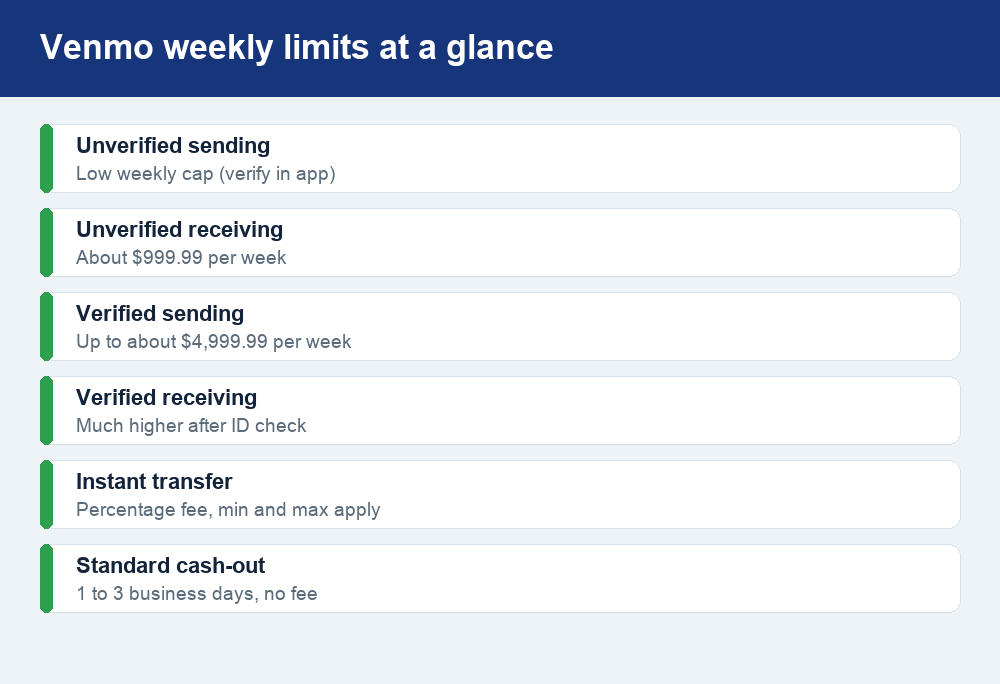
The table below summarizes how Venmo’s core weekly limits typically change once you verify. Treat the dollar figures as ballpark guidance, not a contract. Venmo can adjust individual account limits based on your activity, and the company can update its published numbers at any time, so the app is always the source of truth for your own account.
| Limit type | Unverified account | Verified account |
|---|---|---|
| Weekly person-to-person sending | A low weekly cap (a few hundred dollars) | Part of a combined limit up to about $4,999.99 |
| Weekly receiving | About $999.99 per week | Much higher after verification |
| Combined sending (P2P + authorized merchants) | Very limited | Around $4,999.99 per week |
| Bank transfer / cash-out | Restricted until verified | Higher weekly cash-out allowance |
| Standard bank transfer speed | 1–3 business days | 1–3 business days (no fee) |
| Instant transfer | Limited | Available for a percentage-based fee |
Sending limits explained
Your sending limit is the total dollar amount you can pay out over a rolling week, and it is where verification makes the most dramatic difference. Unverified, you are typically capped at a modest weekly amount, enough for splitting a dinner bill or reimbursing a friend, but not enough for rent or a big purchase. Once you verify, Venmo raises you to a combined weekly sending limit of roughly $4,999.99.
The word “combined” matters. That larger cap generally covers both person-to-person payments (paying friends and family) and payments to authorized merchants (businesses that accept Venmo). Spending in either bucket draws down the same weekly pool, so a large payment to a merchant reduces what you have left to send to people, and vice versa. If you are planning a big transaction, check your remaining available limit in the app first so you are not surprised by a declined payment at checkout.
Paying with a linked credit card can also add a standard card fee to person-to-person payments, which is separate from your limits. For a full picture of what each type of transfer can cost, our guide to Venmo’s fees breaks down where charges apply and how to avoid the avoidable ones.
Receiving limits explained
Receiving limits are easy to overlook until a payment gets held up. On an unverified account, you can generally receive only about $999.99 per week. If someone tries to send you more than that, or if incoming payments push you past the cap, the money can be delayed or the payment blocked until the next rolling period, or until you verify.
This is a common surprise for people selling an item, collecting money for a group gift, or getting reimbursed for a shared vacation. If you expect to receive a larger sum, verifying your identity ahead of time is the cleanest fix, because verified accounts enjoy a much higher receiving ceiling. It is also worth knowing that receiving a payment does not always make it permanent. In certain dispute or fraud situations, funds can be pulled back, so it helps to understand whether a Venmo payment can be reversed before you rely on money you have just received.
How to raise your Venmo limits
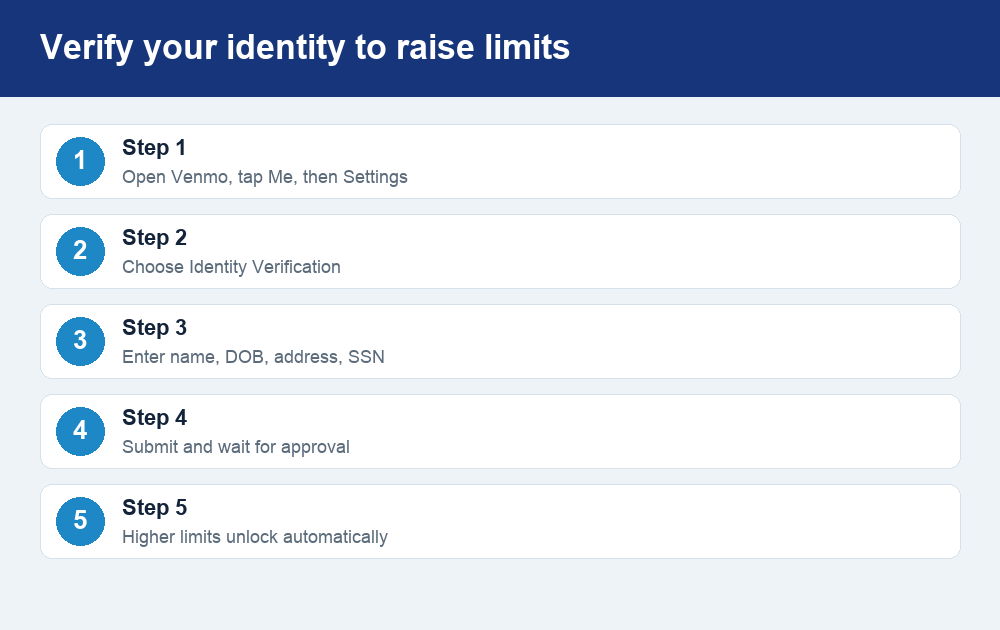
Raising your limits comes down to one action: completing identity verification. The process is quick, usually just a few minutes, and Venmo asks for it precisely so it can lift your caps. Here is the typical path inside the app:
- Open Venmo and go to your profile. Tap the “Me” tab, then open the Settings menu (often the gear icon).
- Find Identity Verification. Look under the security or identity section of Settings and start the verification flow.
- Enter your details. You will provide your full legal name, date of birth, home address, and the last digits of, or full, Social Security number. This is standard for U.S. money apps and is used to confirm your identity.
- Submit and wait. Most verifications clear quickly, though some require additional documents. Venmo will notify you when you are approved.
- Enjoy higher limits. Once verified, your higher sending, receiving, and cash-out limits apply automatically; there is nothing else to toggle.
Only enter these details inside the official Venmo app or on Venmo’s own website. Venmo will never ask for your password, PIN, or verification code by text, email, or phone call. If someone contacts you claiming to be “Venmo support” and pressures you to share those details or to “verify” through an outside link, it is a scam. Close the message and start verification yourself from within the app.
Withdrawal, cash-out, and instant-transfer limits
Getting money out of Venmo has its own set of rules. When you cash out, you move your Venmo balance to a linked bank account or debit card, and Venmo caps how much you can transfer out over a rolling week. Verified accounts get a meaningfully higher cash-out allowance than unverified ones, which is another reason verification is worth completing if you use Venmo regularly.
You generally have two speeds to choose from:
- Standard transfer: Free, but it typically takes one to three business days to land in your bank account.
- Instant transfer: Usually arrives within minutes to an eligible debit card or bank account, but it carries a fee. That fee is normally a small percentage of the amount you move, with a set minimum and maximum. Because the exact percentage and caps can change, confirm the current fee in the app before you send.
Instant transfers also have their own per-transfer and rolling limits that sit alongside your overall cash-out cap. If you need to move a large balance quickly, you may hit an instant-transfer ceiling even when your standard cash-out limit still has room, so splitting a big withdrawal, or using a free standard transfer for part of it, can be the cheaper play.
Venmo vs. Cash App limits
Venmo and Cash App follow the same broad philosophy: low limits until you verify, higher limits afterward. The structure is similar enough that if you use both apps, the mental model carries over. On both platforms, unverified accounts face tight weekly sending and receiving caps, and completing identity verification is the lever that unlocks the higher tiers.
The details differ in the specifics. Venmo’s verified combined sending limit lands around $4,999.99 per week, and its unverified receiving cap sits near $999.99 per week. Cash App uses its own thresholds for sending and receiving, and its verified limits are structured differently, so the two are not perfectly comparable dollar for dollar. If you are choosing between them for a specific transaction size, the practical move is to open each app and read your current limits directly, since both companies adjust these figures over time and may set account-specific caps based on your history.
One shared caution applies to both: peer-to-peer apps are built for paying people you know and trust. Higher limits make it easier to move larger amounts, which is convenient, but it also raises the stakes if you send money to the wrong person or fall for a scam. Neither app is designed to guarantee refunds the way a credit card chargeback might, so treat every payment as if it is final.
Staying safe within your limits
Limits are partly a safety feature. They slow down fraud by making it harder for a compromised account to drain large sums quickly. You can add to that protection with a few habits: enable a PIN or biometric lock on the app, turn on transaction notifications so you spot anything unexpected, and double-check the recipient’s username and profile photo before sending, especially for larger payments that eat into your weekly cap.
Be especially wary of anyone who tells you to raise your limits, verify your identity, or “unlock” your account through a link they send you. Legitimate limit increases only happen through Venmo’s own verification flow inside the app. If a message creates urgency, threatens to lock your account, or asks for a code, treat it as fraud. Slowing down is free, and it is the single best defense against losing money you cannot easily get back.
Frequently asked questions
What is Venmo’s weekly sending limit in 2026?
Unverified accounts are held to a low weekly sending cap of a few hundred dollars. Once you verify your identity, your combined weekly sending limit for person-to-person payments and authorized merchants rises to roughly $4,999.99. Check the Settings section of the Venmo app for the exact figure tied to your account, since Venmo can adjust it.
How much can I receive on Venmo without verifying?
Unverified accounts can generally receive only about $999.99 per week. If incoming payments would push you past that, they can be delayed or blocked until the rolling week resets or until you verify. Verifying your identity raises your receiving ceiling substantially, which is the fix if you expect a larger payment.
Does verifying my identity really raise my limits?
Yes. Identity verification is the main way to unlock Venmo’s higher sending, receiving, and cash-out limits. After you submit your legal name, date of birth, address, and Social Security details in the app and get approved, the higher limits apply automatically, with nothing else to switch on.
How much does a Venmo instant transfer cost?
An instant transfer normally carries a fee equal to a small percentage of the amount you move, with a set minimum and maximum. Standard transfers are free but take one to three business days. Because the exact percentage and caps can change, confirm the current instant-transfer fee in the app before you send, and see our Venmo fees guide for the full breakdown.
Are Venmo’s limits the same as Cash App’s?
No. Both apps use a low-until-verified structure, but the specific dollar thresholds differ, and each company sets and updates its own caps. Venmo’s verified combined sending limit is around $4,999.99 per week. To compare accurately for a specific payment, open each app and read your current limits directly rather than relying on a fixed number.
The bottom line
Venmo’s limits are not arbitrary; they are tied to how much the platform knows about you. Stay unverified and you are capped at a few hundred dollars a week to send and about $999.99 to receive. Verify your identity, and your combined sending limit jumps to roughly $4,999.99 with higher cash-out room to match. Choose free standard transfers when you can wait, understand the percentage-based fee before you tap instant, and treat every payment as final. Most important, complete verification only through the official app, and never in response to an unexpected message, so your higher limits work for you rather than against you.