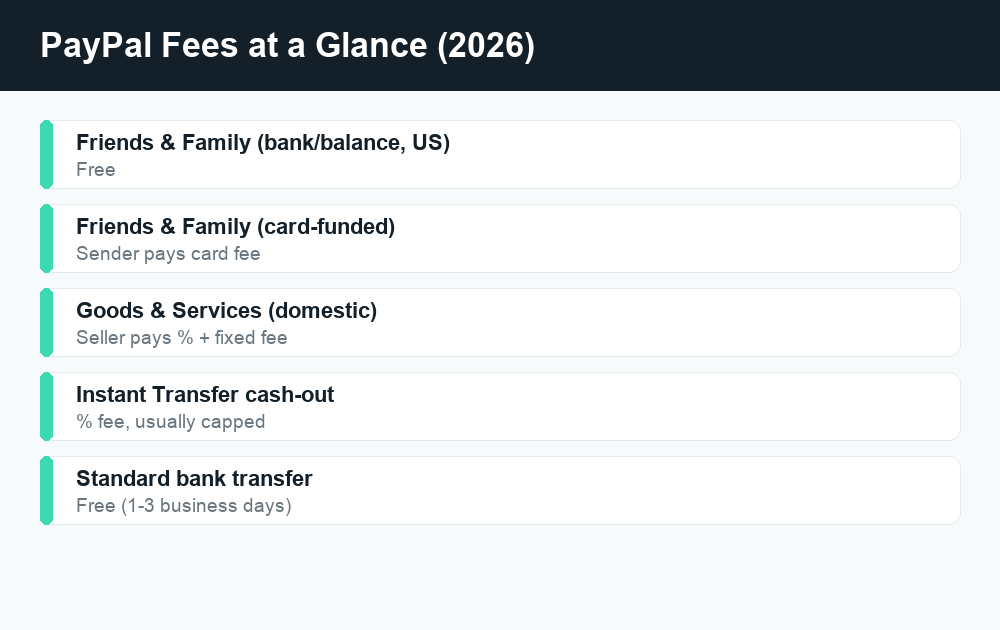
For most everyday transfers, PayPal fees come down to one choice: “Friends & Family” is free when you pay another U.S. user from your PayPal balance or a linked bank account, while “Goods & Services” charges the person receiving the money a seller fee. That single distinction explains the vast majority of confusion people have about what PayPal actually costs. The catch is that other things — paying by credit card, sending money abroad, converting currency, or pulling money out instantly — can add fees on top, and those are where people get surprised.
Quick answer: Sending money to friends and family inside the U.S. is free if you use your PayPal balance or a linked bank account. Paying with a credit/debit card, sending internationally, or choosing Goods & Services adds a percentage-based fee. The Goods & Services fee is charged to the seller (the person getting paid), not the buyer. To skip fees entirely, send Friends & Family from your bank or balance, and use a standard (free) bank withdrawal instead of Instant Transfer.
PayPal has been around long enough that “I’ll just PayPal you” is a verb, but its fee structure hasn’t gotten any simpler over the years. Below, we’ll walk through every common fee in plain English — what it is, who pays it, and how to avoid it where you legitimately can. Exact percentages and fixed fees change periodically and vary by country and account type, so treat the figures here as the general structure and confirm the current numbers on PayPal’s official fees page before a big transaction.
The two transaction types that drive most PayPal fees
Almost every PayPal payment between individuals falls into one of two buckets, and choosing the right one is the single biggest factor in what you’ll pay.
Friends & Family (personal payments)
This is for sending money to people you know and trust — splitting rent, paying back a friend, gifting cash. When you send a domestic Friends & Family payment in the U.S. and fund it with your PayPal balance or a linked bank account, PayPal charges no fee. The recipient gets the full amount.
The important trade-off: Friends & Family payments come with no Purchase Protection. If you send money this way and never get what you paid for, PayPal generally can’t help you claw it back. That’s by design — it’s meant for trusted personal transfers, not buying things from strangers. Scammers love asking buyers to “just send it Friends & Family to avoid the fee,” precisely because it strips away your protection. Don’t do it for purchases.
Goods & Services (commercial payments)
This is for buying and selling. When you pay a seller using Goods & Services, the transaction includes Purchase Protection for the buyer, and PayPal charges a seller fee on the money received. Crucially, the buyer pays nothing extra for a domestic Goods & Services payment — the fee comes out of the seller’s side.
The standard U.S. commercial transaction fee is a percentage of the amount plus a small fixed fee per transaction. The exact percentage depends on the type of transaction (for example, standard payments versus QR-code or in-person payments) and can change, so confirm the current rate on PayPal’s official pricing page if you sell regularly.
Who actually pays the fee — buyer or seller?
This trips up almost everyone, so here it is clearly:
| Payment type | Who pays the fee | Buyer protection? |
|---|---|---|
| Friends & Family (bank/balance, domestic) | No fee | No |
| Friends & Family (card-funded) | Sender pays a card fee | No |
| Goods & Services (domestic) | Seller/recipient | Yes |
| International payment | Higher fee + possible FX markup | Depends on type |
So if you’re selling something, you eat the Goods & Services fee. If you’re buying, you pay nothing extra domestically but you do get protection. Some sellers try to pass the fee along by raising their price or asking for Friends & Family — the first is legitimate, the second removes your safety net.
Card-funded payments: the hidden Friends & Family fee
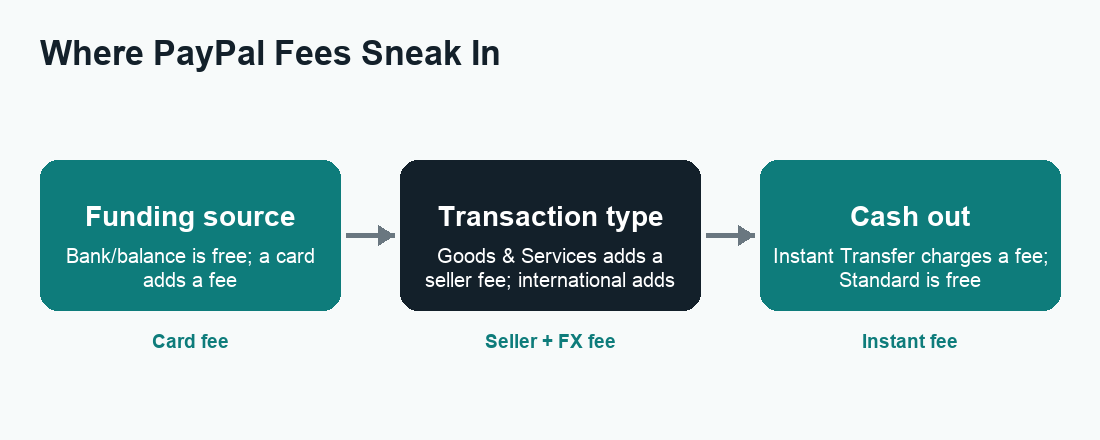
Here’s the gotcha that catches people who think Friends & Family is always free. It’s free only when funded by your PayPal balance or bank account. If you fund a Friends & Family payment with a credit card or debit card, PayPal charges a percentage-based fee — typically the sender chooses whether to absorb it or pass it to the recipient during checkout.
The reason is simple: card networks charge PayPal interchange fees, and PayPal passes that cost along. So if you want a truly free personal transfer, make sure your default funding source is set to your bank account or balance before you hit send.
Instant Transfer vs Standard withdrawal fees
Getting money out of PayPal is its own fee decision. When you cash out to your bank or eligible debit card, you choose between two speeds:
- Standard transfer to your bank — free, but takes roughly 1 to 3 business days.
- Instant Transfer — arrives in minutes to an eligible debit card or bank, but PayPal charges a percentage fee, usually capped at a maximum dollar amount per transfer.
If you’re not in a rush, the standard transfer is the obvious money-saver. Only reach for Instant Transfer when you genuinely need the cash right now. The exact percentage and the fee cap can change, so check the amount PayPal quotes you on the confirmation screen before you confirm.
International and currency conversion fees
Sending money across borders is where PayPal fees get noticeably bigger, and it’s also where they’re easiest to overlook because they’re bundled together.
The international transaction fee
When you send money to someone in another country, PayPal applies an international fee on top of (or instead of) the domestic rate. The percentage depends on the destination country and the payment type. For Friends & Family sent abroad, there’s typically a percentage-based fee even when funded by bank or balance — so “free Friends & Family” generally does not apply across borders.
The currency conversion markup
If the payment needs to switch currencies (say, USD to EUR), PayPal converts it using a base exchange rate and then adds a currency conversion spread on top of that rate. This markup is a percentage above the wholesale rate and is one of the most commonly missed PayPal fees because it’s baked into the exchange rate rather than shown as a separate line item. On larger international transfers, this spread can cost more than the visible transaction fee.
If you’re regularly sending money abroad, it’s worth comparing PayPal’s all-in cost (fee + conversion markup) against dedicated remittance services, which sometimes offer a tighter exchange rate.
Other PayPal fees worth knowing
Chargebacks and disputes
If a buyer files a chargeback through their card issuer, the seller may be charged a dispute/chargeback fee in addition to potentially losing the sale amount. This is a seller-side cost, not something buyers pay.
Refunds
When a seller refunds a Goods & Services payment, PayPal generally returns the variable percentage portion of the original fee but may keep the fixed per-transaction fee, depending on current policy and timing. Confirm refund-fee specifics on PayPal’s official terms if you sell.
Inactivity and other account fees
Depending on your country, PayPal may charge fees in less common situations (for example, certain account-related charges). These are region-specific, so U.S. users rarely encounter them, but it’s worth glancing at the fee schedule for your country if something looks unfamiliar.
How to avoid PayPal fees: a practical checklist
You can legitimately dodge most PayPal fees with a few habits. Here’s the step-by-step:
- For personal transfers, use Friends & Family — but only when you actually know and trust the recipient.
- Fund from your bank or PayPal balance, never a card, to keep Friends & Family free. Check your default funding source in your wallet settings before sending.
- For purchases, always use Goods & Services — the buyer pays no extra fee domestically and gets Purchase Protection. The small cost to the seller is worth your safety.
- Cash out with Standard (free) transfer instead of Instant Transfer whenever you can wait a day or two.
- Avoid unnecessary currency conversion. If you hold a balance in another currency, paying directly in that currency can skip the conversion spread.
- Compare alternatives for international transfers, where PayPal’s combined fee and exchange markup can be steep.
One thing you should not do to “save the fee”: send a purchase as Friends & Family. It saves the seller a few percent but leaves you with zero recourse if the deal goes bad. That trade is never worth it for anything you’re buying from someone you don’t fully trust.
How PayPal compares to Cash App, Venmo, and Zelle
PayPal isn’t the only peer-to-peer option, and the fee logic rhymes across apps: free bank/balance personal transfers, fees for instant cash-outs and card funding. If you’re weighing your options, it helps to know how the others handle the same situations — for example, what triggers a hold, how instant transfers are priced, and what protection you get.
It’s a similar story over at Cash App’s fee structure and Venmo’s fees, both of which also charge for instant deposits and certain business payments. Zelle takes a different approach — it’s typically free with no per-transfer fee — but it offers little buyer protection, which is why it’s worth understanding whether Zelle is safe before using it with people you don’t know. And if a payment ever seems stuck, the fix often depends on the app: here’s what to do when a Venmo payment is pending.
Frequently asked questions
Are PayPal fees charged to the sender or the receiver?
For Goods & Services payments, the receiver (seller) pays the fee. For Friends & Family, there’s no fee when funded by bank or balance domestically; if the sender uses a card, the sender chooses whether to absorb or pass on that card fee.
Is sending money on PayPal Friends & Family really free?
Yes — as long as it’s a domestic U.S. transfer funded by your PayPal balance or linked bank account. Card funding and international transfers add a fee, so it’s not universally free.
How much does PayPal charge to receive money for goods and services?
PayPal charges sellers a percentage of the payment plus a small fixed fee per transaction for standard domestic Goods & Services payments. The exact percentage depends on the transaction type and can change, so confirm the current rate on PayPal’s official fees page.
Why was I charged a fee on a Friends & Family payment?
The most common reason is that the payment was funded by a credit or debit card rather than your bank or balance. International Friends & Family transfers also carry a fee. Check your funding source and whether the recipient is in another country.
How do I avoid the PayPal Instant Transfer fee?
Choose the Standard transfer to your bank instead. It’s free but takes about 1 to 3 business days, whereas Instant Transfer arrives in minutes for a percentage-based fee.
Does PayPal charge a fee for currency conversion?
Yes. When a payment changes currency, PayPal adds a percentage markup on top of the base exchange rate. This conversion spread is separate from the international transaction fee and is easy to miss because it’s built into the rate.
Is it safe to pay a seller using Friends & Family to avoid the fee?
No. Friends & Family payments have no Purchase Protection, so you’d have little recourse if the item never arrives or isn’t as described. Scammers specifically request this to dodge accountability. Always use Goods & Services for purchases.
Do PayPal fees ever get refunded if I return an item?
When a seller issues a refund, PayPal generally returns the variable percentage portion of the original Goods & Services fee, but the fixed per-transaction fee may not be returned depending on current policy. Sellers should check PayPal’s official terms for the latest refund-fee rules.
Last updated: June 2026. Fees, limits, and features can change — always confirm current details in the app. WalletWisp is an independent guide and is not affiliated with any app mentioned. This article is general information, not financial advice.
Related: Cash App fees explained, Venmo fees breakdown, and more PayPal guides.