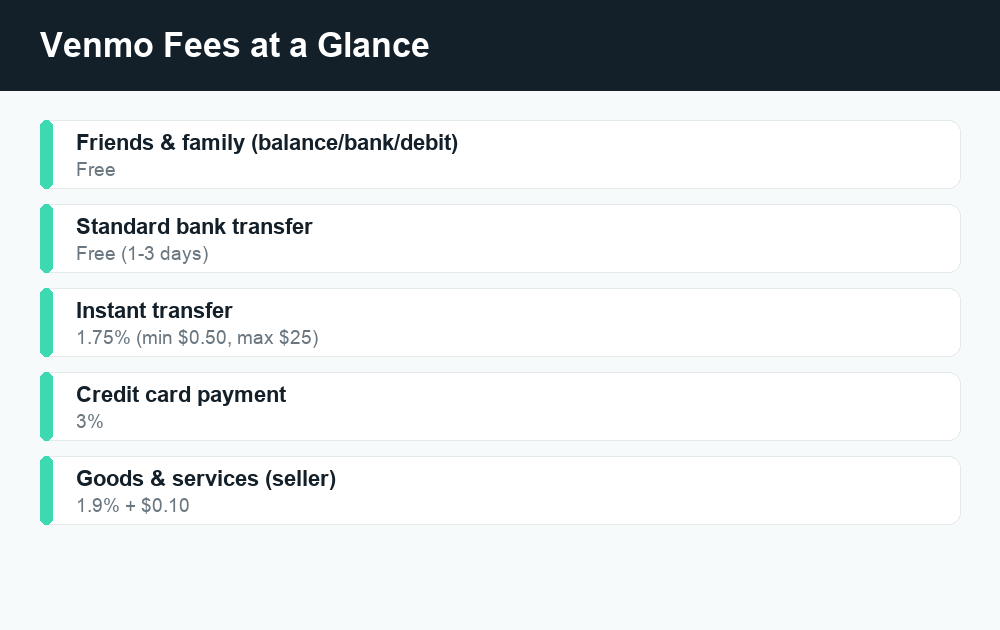
Most everyday Venmo fees are easy to avoid: sending money from your Venmo balance, bank account, or debit card to friends and family is free, and a standard transfer to your bank is free too. You only pay a fee when you choose a paid option, like an instant transfer (1.75%), pay with a credit card (3%), get tagged as goods and services (1.9% + $0.10), or buy and sell crypto.
Quick answer: Venmo is free for personal payments funded by your balance, bank, or debit card, and free for standard 1-3 day bank transfers. The common Venmo fees are 1.75% for instant cashout (50 cents minimum, $25 cap), 3% to pay with a credit card, 1.9% + $0.10 for purchases tagged “goods and services,” and a spread on crypto. Choose the right funding source and the standard transfer, and most people pay $0.
The two kinds of Venmo payments
Before fees make sense, you need to know that Venmo treats payments in two very different ways.
Personal payments are money you send to friends and family — splitting a dinner bill, paying back a coworker, sending rent to a roommate. These are free as long as you fund them the right way (more on that below).
Goods and services payments are when you’re buying or selling something. If a payment is marked as “goods and services,” the seller pays a fee, but the payment comes with purchase protection for the buyer. Think of it like a built-in receipt and dispute system.
Knowing which bucket a payment falls into is the single biggest factor in whether anyone pays a fee. Now let’s break down each one.
Venmo fees at a glance
Here’s a quick table of the fees most people run into. Always confirm current numbers in the app, since Venmo can update them.
| Action | Fee | Who pays |
|---|---|---|
| Send to friends/family (balance, bank, or debit) | Free | — |
| Send to friends/family with a credit card | 3% | Sender |
| Standard transfer to your bank (1-3 business days) | Free | — |
| Instant transfer to your bank or debit card | 1.75% (min $0.50, max $25) | You (cashing out) |
| Receiving a “goods & services” payment | 1.9% + $0.10 | Seller (receiver) |
| Buying or selling crypto | Spread + tiered fee | You |
| Adding cash at a retailer | Up to ~$3.50 | You |
| Inactivity (after long dormancy) | Possible monthly fee | Account holder |
Instant transfer fee: 1.75%
When you want to move your Venmo balance to your bank, you get two choices.
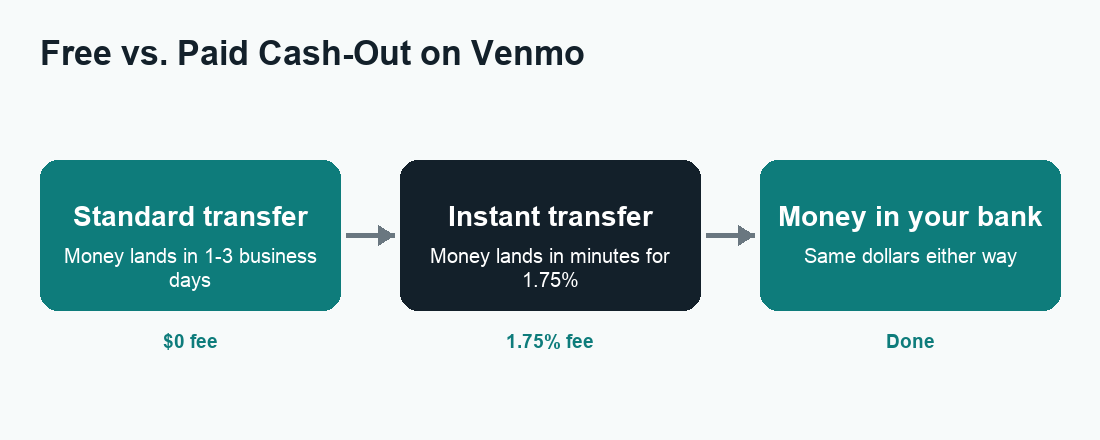
A standard transfer is free and usually lands in 1 to 3 business days. An instant transfer sends the money to an eligible debit card or bank account within minutes, but it costs 1.75% of the transfer amount. There’s a minimum fee of 50 cents and a maximum of $25 per transfer.
So if you cash out $100 instantly, the fee is $1.75 and you receive $98.25. If you only move $10, you still pay the 50-cent minimum. For large amounts, the fee caps at $25, so a $5,000 instant transfer doesn’t cost more than that.
When the instant fee is worth it
The 1.75% fee is only worth paying when you genuinely need the cash right now — a bill due today, or money you need before the weekend. If you can wait a day or two, the standard transfer is free and gets you the exact same money. Many people lose small amounts every month simply by hitting “Instant” out of habit.
Credit card fee: 3%
Venmo lets you fund payments with a linked credit card, but it charges a 3% fee on those payments. This applies when you send money to another person using a credit card as the funding source.
On a $200 payment, that’s a $6 fee — money you simply hand over for using plastic. There are a few important details:
- Paying from your Venmo balance, a linked bank account, or a debit card avoids the 3% entirely.
- Using a credit card can also trigger a cash advance from your card issuer, which adds its own interest and fees on top of Venmo’s 3%. Check with your card company before doing this.
- Approved business profile purchases (goods and services) are treated differently — there’s no extra 3% credit card surcharge to the buyer on those.
The takeaway: don’t use a credit card to pay friends on Venmo unless you have a very good reason. Switch your funding source to a bank or debit card and the fee disappears.
Goods and services fee: 1.9% + $0.10
When you buy from someone and the payment is tagged as “goods and services,” the seller pays a fee of 1.9% of the payment plus a fixed 10 cents. The buyer pays nothing extra and gets Venmo’s Purchase Protection in case the item never arrives or isn’t as described.
On a $50 sale, the seller’s fee is about $1.05 (95 cents plus the dime), so they net roughly $48.95.
Who should use goods and services?
Use it whenever real money is changing hands for an item or service from someone you don’t fully trust — a marketplace purchase, a concert ticket from a stranger, freelance work. The small fee buys you (the buyer) protection that a friends-and-family payment doesn’t have.
For genuine friends-and-family transfers, leave the toggle off so no one pays a fee. Just don’t use friends-and-family to dodge fees on a real purchase — you’d lose your protection if the deal goes bad. If a payment ever gets stuck before it clears, our guide on Venmo payments showing pending walks through what’s happening.
Venmo business profile fees
If you sell products or services, you can open a business profile linked to your personal account. This gives you a public-facing payment page and lets customers pay you with the tap of a button. In exchange, Venmo charges a seller transaction fee on the payments you receive.
The standard business profile fee is typically 1.9% + $0.10 per payment, the same structure as goods and services. Some seller setups and instant-access-to-funds options carry different rates, so confirm your exact pricing inside the Venmo app’s business settings before relying on a number.
Business profile vs. personal account
| Feature | Personal (friends & family) | Business profile |
|---|---|---|
| Fee to receive money | Free | ~1.9% + $0.10 per payment |
| Buyer/customer fee | Free | Free (customer pays no surcharge) |
| Purchase protection | No | Yes |
| Public profile & QR code | No | Yes |
| Best for | Splitting costs with people you know | Accepting payment for products/services |
A business profile is the legitimate way to take customer payments. Using a personal account to run a side hustle can get payments frozen, since it skips taxes and protections Venmo expects from sellers.
Crypto fees on Venmo
Venmo lets you buy, hold, and sell certain cryptocurrencies. There are two costs to watch here. First, a transaction fee that’s tiered by the size of your trade — smaller trades pay a slightly higher percentage. Second, a spread, which is the small difference baked into the buy and sell price.
Because crypto prices and fee tiers move, the app shows you the exact fee before you confirm a trade. Always read that confirmation screen. Crypto is also not FDIC-insured and its value can drop fast, so treat it differently from the cash in your Venmo balance.
Other fees to know about
- Adding cash at a store: If you load cash onto Venmo at a participating retailer, expect a fee of up to about $3.50 per load.
- Inactivity fee: Accounts that sit unused for a very long time may be charged a monthly inactivity fee until the balance reaches zero. Keeping a $0 balance or using the account occasionally avoids this.
- ATM and over-the-counter withdrawals (Venmo Debit Card): Out-of-network ATM use carries a flat fee, plus possible charges from the ATM owner. In-network ATMs are free.
- Card replacement and foreign use: The Venmo Debit Card may carry charges for things like rush card delivery. Check the cardholder agreement.
None of these hit a typical user who just sends money to friends and cashes out with the free standard transfer.
How to avoid Venmo fees
Most people can use Venmo for $0. Follow these steps:
- Fund payments with your balance, bank account, or debit card — never a credit card — to skip the 3% surcharge.
- Use the standard (free) transfer to move money to your bank instead of the 1.75% instant transfer, unless you truly need the cash within minutes.
- Keep friends-and-family payments tagged correctly. Don’t flip the goods-and-services toggle for a genuine personal payment, and don’t dodge it on a real purchase.
- Open a business profile if you’re selling regularly so customer payments are handled properly — and price the ~1.9% + $0.10 fee into what you charge.
- Avoid loading cash at retailers when you can just transfer from your bank for free.
- Keep your balance near zero if you won’t use the account for a long stretch, to sidestep any inactivity fee.
Do these and the only Venmo fees you’ll ever see are the ones you choose to pay for speed or protection.
How Venmo compares to Cash App and Zelle
Venmo isn’t the only money app, and fees differ. Zelle moves money bank-to-bank, usually within minutes, and charges no fees for standard transfers — but it has no buyer protection, so it’s meant for people you trust. You can read more in our guides on how long a Zelle transfer takes and whether Zelle is safe.
Cash App has a similar instant-vs-standard fee model and its own credit card surcharge; see our Cash App fees breakdown to compare side by side. For most everyday peer-to-peer payments, all three are free when you use the standard, no-rush options.
Frequently asked questions
Is Venmo free to use?
Yes, for the common stuff. Sending money to friends and family from your balance, bank, or debit card is free, and the standard 1-3 day transfer to your bank is free. You only pay when you pick a paid option like instant transfer, credit card, or a goods-and-services purchase.
How much is the Venmo instant transfer fee?
It’s 1.75% of the amount you transfer, with a minimum of 50 cents and a maximum of $25 per transfer. The standard transfer is free but takes 1 to 3 business days.
Why was I charged 3% on Venmo?
That’s the credit card fee. If you funded a payment with a linked credit card, Venmo adds 3%. Switch your funding source to your Venmo balance, a bank account, or a debit card to avoid it.
Who pays the goods and services fee?
The seller (the person receiving the money) pays 1.9% + $0.10. The buyer pays nothing extra and gets Purchase Protection. Don’t mark a real purchase as friends-and-family just to dodge the fee, or you lose that protection.
Does it cost money to receive money on Venmo?
Not for personal friends-and-family payments — those are free to receive. You’re only charged to receive money when the payment is tagged goods and services or comes into a business profile, where the ~1.9% + $0.10 seller fee applies.
Are there fees to send money to family on Venmo?
No, as long as you fund it with your balance, bank, or debit card and don’t tag it as goods and services. Using a credit card would add the 3% fee.
Does Venmo charge a monthly fee?
There’s no standard monthly account fee for active users. However, accounts that stay completely unused for a long time can be charged a monthly inactivity fee until the balance hits zero. Using the account occasionally avoids this.
How do I avoid Venmo fees completely?
Pay with your balance, bank, or debit card (not a credit card), use the free standard transfer instead of instant cashout, and keep personal payments tagged as friends-and-family. Do that and you’ll typically pay nothing.
Last updated: June 2026. Fees, limits, and features can change — always confirm current details in the app. WalletWisp is an independent guide and is not affiliated with any app mentioned. This article is general information, not financial advice.
Related: Why is my Venmo payment pending? · Cash App fees explained · More Venmo guides