Cash App sets separate limits for sending, receiving, ATM withdrawals, Bitcoin, and direct deposit — and the single biggest jump comes when you verify your identity. Unverified accounts are tightly capped (commonly around $1,000 sent per rolling 30 days), while verified accounts can send far more, with a verified peer-to-peer sending limit that is often cited around $7,500 per week. Because these figures can change, the numbers below are a guide — always confirm your own current limits inside the app.
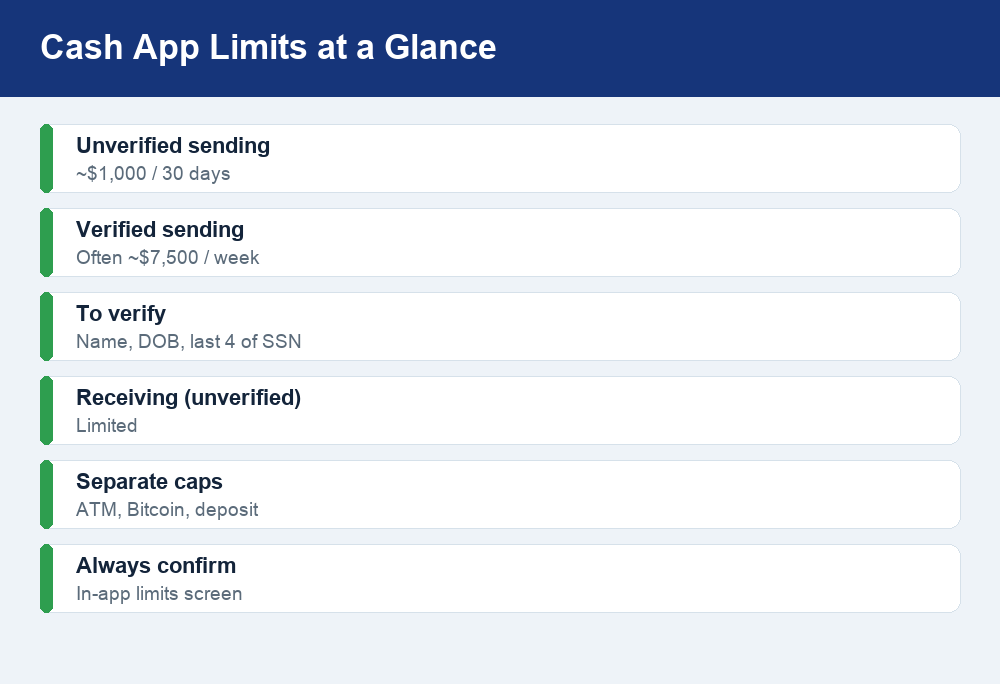
Quick answer: New, unverified Cash App accounts can typically send only about $1,000 every 30 days and receive a limited amount. Once you verify your identity with your full name, date of birth, and the last four digits of your Social Security number, your sending limit rises substantially — often to around $7,500 per week, which is higher than Venmo. ATM withdrawals, Bitcoin, and direct deposit have their own separate caps. Exact amounts vary by account, so check the limits screen in the app.
The different types of Cash App limits
One reason people get confused is that “Cash App limit” isn’t a single number. The app applies several distinct caps depending on what you are trying to do, and hitting one does not mean you have hit the others. Here are the main categories to know:
- Sending limits — how much you can send to other people (peer-to-peer, or P2P) over a rolling period.
- Receiving limits — how much money you can accept into your balance. Unverified accounts are restricted here too.
- Cash Card ATM and withdrawal limits — daily and weekly caps on cash withdrawals and card spending if you have the free Cash Card.
- Bitcoin limits — separate daily and weekly caps on buying, selling, and withdrawing BTC.
- Direct deposit limits — a ceiling on how large a single deposit (like a paycheck) can be.
Each of these is tracked on its own clock — some reset daily, some weekly, and the core sending cap for unverified users is measured over a rolling 30-day window rather than a calendar month. That rolling window matters: a payment you sent 29 days ago still counts against you today, then drops off tomorrow.
Unverified vs. verified: what changes
The most important lever you control is verification. When you first sign up, Cash App lets you send and receive small amounts without confirming who you are. That is convenient, but the caps are low by design — this is a fraud-prevention and regulatory measure that applies across the industry, not a way to nudge you into a paid product.
Verifying your identity unlocks meaningfully higher limits. The table below shows the general picture. Treat the dollar figures as typical ranges rather than exact promises, because Cash App can adjust them and may set your personal limit based on your account history.
| Limit type | Unverified account | Verified account |
|---|---|---|
| Sending (P2P) | ~$1,000 per 30 days | Often ~$7,500 per week |
| Receiving | Limited | No stated cap for most users |
| What’s required | Just a phone or email | Name, date of birth, last 4 of SSN |
| ATM / Cash Card | Own daily & weekly caps | Own daily & weekly caps |
| Bitcoin | Restricted / may be unavailable | Separate BTC daily & weekly caps |
A helpful way to think about it: verification mainly moves the sending and receiving ceilings. It does not merge all the caps into one big pool. Even a fully verified account still has independent ATM, Bitcoin, and direct deposit limits.
Worth noting: raising your limit does not change what a transfer costs. Standard P2P payments are free, but instant transfers to your bank and a few other actions carry a percentage fee. If you are moving larger sums after verifying, it is worth understanding the full breakdown of Cash App fees so a big instant cash-out does not surprise you.
How to verify your identity to raise your limits
Verification is free and usually quick. You are giving Cash App the same basic details any U.S. financial app collects to comply with “Know Your Customer” rules. Here is the standard flow:
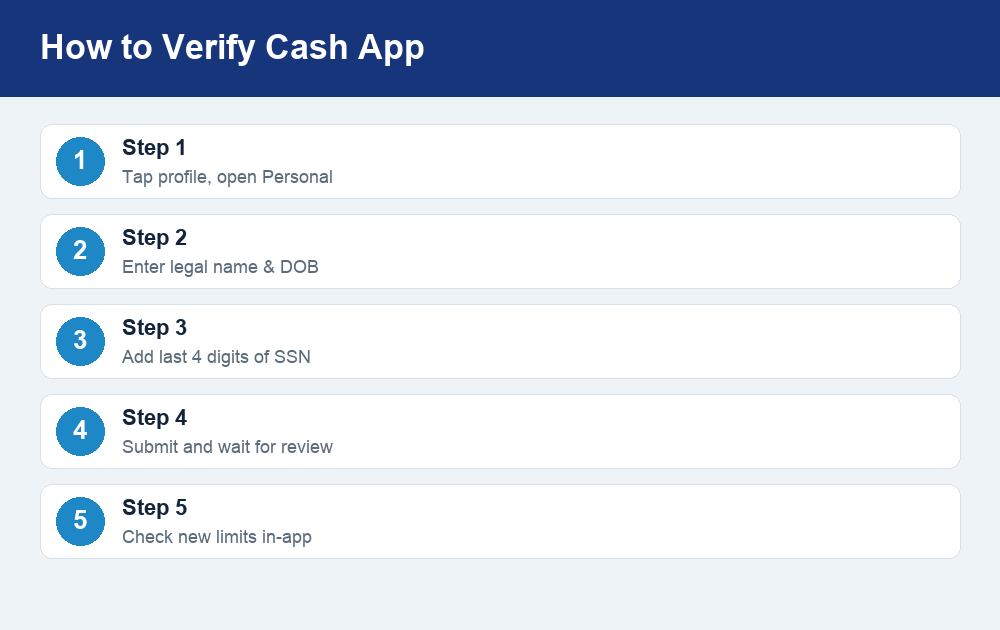
- Open Cash App and tap your profile icon (top of the screen).
- Look for a Personal or account settings section — this is where identity details live.
- Enter your full legal name and date of birth exactly as they appear on your government ID.
- Provide the last four digits of your Social Security number. In some cases Cash App may ask for more, such as a photo of your ID, if it needs to confirm your identity further.
- Submit and wait. Many verifications are near-instant, but some are reviewed and can take a bit longer.
Once you are verified, your higher limits typically apply automatically. You do not usually need to make a separate request. If your limit doesn’t update right away, give it some time and re-check the limits screen before contacting support.
A quick safety note while you are here: your SSN and personal data are sensitive. Only enter them inside the official Cash App application — never on a link someone texts or emails you, and never read them aloud to a “support agent” who called you. Cash App will not ask for your full SSN, PIN, or sign-in code over the phone.
Cash Card ATM and withdrawal limits
If you order the free Cash Card (a Visa debit card tied to your balance), a different set of rules governs cash. ATM withdrawals have their own daily, weekly, and sometimes per-transaction caps, and these are separate from your P2P sending limit. In practice that means you could be nowhere near your weekly sending cap and still be told you have hit your ATM limit for the day.
Two things trip people up here. First, ATM operators charge their own surcharge on top of anything Cash App applies, so a small withdrawal can feel expensive. Second, “withdrawal” can mean two different things — pulling physical cash at an ATM, or transferring your balance out to a linked bank account. Those are governed differently, and the bank transfer path is usually where you move larger amounts.
Because your Cash App balance functions like a spending account, it is also fair to ask how protected that money is. We cover the nuances of whether your funds are covered and under what conditions in our explainer on whether Cash App is FDIC insured — a useful read before you park a large balance there.
Bitcoin and stock limits
Cash App also lets you buy and sell Bitcoin, and Bitcoin has its own limits that are completely independent of your cash sending cap. Typically there are daily and weekly ceilings on how much BTC you can buy, and separate rules for withdrawing Bitcoin to an external wallet. Full identity verification is generally required before you can transact in or move crypto at all, and withdrawal of Bitcoin to an outside wallet may require additional verification steps.
The practical takeaway: if crypto is your goal, verify first. An unverified account will hit walls quickly. And as always with digital assets, only invest money you can afford to lose — Bitcoin’s price can swing sharply, and Cash App’s limits do nothing to protect you from market volatility.
Direct deposit limits
Getting your paycheck or benefits sent straight to Cash App is one of its most popular features, and it comes with its own ceiling: there is a maximum size for any single direct deposit. For most paychecks this is a non-issue, but a large one-time deposit — a bonus, a tax refund, or a settlement — could bump against the cap, in which case the sender may need to split it or send it another way.
Direct deposit is only available on verified accounts, and you will need your Cash App routing and account numbers to set it up. If you have not done this yet, our step-by-step guide to setting up Cash App direct deposit walks through where to find those numbers and how to hand them to your employer safely. Setting up direct deposit can also, in some cases, unlock perks and higher effective limits over time as your account builds history.
Tips to raise or work around your limits safely
You cannot simply request an arbitrary limit increase the way you might ask a credit card issuer for a higher line. Cash App’s caps are formula-driven and tied largely to verification status and account behavior. Still, there are legitimate ways to give yourself more headroom:
- Complete verification fully. This is the single biggest increase available, and it is free. If you started verification but never finished, that is likely why your limit still looks low.
- Keep your account in good standing. A consistent, clean transaction history over time can support higher limits. Frequent disputes, chargebacks, or flagged activity work against you.
- Plan around the rolling window. Remember the unverified sending cap resets on a rolling 30-day basis. If you are close to the edge, waiting a few days can free up room as older payments age out.
- Split a large payment intelligently. If a legitimate transfer exceeds your cap, you can sometimes send part now and the rest after the window rolls — but never do this to dodge legal reporting requirements.
- Use a bank transfer for very large sums. For amounts beyond what any P2P app comfortably handles, a direct bank-to-bank transfer or wire may simply be the better tool.
Watch out for limit-related scams
Scammers love the word “limit.” A common con works like this: you try to receive a large payment, hit a cap, and a fake “seller” or “buyer” tells you to send them money first to “unlock” or “upgrade” your account. Cash App never requires you to send money to raise your own limits — verification is free and happens entirely inside the app. Anyone asking you to pay to increase a limit is running a scam.
Be equally wary of “Cash App support” accounts on social media, phone calls claiming your account is limited and must be “verified” via a link, and screen-share requests. The only legitimate way to verify is by entering your details directly in the official app. When in doubt, close the message, open Cash App yourself, and check your limits screen — the real numbers live there and nowhere else.
Frequently asked questions
What is the Cash App sending limit without verification?
Unverified accounts can typically send only about $1,000 over a rolling 30-day period, and receiving is also restricted. The exact figure can vary and may change, so open the app and check your own limits screen for the current number that applies to your account.
How much can I send after verifying my identity?
Verified accounts generally get a much higher peer-to-peer sending limit, often cited at around $7,500 per week — higher than Venmo’s comparable cap. Your personal limit can differ based on account history, and Cash App may adjust these figures over time, so treat this as a range and confirm in-app.
Does verifying merge all my limits into one?
No. Verification mainly raises your sending and receiving ceilings. ATM withdrawals, the Cash Card, Bitcoin, and direct deposit each keep their own separate limits even after you verify, and they reset on their own daily or weekly schedules.
How long does Cash App verification take?
Many verifications complete almost instantly once you submit your name, date of birth, and the last four digits of your SSN. Some are flagged for review or require a photo ID and can take longer. If your higher limits don’t appear right away, wait and re-check before contacting support.
Can I pay a fee to increase my Cash App limit?
No — and anyone who tells you otherwise is scamming you. Raising your limit is done for free by completing identity verification inside the official app. Cash App will never ask you to send a payment, share your full SSN by phone, or use an outside link to “unlock” a higher limit.
The bottom line
Cash App’s limits are less mysterious once you see them as several independent caps rather than one number. Unverified accounts are deliberately restricted; verifying your identity with your name, date of birth, and the last four of your SSN is the free, legitimate way to unlock substantially higher sending — often around $7,500 a week — while ATM, Bitcoin, and direct deposit keep their own separate ceilings. Because Cash App can change these amounts at any time, the smartest habit is simple: verify early, keep your account in good standing, ignore anyone who asks you to pay to raise a limit, and always confirm your current numbers on the limits screen in the app itself.