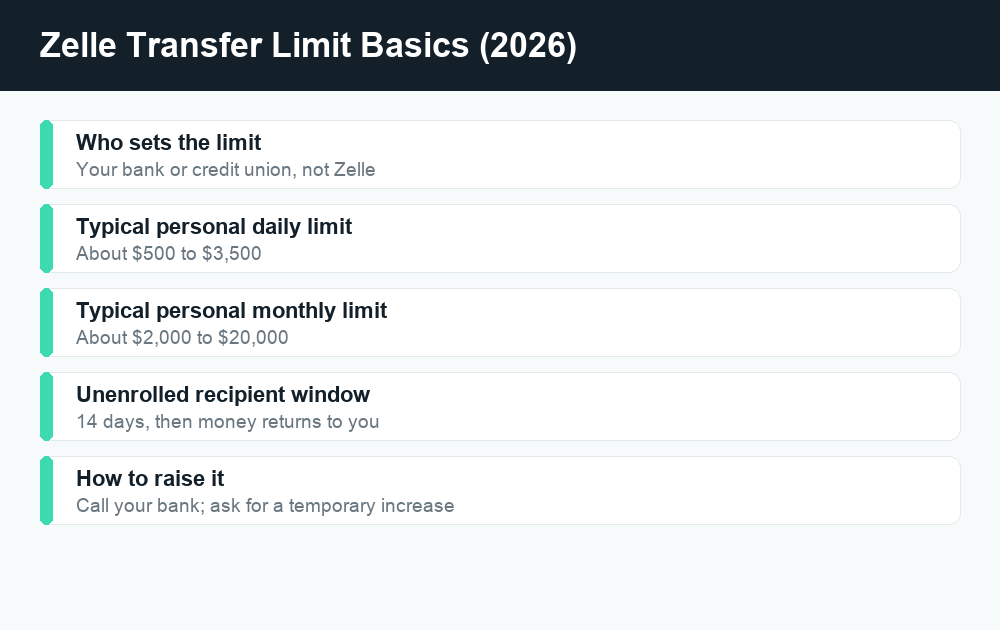
Yes, there is a Zelle transfer limit on every account, but here is the part that surprises most people: the limit is set by your bank or credit union, not by Zelle itself. Zelle is just the network that moves the money. Each bank decides how much you can send per day and per month, which is why a friend at one bank might be able to send $3,500 a day while you are capped at $1,000.
Quick answer: There is no single Zelle limit. Your bank sets it. At many big banks, personal accounts can send roughly $2,000 to $3,500 per day and around $10,000 to $20,000 per month, while some smaller banks and credit unions cap you at $500 to $1,000 a day. Chase uses a dynamic limit that can range from a few hundred to several thousand dollars. To find your exact limit, check your bank’s Zelle FAQ or call them — and ask them directly if you want it raised.
Who actually sets your Zelle transfer limit?
This is the single most important thing to understand. Zelle does not publish one universal cap that applies to everyone. Instead, Zelle is a payment rail — like the pipes — and each participating bank or credit union decides how much water can flow through for its own customers.
That means your Zelle transfer limit depends entirely on three things:
- Which bank or credit union you use. A large national bank usually allows more than a small community bank.
- Your account type. Premium, private-client, and business accounts almost always get higher limits than basic checking.
- Your account history. Brand-new accounts are frequently given lower limits for the first few weeks or months as an anti-fraud measure, then bumped up automatically once you have a track record.
One more wrinkle: if you use the standalone Zelle app instead of going through your bank’s app, your debit card’s issuing bank still sets the limit. Note that the standalone Zelle app was retired in 2025, so most people now access Zelle inside their own bank’s app or website. Either way, the rule holds — your bank controls the number.
Typical Zelle daily and monthly send limits by bank (2026)
The table below shows commonly published send limits at major US banks as of 2026. Treat these as a starting point, not gospel. Banks adjust these figures, run promotions, apply different caps to different account tiers, and sometimes use dynamic limits that change per transaction. Always confirm your own limit inside your bank’s app or its Zelle FAQ before sending a large payment.
| Bank | Typical daily send limit | Typical monthly send limit |
|---|---|---|
| Chase (personal) | Dynamic — roughly $500 to $10,000 depending on account and risk factors | Not publicly fixed; varies |
| Bank of America (personal) | Up to $3,500 (lower for newer accounts) | Up to $20,000 |
| Wells Fargo (personal) | Up to $3,500 (rolling 24 hours) | Up to $20,000 (rolling 30 days) |
| Citibank (personal) | $500 to $2,500 depending on account age | Around $15,000 |
| Capital One | About $3,000 | Not publicly fixed |
| Truist | About $2,000 | About $10,000 |
| TD Bank | $1,000 to $2,500 by speed/account | $5,000 to $10,000 |
| USAA | About $1,000 | About $10,000 |
| Many small banks / credit unions | $500 to $1,000 | $2,000 to $5,000 |
A few patterns jump out of that table. Business and small-business accounts at banks like Bank of America and Wells Fargo can run much higher — often up to $15,000 per day and $60,000 per month — so if you regularly send large amounts, a business account may be the cleanest fix. And notice how several banks decline to publish a hard monthly number at all, instead using rolling windows or per-transaction caps. When in doubt, your bank’s number always wins over any number you read online.
Why the same bank can show you a different limit than your friend
If you and a coworker both bank at Chase but see different limits, you are not imagining it. Banks increasingly use risk-based, dynamic limits that factor in how long you have had the account, your typical activity, whether the recipient is new to you, and the size of the payment. A first-time payment to a brand-new contact may be held to a lower amount than a repeat payment to someone you have paid for years.
How Zelle limits work for unenrolled recipients
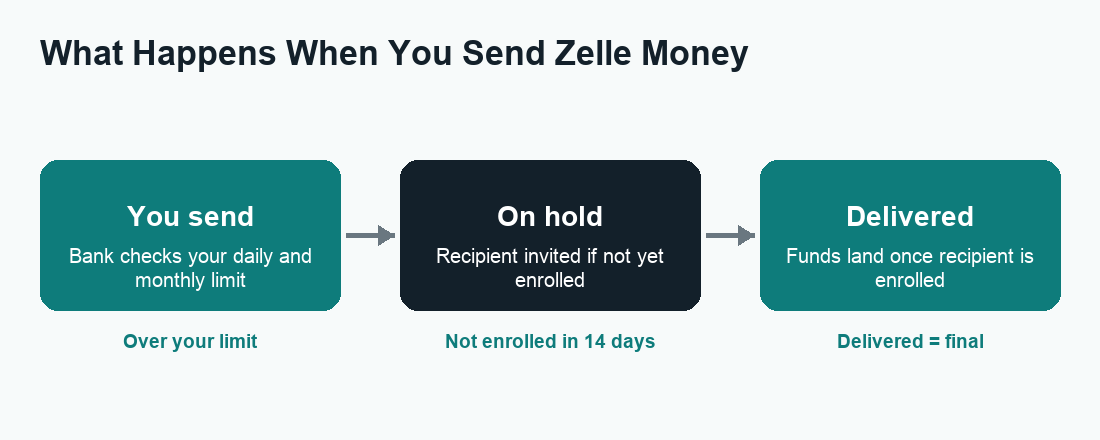
There is a second, separate rule that catches a lot of people off guard, and it has nothing to do with dollar caps. When you send money to someone who has not yet enrolled in Zelle, the payment behaves differently:
- The money is debited from your available balance and placed on hold.
- Your recipient gets a text or email inviting them to enroll and claim the money.
- They have 14 calendar days to enroll. If they do, the funds land in their account.
- If they do not enroll within 14 days, the payment expires and the money is automatically returned to your account, and the transaction is cancelled.
This 14-day window is also your safety net: as long as the recipient has not yet enrolled, most banks let you cancel the payment yourself from your activity screen. Once they enroll and the money is delivered, the transfer is generally final and cannot be reversed. If you sent to the wrong person and they have already enrolled, see our guide on how to cancel a Zelle payment for your options. Some banks also apply a slightly lower limit or extra review the first time you pay a brand-new, unenrolled contact — another anti-fraud guardrail.
Daily limit vs. monthly limit: what counts against each
Most banks apply two ceilings at once, and you hit whichever you reach first:
- Daily limit — often measured as a rolling 24-hour window rather than a calendar day. If you send $3,500 at 3 p.m. today, you may not be able to send again until after 3 p.m. tomorrow.
- Monthly limit — frequently a rolling 30-day window. Large payments earlier in the month reduce how much room you have later.
“Rolling” is the keyword. Many people assume the counter resets at midnight or on the first of the month, then get blocked unexpectedly. If a transfer is declined for being over the limit even though you think you are under, a rolling window is usually the culprit — wait for the oldest large payment to age out, and your available room reopens.
Do incoming payments count against your limit?
No. Limits apply to money you send, not money you receive. Many banks do not cap how much you can receive through Zelle at all, though a few apply a receiving limit. Receiving money also does not free up more sending room — the two are tracked separately.
How to increase your Zelle transfer limit
Because the bank controls the cap, the bank is also the only one who can raise it. Zelle’s customer service cannot change your limit. Here is the realistic playbook for 2026:
- Call your bank or use secure message/chat. Ask specifically about your Zelle (or “person-to-person payment”) send limit and whether it can be raised.
- Ask for temporary vs. permanent. A temporary increase covers a single large payment or a few days and is much easier to get approved. A permanent increase is a standing higher limit and usually needs more account history and sometimes a supervisor’s sign-off.
- Give a clear reason. “I’m paying rent,” “I’m covering a contractor for a home repair,” or “I’m splitting a large purchase” all help the rep justify the bump.
- Wait out the new-account period. If your account is only a few weeks old, your limit may rise automatically once you cross the bank’s seasoning threshold. Sometimes patience is the only step required.
- Consider upgrading your account. Premium, private-client, or business accounts carry higher built-in limits. If you send large amounts often, this can be a permanent solution.
If your bank won’t raise it
Banks set these caps largely to fight fraud, so some will say no — especially on newer or basic accounts. If you are stuck below what you need, your alternatives for a large transfer are a wire transfer (higher limits, may carry a fee, same-day), an ACH transfer (cheaper, slower), a cashier’s check, or splitting the amount across several days within your limit. For ongoing high-volume needs, opening a business account or a relationship with a bank that publishes higher Zelle limits is the cleanest path.
Watch out for scams when “raising your limit”
Limit confusion is a favorite tool of scammers. A common script: someone claims your “Zelle limit” needs to be “verified” or temporarily raised, and asks you to send a payment to yourself or to a “test” account to “confirm” the higher limit. That is always a scam. Real banks never ask you to send a Zelle payment to verify or unlock a limit. Zelle is designed for paying people you know and trust, and payments are typically irreversible once delivered.
If anyone — even someone claiming to be from your bank’s fraud department — pressures you to send Zelle money to “protect” or “verify” your account, hang up and call the number on the back of your card. To report fraud or file a complaint, contact your bank directly and use official channels such as the FTC and the CFPB. For a fuller breakdown of protections and red flags, read is Zelle safe?
How limits affect how long a transfer takes
Hitting a limit is one reason a payment can stall, but it is not the only one. Between enrolled users, Zelle is usually near-instant; for unenrolled recipients it waits on that 14-day enrollment window. New accounts and first-time recipients sometimes see a short hold for review. If your money seems stuck, our guide on how long a Zelle transfer takes walks through every cause and what to do.
Zelle vs. Cash App and Venmo limits
Zelle is not the only app with caps, and the rules differ in an important way. With Zelle, the limit comes from your bank and there are typically no fees. With Cash App and Venmo, the app itself sets the limits, and those limits rise sharply once you verify your identity. Those apps also hold a balance and offer instant cash-out for a fee, while Zelle moves money straight between bank accounts. If you are comparing, our breakdowns of Cash App fees and Venmo fees show where each one can cost you.
Frequently asked questions
Does Zelle have a maximum transfer limit?
Not a universal one. Zelle itself does not set a single maximum — your bank or credit union does. At big banks, personal limits often top out around $3,500 a day and $20,000 a month, while smaller institutions may cap you at $500 to $1,000 a day. Business accounts can be much higher.
What is the Zelle limit if my bank isn’t listed?
If your bank uses Zelle but does not publish a number, open your bank’s app, find the Zelle or “Send Money” section, and look for the limits in the help or FAQ area — or simply call your bank. Their figure is the only one that actually applies to your account.
Can I send $5,000 through Zelle?
Sometimes. A $5,000 transfer is above the standard personal daily limit at several major banks, so it may be declined unless you have a higher-tier or business account, or you ask your bank for a temporary increase first. Check your specific limit before trying.
Does the recipient’s limit matter?
Generally no — sending limits apply to the sender. Most banks do not cap how much you can receive, though a few apply a receiving limit. If a payment to you is delayed, it is more often about enrollment or review than a receiving cap.
Why was my Zelle payment declined if I’m under the limit?
The most common reason is a rolling window: your daily or monthly counter measures the last 24 hours or 30 days, not a calendar reset, so an earlier large payment may still be using up your room. New-account holds, first-time-recipient review, or a fraud flag can also block a payment.
How do I increase my Zelle limit fast?
Call your bank and ask for a temporary increase tied to a specific reason, like rent or a large purchase. Temporary bumps are far easier to approve than permanent ones. Zelle’s own support cannot change your limit — only your bank can.
Do business accounts have higher Zelle limits?
Usually yes. Small-business accounts at banks like Bank of America and Wells Fargo can send well into the tens of thousands per day and month — often around $15,000 daily and $60,000 monthly — versus a few thousand a day for personal accounts. If you regularly send large amounts, a business account is often the simplest long-term fix.
Is there a fee for sending large amounts on Zelle?
Zelle itself does not charge a fee to send or receive money, and that does not change with larger amounts. Always confirm with your own bank, since a small number of institutions add their own fees, but for most users Zelle transfers are free regardless of size.
Last updated: June 2026. Fees, limits, and features can change — always confirm current details in the app. WalletWisp is an independent guide and is not affiliated with any app mentioned. This article is general information, not financial advice.
Related: How long does a Zelle transfer take? · How to cancel a Zelle payment · Is Zelle safe?