
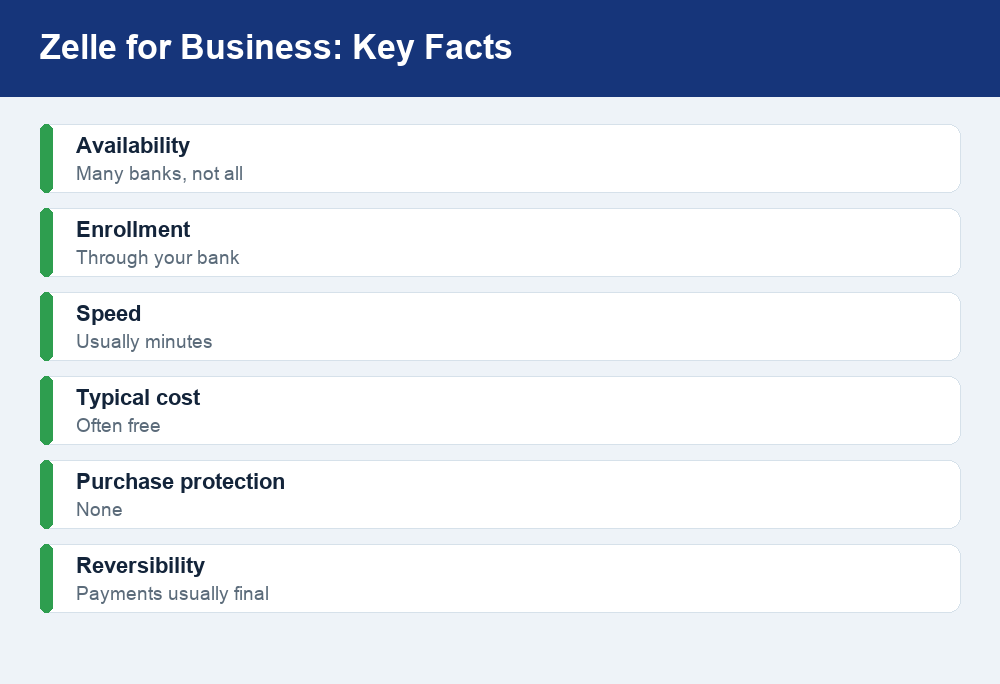
Yes, Zelle for business lets many small businesses accept payments directly into their bank account, usually within minutes and often with no fee. But you enroll through a participating bank, your limits are set by that bank, and there is no purchase protection because most payments cannot be reversed.
Quick answer: Zelle for business is available at many (not all) U.S. banks, and you sign up through your bank rather than a separate business app. Payments are fast and typically free, but they offer no buyer or seller protection and are usually irreversible, which makes disputes and chargebacks risky. Any income you receive is taxable and should be tracked. Always confirm your exact limits and fees with your bank.
What is Zelle for business?
Zelle is a bank-to-bank payment network built into the mobile apps and online banking of most large U.S. financial institutions. On the personal side, it is designed for sending money to people you know and trust, such as splitting rent or paying a friend. Zelle for business extends that same network to eligible small businesses, so a customer can pay you directly from their bank account into yours.
The key difference from personal use is enrollment. Instead of linking a debit card in the standalone Zelle app, a business enrolls through a participating bank using a business deposit account. Your business is then represented by a Zelle profile tied to an email address or U.S. mobile number that customers use to send you money. When a payment goes through, the funds usually land in your business checking account within minutes, without a separate payout step.
It is important to be clear about what Zelle is not. It is not a full payment processor like Square or Stripe, and it is not a marketplace with a resolution center like PayPal. There is no invoicing suite, no card-swipe hardware, and no built-in dispute system. Zelle is a fast, low-cost way to move money between bank accounts, and for the right kind of business that simplicity is exactly the appeal.
How to enable Zelle for business through your bank
You cannot turn on Zelle for business from a central Zelle website. Because the service lives inside each bank’s own platform, availability and setup steps vary. Some banks offer business Zelle broadly, some limit it to certain account types, and some do not offer a business version at all. If you are not sure whether your institution participates, it is worth checking directly. For example, customers often ask questions like whether a specific bank such as Huntington offers Zelle, and the answer can differ by account tier.
The general path to getting set up looks like this:
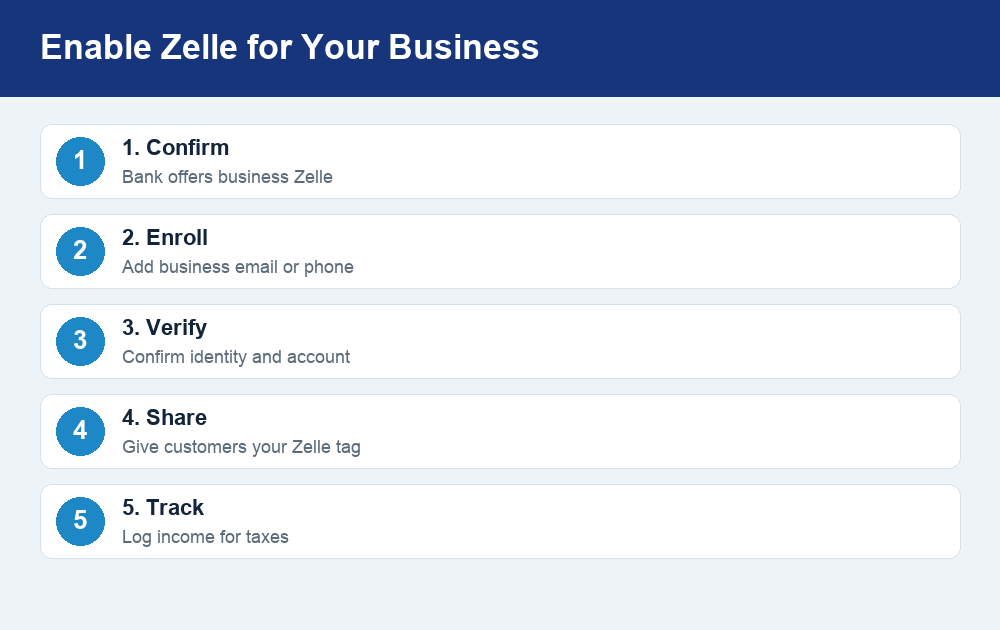
- Confirm eligibility. Log in to your business online banking or mobile app and look for Zelle in the payments or transfers menu. If you do not see it, contact your bank to ask whether business Zelle is available for your account.
- Enroll your business profile. Register a business email address or U.S. phone number that customers will use to pay you. This becomes your public “Zelle tag.”
- Verify your identity and account. Your bank may confirm business details and the deposit account where funds will land.
- Share your details with customers. Once active, give customers the exact email or phone number tied to your business profile so payments route correctly.
- Set up recordkeeping. Decide how you will log each incoming payment for bookkeeping and taxes, since Zelle itself is a lightweight tool.
Because every bank runs Zelle a little differently, treat the steps above as a general map rather than a guarantee. Your bank’s help center or a quick call is the fastest way to confirm the exact process for your account.
Zelle business limits: what to expect
There is no single national Zelle limit for businesses. Each bank sets its own daily, weekly, and sometimes monthly caps, and business limits can be different from the personal ones. In some cases a business account may have a higher ceiling than a personal account; in others the limits are similar or the bank applies its own custom rules. The only reliable way to know your numbers is to check inside your business banking app or ask your bank.
If you are trying to understand how these caps typically work and why they vary so much, it helps to review how Zelle transfer limits are structured across banks, since the same logic applies to business accounts. The table below shows the kinds of limits to ask about rather than specific dollar figures, because those change by institution.
| Limit type | What it controls | Where to confirm |
|---|---|---|
| Daily send limit | Max you can send in 24 hours | Your bank’s app or terms |
| Rolling weekly/monthly limit | Max over a longer window | Your bank’s app or terms |
| Per-transaction limit | Cap on a single payment | Your bank’s app or terms |
| Receiving limits | Some banks cap incoming funds | Your bank’s support team |
One practical tip: if you expect large or frequent payments, ask your bank about receiving limits specifically, not just sending limits. A customer’s own bank limit can also cap how much they are able to send you in a single day, so a big payment may need to be split.
Fees: is Zelle for business free?
In most cases, Zelle itself does not charge a per-transaction fee to receive money, which is a major draw compared with card processors that take a percentage of every sale. That said, “free” depends on your bank. Some institutions include business Zelle at no cost, while others may attach it to an account package that carries a monthly maintenance fee, or may charge for certain business features.
Compare this to card-based processors, which commonly charge a percentage plus a fixed amount per transaction. For a business with thin margins or high volume, avoiding those fees can add up quickly. The trade-off, as the next section explains, is that you give up the protection and dispute infrastructure that those fees help pay for. Before you rely on Zelle, confirm with your bank exactly what, if anything, it charges for business use so there are no surprises.
The big risk: no purchase protection and irreversible payments
This is the single most important thing to understand about Zelle for business. Zelle offers no purchase protection for either party, and once a payment is sent to the correct recipient, it generally cannot be reversed. There is no chargeback process and no resolution center to claw funds back the way you might with a credit card or PayPal.
For a business, this cuts both ways. On the plus side, you do not have to worry about a customer filing a fraudulent chargeback weeks after receiving a service, which is a real problem with card payments. On the downside, if a customer pays you and then claims the product was defective or never arrived, Zelle will not mediate. And if you ever need to refund someone, you are trusting them to send the money back, because Zelle has no built-in refund tool.
The irreversibility also makes scams a serious concern. Because payments are fast and final, fraudsters frequently use Zelle in schemes, and money sent to the wrong person or to a scammer is very hard to recover. If a “customer” overpays and asks you to refund the difference, or pressures you to move fast, treat it as a red flag. It is worth taking time to understand how safe Zelle actually is and where the fraud risks lie before you use it as a primary way to get paid.
Practical safeguards for business owners:
- Only accept Zelle from customers you can identify and, ideally, have a relationship with.
- Confirm the payment has actually landed in your account before releasing goods or services. Do not rely on a screenshot, which can be faked.
- Never refund an “overpayment” by sending money back, as this is a classic scam pattern.
- Keep your own records so you can prove what was paid and when.
Zelle vs PayPal vs Square for business
Zelle is not the only way for a small business to get paid, and it is often best used alongside other tools rather than as a complete solution. PayPal and Square both charge processing fees but add features Zelle lacks, such as invoicing, card acceptance, and dispute handling. The right choice depends on whether you value low cost or built-in protection more.
| Feature | Zelle for business | PayPal | Square |
|---|---|---|---|
| Typical cost to receive | Often free (bank-dependent) | Percentage + fixed fee | Percentage + fixed fee |
| Speed of funds | Usually minutes to your bank | Fast, payout may take a step | Fast, payout may take a step |
| Purchase/seller protection | None | Available in many cases | Available in many cases |
| Chargebacks/disputes | No formal process | Resolution center | Dispute handling |
| Card acceptance | No | Yes | Yes |
| Invoicing tools | No | Yes | Yes |
A common approach is to use Zelle for trusted, recurring, or local customers where speed and low cost matter and fraud risk is low, while keeping a processor like Square or PayPal for new customers, online sales, or anyone who wants to pay by card. That way you capture the savings of Zelle without giving up protection where you need it most.
Tax considerations for business payments
Money you receive through Zelle for business is taxable income, just like cash, checks, or card payments. The fact that Zelle moves money bank-to-bank does not make it tax-free, and you are responsible for reporting it. Because Zelle is a lightweight tool without a full transaction dashboard or built-in bookkeeping, the burden of tracking falls on you.
A few points to keep in mind:
- Track every business payment. Keep a running log of what each Zelle payment was for, who it came from, and the date, so your records match your bank statements.
- Separate business and personal. Using a dedicated business account for Zelle makes bookkeeping and tax time far easier.
- Understand reporting rules can change. Thresholds for tax forms tied to payment platforms have shifted in recent years. Do not rely on receiving a specific form as your only record. Confirm current rules at IRS.gov or with a tax professional.
- Set money aside. Since taxes are not withheld from Zelle payments, plan for what you may owe rather than being surprised later.
When in doubt about how a particular payment should be recorded or reported, a quick conversation with a tax professional is worth it, especially as your volume grows.
Frequently asked questions
Is Zelle for business free?
Zelle itself typically does not charge a per-payment fee to receive money, which is one of its biggest advantages over card processors. However, whether it is truly free depends on your bank, since some tie business Zelle to an account package with a monthly fee. Confirm the specifics with your bank before relying on it.
Can I dispute a Zelle payment or get a chargeback?
No. Zelle has no formal dispute or chargeback process, and authorized payments to the correct recipient are generally final and irreversible. This is why it is best used with trusted customers, and why you should confirm funds have arrived before delivering goods or services.
Are Zelle business limits different from personal limits?
They can be. Limits are set by each bank, and business account caps may be higher, lower, or similar to personal ones depending on the institution. Check your exact daily, weekly, and receiving limits in your business banking app or by contacting your bank.
Do I have to pay taxes on Zelle business payments?
Yes. Income received through Zelle for business is taxable and must be reported, regardless of whether you get a tax form from any platform. Keep detailed records of every payment and verify current reporting rules at IRS.gov or with a tax professional.
Does every bank offer Zelle for business?
No. Many major U.S. banks participate, but not all do, and some limit it to certain account types. Because enrollment happens through your bank, the fastest way to know is to check your online banking or ask your bank directly.
The bottom line
Zelle for business can be a fast, low-cost way to get paid straight into your bank account, and for trusted or repeat customers that simplicity is hard to beat. The catch is what you give up: no purchase protection, no chargebacks, and payments that are usually final, which makes fraud and refunds real risks. Treat it as one tool in your payments mix rather than a full replacement for a processor, keep careful records for taxes, and always confirm your limits, fees, and eligibility directly with your bank before you count on it.