If you’ve ever tapped “Pay” and instantly felt your stomach drop, you’re asking the right question: can a Venmo payment be reversed? The short, honest answer is that a completed Venmo payment usually cannot be reversed by you, because money lands in the recipient’s account immediately and Venmo has no automatic “undo” button. There’s one big exception and a few important workarounds, though, so it’s worth knowing exactly where you stand before you panic.
Quick answer: You generally can’t reverse a completed Venmo payment on your own. The main exception is a payment sent to someone who hasn’t yet accepted it (often a new user, or one sent to the wrong email/phone) — that you can cancel. For everything else, your options are to politely ask the recipient to send the money back, open a dispute if it was an eligible goods-and-services purchase covered by Purchase Protection, or report fraud to Venmo and your bank.
Why most completed Venmo payments can’t be reversed
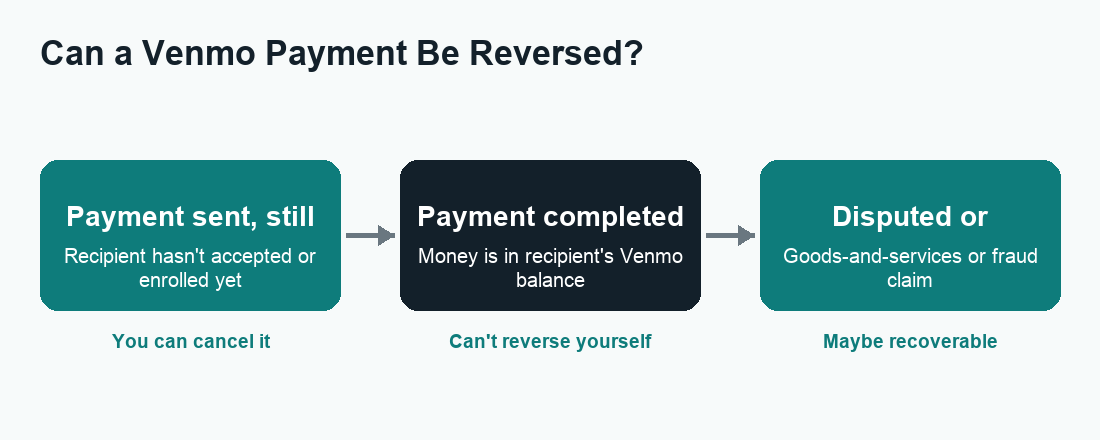
Venmo is built for speed. When you send money to another established Venmo user, the transfer is processed almost instantly and the funds appear in their Venmo balance right away. There’s no holding period during which Venmo “approves” the transfer and no built-in grace window where you can pull it back. From Venmo’s point of view, the payment is final the moment it goes through — much like handing someone cash in person.
This is very different from a traditional bank transfer or a credit card charge, where there can be a settlement delay or a formal chargeback process. With peer-to-peer apps, the trade-off for instant convenience is finality. Venmo states clearly that payments to friends and family are intended to work like cash and that it cannot guarantee you’ll get a refund if a payment doesn’t go as planned. That’s why the app shows you a warning when you send money to someone you haven’t paid before.
So if you’ve already sent a completed payment to the right person and simply changed your mind, Venmo itself won’t reverse it. Your realistic path is to ask the other person to return the money — which leads to the next section.
The one payment you can cancel: unaccepted payments
Here’s the exception that gives a lot of people relief. If you send money to a recipient who has not yet enrolled or accepted the payment, the transaction sits in a pending state, and you can cancel it before it’s claimed.
This commonly happens when:
- You sent money to a phone number or email address that isn’t tied to an active Venmo account yet.
- The recipient is a brand-new user who hasn’t finished signing up.
- You typed the contact info slightly wrong, so it went to someone who never claimed it.
In these cases the payment shows as pending and gives you the ability to take it back. Venmo also auto-cancels and returns unclaimed payments after a set period if the recipient never signs up to accept them, so the money isn’t lost forever even if you do nothing.
How to cancel an unaccepted Venmo payment
- Open the Venmo app and tap the Me tab to see your personal transaction feed.
- Find the payment in question — a cancelable one will be marked as pending or “incomplete.”
- Tap the payment to open its details.
- Look for a Take Back or Cancel option and confirm. The funds return to your Venmo balance or original funding source.
If you don’t see a cancel option, the payment has already been accepted — and at that point you’re back to the “ask for it back” or “dispute” routes below. Exact wording and menu placement can change between app updates, so if you can’t find the option, check Venmo’s in-app Help Center for the current steps.
What to do if you sent money to the wrong person
Sending to the wrong @username, an old phone number, or a stranger with a similar name is one of the most common Venmo regrets. If the payment is still pending, cancel it using the steps above. If it’s already completed, do this:
- Message the recipient politely right inside the payment. Explain it was an accidental transfer and ask them to send it back. Most honest people will return it.
- Request the money using Venmo’s “Request” feature for the same amount, so they can repay with a single tap.
- If they refuse or don’t respond, contact Venmo Support through the app or website. Venmo can reach out to the recipient on your behalf, but it generally cannot force someone to return money from a personal payment.
Be realistic: for accidental person-to-person payments, recovery depends largely on the goodwill of the person who received the funds. That’s exactly why double-checking the @username and the last four digits of a phone number before you hit send is the single best habit you can build.
Disputes and Purchase Protection: when you bought goods or services
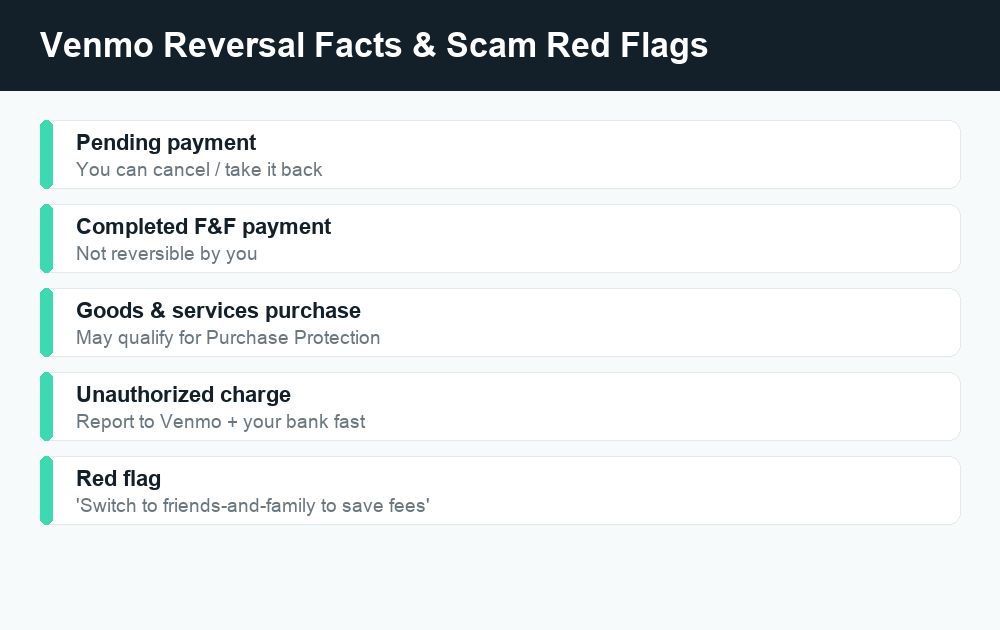
The rules change in your favor when the payment was for an eligible purchase of goods or services rather than a personal payment to a friend. Venmo offers Purchase Protection for transactions that are properly tagged as goods and services, and these may qualify you to open a dispute and potentially get your money back.
For a payment to be covered, it generally needs to be marked as a purchase. When you pay a business profile, or when you toggle the “Turn on for purchases” option while paying a person, Venmo treats it as a goods-and-services transaction. These purchases typically carry a small seller fee, and in exchange the buyer gets eligibility for Purchase Protection. A plain friends-and-family payment — the default for personal transfers — is not covered, which is a key reason you should never use a personal payment to buy something from a stranger online.
What Purchase Protection can cover
Purchase Protection is designed to help when an eligible item or service:
- Never arrives.
- Arrives significantly different from how it was described.
- Is an unauthorized transaction you didn’t make.
Coverage has conditions and exclusions, and Venmo decides each claim case by case. Because the specific eligibility terms and any caps can change, confirm the current details in Venmo’s User Agreement and Purchase Protection terms before relying on them.
How to open a Venmo dispute
- Try to resolve it directly with the seller first — many issues are simple mix-ups, and Venmo may expect you to attempt contact.
- Open the Venmo app, go to the transaction, and look for the option to get help or dispute the payment.
- Submit your claim with clear details: what you bought, what went wrong, and any evidence (screenshots of the listing, messages, tracking).
- Respond promptly to any follow-up requests from Venmo while they review.
If you funded the Venmo payment with a linked credit or debit card, you may also have a separate chargeback right through your card issuer. That’s a parallel avenue worth knowing about, especially if a Venmo dispute doesn’t resolve in your favor.
Reversal options at a glance
| Situation | Can it be reversed? | Your best move |
|---|---|---|
| Payment still pending / not yet accepted | Yes — by you | Cancel or “Take Back” in the app |
| Completed payment, wrong person | Not by you directly | Ask for it back or request the amount; contact Support |
| Completed friends-and-family payment, changed your mind | No | Politely ask the recipient to return it |
| Eligible goods-and-services purchase gone wrong | Possibly | Open a Purchase Protection dispute |
| Unauthorized / fraudulent charge on your account | Possibly | Report to Venmo and your bank immediately |
Use this as a quick map, not a guarantee — Venmo reviews claims individually, and outcomes depend on the facts and current policy.
What to do if you were scammed
Scammers love instant payment apps precisely because personal payments are hard to reverse. If you believe you’ve been tricked into sending money — a fake marketplace seller, a “you’ve been hacked” impersonator, an overpayment trick, or a too-good-to-be-true deal — move quickly and methodically.
- Stop sending money. A real bank, Venmo, or government agency will never demand payment through a peer-to-peer app to “protect” your account. That’s a scam script.
- Report it to Venmo right away. Use the in-app Help Center or Venmo’s official support channels to flag the transaction as fraud. Don’t trust phone numbers or links texted to you — look up Venmo’s contact details from inside the app or its official website.
- Contact your linked bank or card issuer. If you funded the payment with a card or bank account, ask about a dispute or chargeback. Report the fraud as soon as you spot it, since timing can affect your protections.
- Change your password and turn on extra security like a PIN, Face ID, and two-factor authentication if your account itself may have been compromised.
- File official complaints. You can report scams to the FTC and submit a complaint to the CFPB. For unauthorized electronic transfers, federal law (the Electronic Fund Transfer Act / Regulation E) gives you certain rights — verify the current details through these official channels rather than relying on anyone who contacts you.
A blunt but important truth: money you willingly sent to a scammer (an “authorized” payment) is much harder to claw back than an unauthorized charge someone made without your permission. That distinction shapes what protections apply, so be honest with Venmo and your bank about what happened.
Common Venmo scam red flags
- Pressure to act “right now” or your account will be locked.
- A “buyer” who overpays and asks you to refund the difference.
- Requests to switch a goods-and-services purchase to a friends-and-family payment to “save fees.”
- Anyone claiming to be Venmo support and asking for your password, PIN, or a verification code.
- Deals on marketplaces where you’ve never met or verified the seller.
How Venmo compares to Cash App and Zelle on reversals
Reversal questions aren’t unique to Venmo — every instant payment app shares the same basic “fast money is final money” reality. If you also use other apps, it helps to know the general landscape. With Zelle, payments to an already-enrolled recipient are typically sent within minutes and can’t be canceled, while payments to someone not yet enrolled may be cancelable — similar to Venmo’s pending-payment rule. You can read more in our guides on canceling a Zelle payment and whether Zelle is safe. Cash App works much the same way, where completed payments generally can’t be reversed but pending ones sometimes can.
The universal takeaway across all three: treat a personal payment like cash, and reserve goods-and-services / Purchase Protection options for anything where you don’t fully trust the other party.
How to avoid needing a reversal in the first place
- Confirm the recipient. Check the @username, profile photo, and the last digits of the phone number Venmo shows before sending.
- Use goods-and-services for purchases. If you’re buying from someone you don’t know, tag it as a purchase so Purchase Protection can apply — even with the small fee, it’s cheap insurance.
- Never pay strangers as friends-and-family. Anyone insisting you do this is a red flag.
- Slow down on big amounts. Re-read the screen before confirming a large payment.
- Keep your account locked down with a PIN/biometrics and two-factor authentication.
For more on how Venmo handles money in transit and what it costs, see our guides on why a Venmo payment is pending and Venmo fees.
Frequently asked questions
Can I cancel a Venmo payment after sending it?
Only if it hasn’t been accepted yet. A payment to someone who hasn’t enrolled or claimed it shows as pending and can be canceled or taken back in the app. Once it’s completed and in the recipient’s balance, you can’t cancel it yourself.
Will Venmo refund money I sent to the wrong person?
Venmo generally can’t force a recipient to return a personal payment. Your best move is to message and request the money back. Venmo Support may contact the recipient on your behalf, but a refund isn’t guaranteed for friends-and-family payments.
Does Venmo Purchase Protection cover all payments?
No. It only applies to eligible payments properly marked as goods and services (for example, paying a business profile or toggling on the purchase option). Standard friends-and-family payments are not covered, which is why you shouldn’t use them to buy from strangers.
How long does a Venmo dispute take?
It varies by case. Venmo reviews each dispute individually and may ask both parties for information, so timelines aren’t fixed. Respond quickly to any requests, and check the app for status updates. Confirm current expectations in Venmo’s Help Center.
Can my bank reverse a Venmo payment?
If you funded the payment with a linked card or bank account, you may be able to dispute it or request a chargeback through your bank or card issuer — especially for unauthorized transactions. Report it as soon as possible, since timing affects your protections.
What happens to an unclaimed Venmo payment?
If the recipient never accepts it, the payment stays pending and is automatically canceled and returned to you after a set period. You can also cancel it manually from the transaction details while it’s still pending.
Is a completed Venmo payment ever truly final?
For friends-and-family payments, treat it as final. The exceptions are unauthorized/fraudulent charges and eligible goods-and-services purchases, where a dispute or Purchase Protection claim may help. Outside those, recovery depends on the recipient agreeing to return the money.
How do I report a Venmo scam safely?
Report it through the official Venmo app Help Center or Venmo’s verified website — never through a number or link someone texts you. Also contact your bank, and file complaints with the FTC and CFPB through their official sites. Never share your password, PIN, or verification codes.
Last updated: June 2026. Fees, limits, and features can change — always confirm current details in the app. WalletWisp is an independent guide and is not affiliated with any app mentioned. This article is general information, not financial advice.
Related: Why is my Venmo payment pending? · Venmo fees explained · How to cancel a Zelle payment