If you bank with Chime and a friend asks you to “just Zelle it,” you’ve probably wondered does Chime work with Zelle — and the short version is yes, with one important catch. Chime is not a built-in Zelle partner bank, so you can’t send a Zelle payment from inside the Chime app. Instead, you download the separate, standalone Zelle app and link your Chime account to it. Once it’s connected, sending and receiving money with Zelle works much like it does for people at big banks.
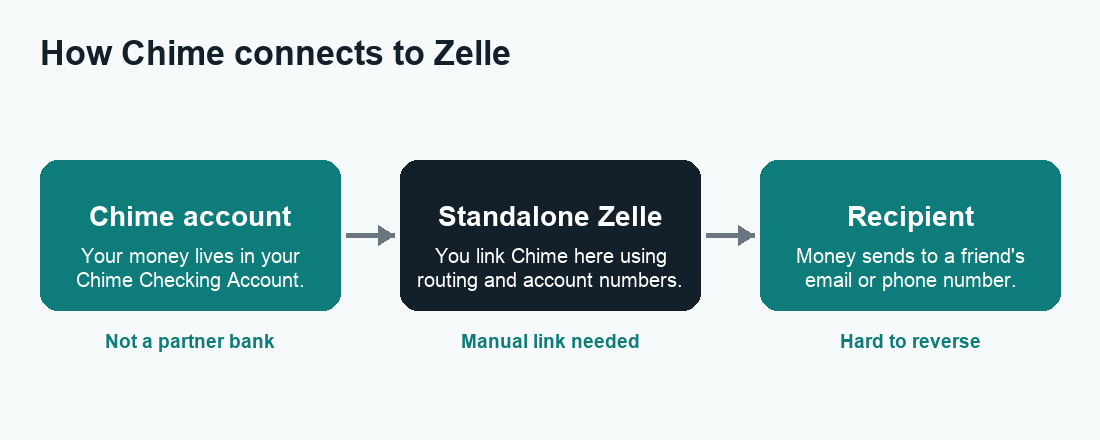
Quick answer: Chime works with Zelle, but only through the standalone Zelle app — not inside the Chime app itself. Download the Zelle app, register with your email or U.S. mobile number, and link your Chime Checking Account using its routing and account numbers (or a debit card, depending on what the app offers you). After that you can send and receive money. Limits are set by the Zelle app for accounts that aren’t tied to a partner bank, so confirm your current sending limit inside the app before you rely on it for anything large.
Does Chime work with Zelle in 2026?
Yes. As of 2026, you can use Zelle with a Chime account — but the way you do it is different from how a Bank of America or Wells Fargo customer would. Those banks are official Zelle network partners, so Zelle is baked right into their mobile apps. Chime is not on that partner list, which is the source of nearly all the confusion around this question.
Because Chime isn’t a partner, you won’t find a “Send with Zelle” button anywhere inside the Chime app. What you do instead is use the standalone Zelle app — a free app from Early Warning Services (the company that runs Zelle) made specifically for people whose bank or credit union isn’t directly integrated. You link your Chime account to that app, and from then on the Zelle app acts as the bridge between your Chime money and whoever you’re paying.
So the honest, complete answer to “does Chime work with Zelle” is: yes, through a workaround that’s officially supported, not a hack. It takes a few extra minutes to set up the first time, and then it largely fades into the background.
Why isn’t Zelle just inside the Chime app?
Chime is a financial technology company, not a bank — banking services are provided through its partner banks. Zelle’s tightest integrations are reserved for banks and credit unions that have formally joined the network. Chime hasn’t, so the in-app experience that big-bank customers enjoy simply isn’t available. The standalone app exists precisely to fill that gap for everyone left out of the partner network.
How to add Chime to the standalone Zelle app
Setting up Zelle with Chime is a one-time process. Here’s the typical flow. Screens and wording can shift between app updates, so treat this as a guide rather than a pixel-perfect script.
- Download the Zelle app. Get it from the Apple App Store or Google Play. Make sure it’s the official app published by Early Warning Services — check the developer name before you install.
- Register your contact info. Open the app and enroll using a U.S. mobile phone number or an email address. This is the “token” people will use to send money to you, so pick one you actually check.
- Verify with a one-time code. Zelle texts or emails you a verification code. Enter it to confirm the number or email is yours.
- Add your Chime account. When prompted to link a bank, you’ll usually either log in through a secure connection or enter your Chime Checking Account’s routing and account numbers. You can find those inside the Chime app under your account details. Some users are offered the option to link a debit card instead — follow whichever path the app gives you.
- Confirm and start sending. Once Chime is linked and verified, you can send money by entering a recipient’s email or phone number, or receive money that others send to your registered token.
Finding your Chime numbers is easy: open the Chime app, go to your Checking Account, and look for the routing and account numbers (often under “Move Money” or account settings). Copy them carefully — a single wrong digit is the most common reason a link fails.
Receiving money on Chime through Zelle
To receive a Zelle payment, the sender just needs the email address or phone number you registered in the Zelle app. As long as that token is enrolled and your Chime account is linked, the money routes to your Chime balance. If someone tries to pay an email or number you haven’t enrolled yet, they may get a prompt telling them you still need to sign up — so register the exact contact detail you give people.
Limits, timing, and caveats to know
This is where using Zelle with Chime differs most from the big-bank experience, and where you should pay the closest attention.
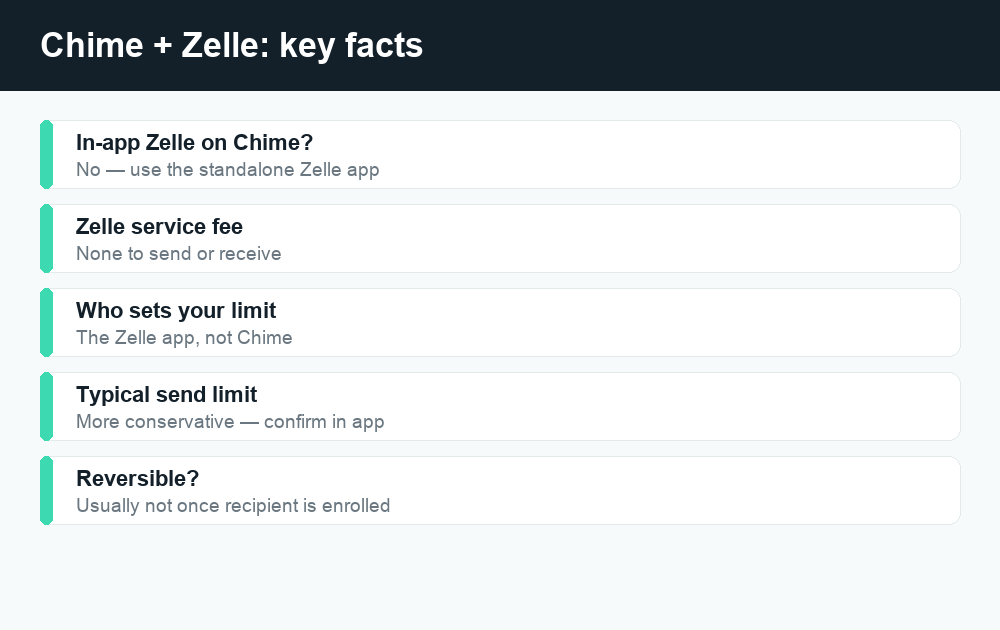
Sending limits are set by the Zelle app, not Chime. When your bank is a Zelle partner, the bank sets your send limit. When you use the standalone app — which is what Chime users do — the limit is governed by the Zelle app itself, and it tends to be more conservative than a typical partner-bank limit. The exact dollar figure can change and may depend on how long you’ve been enrolled and your activity, so always check your current limit inside the Zelle app rather than assuming a number. Don’t promise to “Zelle someone $3,000 tonight” until you’ve confirmed your account can actually do it.
Speed is usually fast, but not always instant. Zelle is built for near-instant transfers between enrolled users. With a standalone-app setup, most payments still arrive quickly, though some can take longer — especially the recipient’s very first payment, or if extra verification is triggered. If you’re curious about the mechanics of timing, our guide on how long a Zelle transfer takes breaks down the normal windows and the things that slow them down.
Payments are hard to reverse. Zelle moves money like cash. If the recipient is already enrolled, the transfer can complete almost immediately and generally can’t be canceled. If they haven’t enrolled yet, the payment sits pending and you may be able to cancel it — see our walkthrough on how to cancel a Zelle payment. The big takeaway: only send to people you know and trust.
Watch for scams. Because Zelle is fast and irreversible, scammers love it. Never send Zelle money to a stranger, a “too good to be true” marketplace deal, or anyone pressuring you to pay immediately — and be suspicious of anyone claiming to be your bank’s fraud department asking you to “send yourself” money. If you want a fuller rundown of protections and red flags, read is Zelle safe before you send anything to someone you don’t know personally.
Quick comparison: Chime-in-Zelle vs. partner-bank Zelle
| Feature | Chime via standalone Zelle app | Partner bank (e.g., big banks) |
|---|---|---|
| Where you send from | Separate Zelle app | Inside your bank’s own app |
| Setup needed | Link Chime account manually | Already built in |
| Who sets your send limit | The Zelle app | Your bank |
| Typical limit size | Often more conservative | Often higher |
| Transfer speed | Usually fast; can vary | Usually fast |
| Cost to send | No Zelle fee | No Zelle fee |
One genuinely good piece of news across the board: Zelle itself doesn’t charge a fee to send or receive money. Always confirm your own bank or app hasn’t layered on anything, but the Zelle service is free to use.
What if you can’t link Chime to Zelle?
Most people get linked on the first try, but a few hit snags. If yours won’t connect, work through these in order:
- Re-check your account and routing numbers. Pull them fresh from the Chime app and re-enter them slowly. Transposed digits are the number-one culprit.
- Update the Zelle app. An outdated version can fail to link. Update it, then restart your phone and try again.
- Confirm your token is verified. Make sure the email or phone number you enrolled is fully confirmed in the Zelle app.
- Try the debit-card path if offered. Some users have better luck linking a debit card than typing account numbers.
- Contact support. If it still won’t link, reach out to Zelle’s in-app support and Chime’s support so they can check whether anything on the account is blocking the connection.
Alternatives to Zelle if you bank with Chime
Zelle isn’t your only option, and depending on who you’re paying, another app may be simpler. Chime also has its own built-in ways to move money between friends, so you don’t always need a third party at all.
Chime’s own transfer tools
Chime members can typically send money to other Chime members quickly, and you can move money to and from external accounts through standard bank transfers. If the person you’re paying also uses Chime, this is often the easiest route and keeps everything inside one app.
Cash App, Venmo, and PayPal
These peer-to-peer apps each let you link a bank account or debit card and send money to friends. They differ from Zelle in important ways: payments often land in an in-app balance you then move to your bank, instant transfers usually carry a fee, and standard transfers are free but slower. If you’re weighing them, our breakdowns of Cash App fees and Venmo fees explain exactly when you’ll be charged and how to avoid it. And if a payment ever seems stuck, see our guides on a Cash App payment pending or a Venmo payment pending.
Which should you choose?
For paying someone who insists on Zelle, link Chime to the standalone Zelle app. For everyday splitting with friends, whichever app you both already have is usually fine. For Chime-to-Chime payments, just use Chime directly. There’s no single “best” — it’s about matching the tool to who you’re paying and how fast the money needs to arrive.
Frequently asked questions
Is Chime a Zelle partner bank?
No. Chime is not one of Zelle’s official partner banks, which is why Zelle isn’t built into the Chime app. You use the standalone Zelle app and link your Chime account to it instead. Everything still works; it just takes one extra setup step.
Can I send Zelle directly from the Chime app?
No. There’s no “Send with Zelle” feature inside the Chime app. All Zelle activity for Chime users happens in the separate Zelle app after you’ve linked your Chime account.
Does Zelle charge a fee with Chime?
Zelle itself doesn’t charge a fee to send or receive money. That’s true whether you use a partner bank or the standalone app with Chime. Always double-check that no separate fee has been added on your end, but the Zelle service is free.
What’s the Zelle sending limit with a Chime account?
Because Chime isn’t a partner bank, your limit is set by the standalone Zelle app rather than by Chime, and it tends to be more conservative. The exact amount can change, so check your current limit inside the Zelle app before sending anything large. Don’t rely on a figure you saw quoted somewhere online.
How long does a Zelle transfer to Chime take?
Most Zelle payments arrive quickly, often within minutes between enrolled users. A recipient’s very first payment or one that triggers extra verification can take longer. For a full timing breakdown, see our guide on how long a Zelle transfer takes.
Can I cancel a Zelle payment sent from Chime?
If the recipient hasn’t enrolled in Zelle yet, the payment may sit pending and you might be able to cancel it. If they’re already enrolled, it usually completes right away and can’t be reversed. Our cancel a Zelle payment guide explains the difference and what to do.
Is using Zelle with Chime safe?
The connection itself is legitimate and officially supported. The main risk with any Zelle payment is sending to the wrong person or to a scammer, since transfers are fast and hard to reverse. Only pay people you know and trust, and review our is Zelle safe guide for red flags to watch for.
What if my Chime account won’t link to Zelle?
Re-enter your account and routing numbers carefully, update the Zelle app, confirm your email or phone number is verified, and try the debit-card option if it’s offered. If it still won’t connect, contact both Zelle and Chime support so they can check for anything blocking the link.
Last updated: June 2026. Fees, limits, and features can change — always confirm current details in the app. WalletWisp is an independent guide and is not affiliated with any app mentioned. This article is general information, not financial advice.
Related: How long does a Zelle transfer take? · Is Zelle safe? · More Chime guides