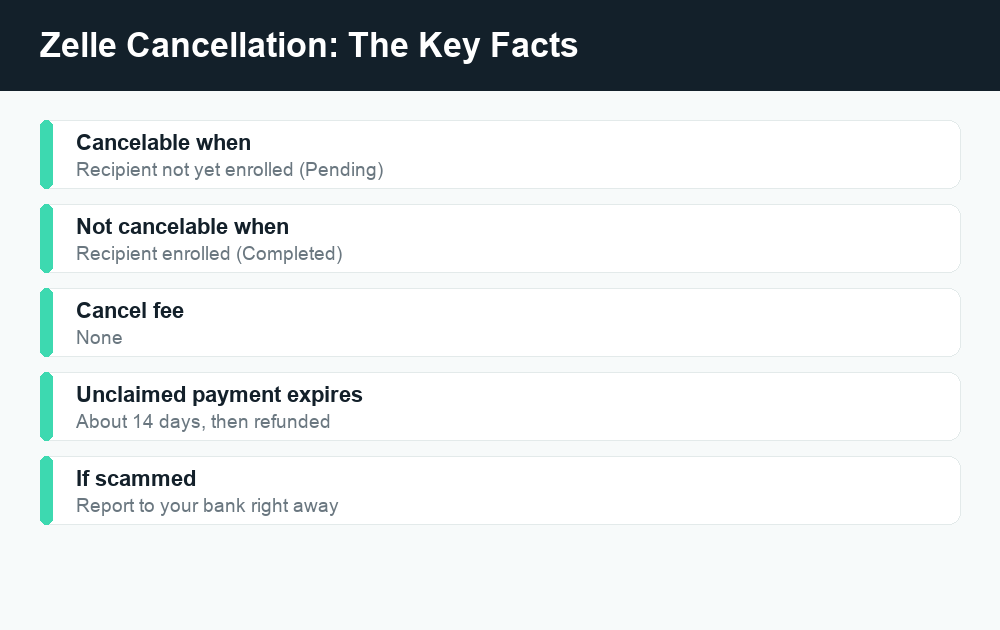
Here’s the short version of how to cancel a Zelle payment: you can only cancel it if the person you sent money to has not yet enrolled with Zelle. If they’re already enrolled, the money moves in minutes and there’s no cancel button — it’s gone. That single rule explains almost every question people have about reversing a Zelle transfer, so it’s worth understanding before you do anything else.
Quick answer: Open your bank or Zelle app, find the payment in your Activity, and tap Cancel This Payment. This option only appears when the recipient hasn’t enrolled with Zelle yet. If the payment shows as “Completed” or the recipient is already enrolled, it can’t be canceled — your only options are to ask them to send it back or, for fraud, report it to your bank.
Why Zelle payments are so hard to cancel
Zelle is built to move money fast — usually within minutes between enrolled users. Unlike a check that takes days to clear or a card payment that posts as “pending” for a while, an enrolled Zelle transfer is more like handing someone cash. Once it lands in their account, there’s no holding period and no built-in way to claw it back.
The one exception is timing. When you send money to someone who has never used Zelle before, the payment can’t complete until that person enrolls their email or phone number. During that waiting window, the money hasn’t actually moved yet — so you’re allowed to cancel it. As soon as they enroll, the window closes.
How to know if your Zelle payment can be canceled
Before you panic or celebrate, check the status of the payment. Open the Zelle section inside your banking app (or the standalone Zelle app) and look at your Activity or transaction history. The status tells you everything:
| Payment status | What it means | Can you cancel? |
|---|---|---|
| Pending | Recipient hasn’t enrolled with Zelle yet | Yes — cancel it now |
| Completed | Money has been delivered to an enrolled recipient | No |
| Expired | Recipient never enrolled within ~14 days; funds returned to you | No need — it’s already coming back |
| Failed | Payment didn’t go through | No need — nothing was sent |
If you see a “Cancel This Payment” button next to the transaction, that’s your green light. If there’s no such button, the recipient is enrolled and the money is already there.
How to cancel a Zelle payment step by step
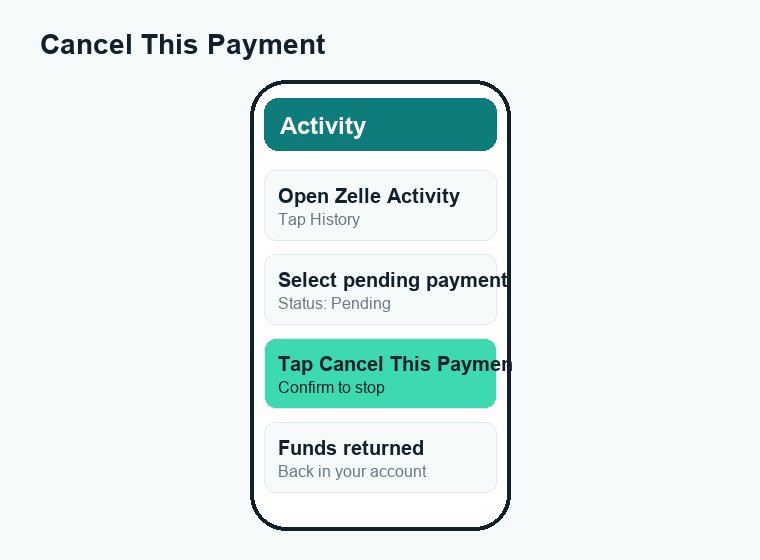
If the payment is still pending, act quickly. The exact wording varies a little between banks, but the path is almost always the same. Here’s how to cancel a Zelle payment in your app:
- Open your banking app (or the Zelle app) and sign in.
- Go to the Zelle section — often labeled “Send Money with Zelle,” “Zelle,” or found under Transfers/Payments.
- Tap Activity (sometimes called “History” or “Transactions”) to see your recent payments.
- Select the pending payment you want to stop.
- Tap “Cancel This Payment” and confirm. The funds return to your account, usually right away.
That’s it. If the cancel option simply isn’t there, skip ahead — the rest of this guide covers exactly what to do when you can’t cancel.
What to do if you can’t cancel the payment
If the money already went to an enrolled recipient, Zelle itself can’t reverse it. But you still have moves to make. The right one depends on why you want the money back.
You sent it to the right person, just the wrong amount
The simplest fix: contact the person and politely ask them to send it back. If they’re someone you know and trust, they can Zelle the money straight back to you in a couple of taps. This is by far the most common — and most successful — outcome.
You sent it to the wrong person (typo in email or phone)
If you mistyped a digit or picked the wrong contact, the money may have gone to a stranger. First, check whether the payment is still pending — if so, cancel it immediately. If it already completed, contact your bank right away and explain it was an accidental misdirected payment. Banks can’t guarantee a recovery, but they can sometimes contact the receiving bank to request the funds back. Move fast; the sooner you report it, the better your odds.
You believe you were scammed
This is different from a simple mistake, and it matters. We cover scam reporting in its own section below, because the steps and your protections are different.
Zelle cancellation timelines at a glance
People often ask how long they have to act. There’s no fixed countdown clock you can watch, but here’s a realistic picture of the windows involved:
| Situation | Typical timing | Your action |
|---|---|---|
| Recipient not yet enrolled | You can cancel until they enroll | Cancel in Activity now |
| Recipient already enrolled | Money arrives in minutes | Ask them to send it back |
| Unenrolled recipient never signs up | Payment expires in ~14 days | Funds auto-return to you |
| Suspected fraud or scam | Report as soon as you notice | Call your bank’s fraud line |
For more on speed and when funds actually land, see our guide on how long a Zelle transfer takes.
How to handle a wrong-number or wrong-email Zelle payment
Sending to the wrong contact is one of the most stressful Zelle mistakes because the system trusts the email or phone number you typed. Here’s how to limit the damage:
- Check the status immediately. If it’s still pending, cancel it before the stranger enrolls.
- If it completed, call your bank. Report it as a payment sent to the wrong recipient. Have the date, amount, and the number/email you used ready.
- Ask the bank to attempt recovery. They may reach out to the receiving institution, though recovery isn’t guaranteed.
- Double-check your contact next time. Re-read the email or phone number before you hit send, and start with a small “test” amount when paying someone new.
Because Zelle doesn’t let you confirm a stranger’s full name before sending, slowing down for two seconds to verify the number is the best protection you have.
How to report a Zelle scam
Scams are treated differently from accidental payments. If you authorized a payment because someone tricked you (a fake seller, a “bank” impersonator, a romance scam, or a “send it back” overpayment trick), report it as fraud — don’t just ask for a refund.
- Stop all contact with the person and don’t send any more money, no matter what they claim.
- Contact your bank or credit union right away using the number on the back of your card or their official app. Tell them you believe you were scammed through Zelle.
- Report it inside Zelle too — the Zelle app and most bank apps have a “Report a Scam” or fraud option.
- File a complaint with the FTC at ReportFraud.ftc.gov, and consider reporting to the FBI’s IC3 for online scams.
- Save everything — screenshots, messages, payment confirmations, and any phone numbers. Documentation strengthens your case.
Thanks to changes that rolled out across the network, banks now reimburse certain confirmed imposter scams (for example, someone pretending to be your bank or a government agency) when reported properly. Protections vary by scam type, so report promptly and let your bank guide you. To understand the bigger picture of safety on the network, read is Zelle safe.
The hard truth about authorized scam payments
Zelle’s standard rule is that you’re protected against unauthorized transactions (someone using your account without permission), but payments you authorized — even ones a scammer talked you into — have historically been much harder to recover. That’s why “never send Zelle to someone you don’t know and trust” is the golden rule. Treat it like cash.
How Zelle compares to Cash App and Venmo for canceling
If you also use other payment apps, the cancel rules are similar but not identical. With Cash App and Venmo, payments to existing users are usually instant too, but they sometimes show a brief “pending” state you can act on. Here’s how the canceling logic stacks up:
- Zelle: Cancel only while the recipient is unenrolled (pending). No fees, no holding period.
- Cash App: Most payments are instant, but a payment stuck in pending may be cancelable — see Cash App payment pending.
- Venmo: Completed payments can’t be canceled; you request the money back. A stuck transfer may show as Venmo payment pending.
The common thread: once money reaches an active user, all three apps expect you to ask for it back rather than reverse it.
How to avoid needing to cancel in the first place
The best cancellation is the one you never need. A few habits go a long way:
- Verify the contact — confirm the exact email or U.S. mobile number before sending.
- Send a small test amount when paying someone for the first time.
- Only pay people you know and trust — Zelle is for friends, family, and trusted businesses, not strangers online.
- Never act on urgent “pay now” pressure — that’s a scammer’s favorite tactic.
- Double-check the amount before confirming, especially the decimal point.
Frequently asked questions
Can I cancel a Zelle payment that already went through?
No. Once a payment is delivered to an enrolled recipient, it’s marked “Completed” and can’t be canceled or reversed by Zelle. Your only options are to ask the recipient to send the money back or, if it’s fraud, to report it to your bank.
How do I cancel a pending Zelle payment?
Open your bank or Zelle app, go to the Zelle Activity or history screen, select the pending payment, and tap “Cancel This Payment.” This button only appears when the recipient hasn’t enrolled yet, so act quickly.
What happens if the recipient never enrolls in Zelle?
If the person you sent money to doesn’t enroll, the payment typically expires after about 14 days and the funds are returned to your account automatically. You don’t need to do anything to get your money back.
Can my bank reverse a Zelle payment for me?
For a normal authorized payment to the wrong person, your bank can try to contact the receiving bank to request the funds, but it can’t force a reversal and recovery isn’t guaranteed. For unauthorized (fraudulent) transactions, you’re protected and should report immediately.
Will I get my money back if I was scammed on Zelle?
It depends on the type of scam. Confirmed imposter scams — where someone pretended to be your bank or a government agency — may now be reimbursed when reported properly. Other authorized payments you were tricked into are harder to recover, so report to your bank right away.
How long do I have to cancel a Zelle payment?
There’s no fixed timer. You can cancel only as long as the recipient remains unenrolled, which could be minutes or days. Once they enroll and the payment completes, the window is gone — so check the status and cancel as soon as possible.
Is there a fee to cancel a Zelle payment?
No. Zelle doesn’t charge a fee to cancel a pending payment, and canceling simply returns the funds to your account. Zelle itself is free to use, though it’s always worth confirming your own bank’s policies in your app.
What if I sent Zelle to the wrong phone number?
If the payment is still pending, cancel it immediately in your Activity. If it already completed, contact your bank right away, explain it was sent to the wrong number by mistake, and ask them to attempt a recovery from the receiving bank.
Last updated: June 2026. Fees, limits, and features can change — always confirm current details in the app. WalletWisp is an independent guide and is not affiliated with any app mentioned. This article is general information, not financial advice.
Related: How to cancel a Zelle payment · How long does a Zelle transfer take? · Is Zelle safe?