A Cash App payment shows “pending” when the transfer has started but isn’t finished — almost always because of a weak internet connection, a security review on Cash App’s side, an account that needs verifying, or a linked bank that hasn’t released the funds. Most pending payments clear on their own within a few minutes to a few hours. A few need you to take one quick action. This guide shows you exactly how to tell which situation you’re in and how to fix it fast.
Quick answer: Open Cash App → tap the Activity tab (the clock icon) → find the pending payment. If it shows a “Complete” button, tap it. If not, check your internet, confirm your linked bank has the funds, and make sure your account is verified. If it’s still pending after 24 hours, contact Cash App support.
What “pending” actually means on Cash App
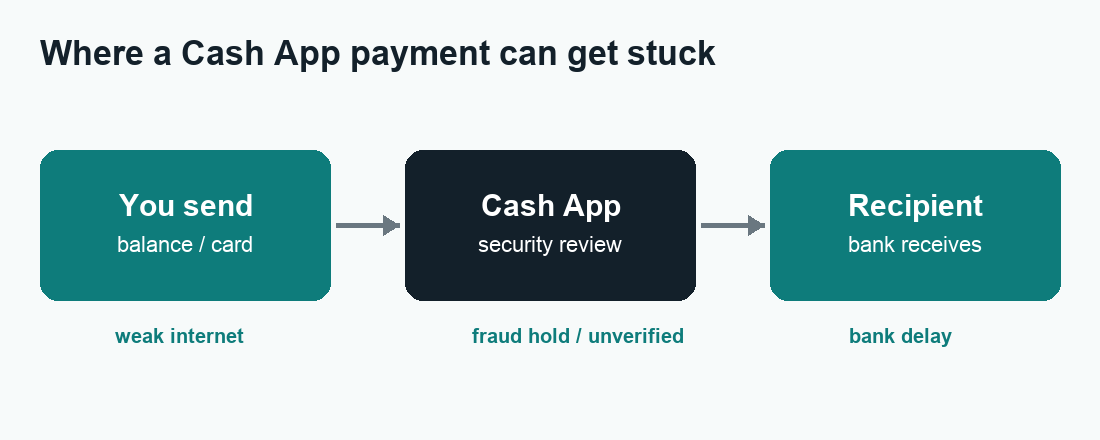
A pending status means your payment is in limbo — it has not fully sent, and it has not failed. Cash App is simply waiting for one more thing to happen before it releases the money. There are three points where a payment can get stuck, and knowing which one you’re dealing with tells you exactly what to do:
- On your side — your internet dropped, your app is out of date, or there’s an action you still need to confirm.
- On Cash App’s side — the payment was flagged for a routine security or fraud review.
- On the bank’s side — your linked debit card or bank account hasn’t released or cleared the funds yet.
Below is a quick-reference table, followed by a detailed fix for each of the seven most common causes.
Cash App pending payment: causes and fixes at a glance
| Cause | Quick fix | Typical wait |
|---|---|---|
| Weak / unstable internet | Switch Wi-Fi ↔ mobile data, reopen app | Instant once reconnected |
| Security / fraud review | Wait — don’t resend | A few hours, up to 24h |
| Action needed | Tap “Complete” in Activity | Instant |
| Unverified account / over limit | Verify identity in Profile | Minutes after verifying |
| Linked bank funds not cleared | Add funds or pay from balance | 1–3 business days |
| Outdated app / glitch | Update app, log out and back in | Instant |
| Cash App outage | Wait for service to return | Until outage ends |
The 7 reasons your Cash App payment is pending (and how to fix each)
1. Weak or unstable internet connection
This is the single most common cause. If your Wi-Fi or mobile data dropped for even a second while the payment was sending, Cash App can’t confirm it and the transfer hangs in “pending.” It’s especially common on public Wi-Fi, in areas with poor signal, or when a VPN is switching servers.
Fix: Toggle from Wi-Fi to mobile data (or vice versa), turn airplane mode on and off to refresh your connection, then fully close and reopen Cash App. Avoid sending payments over public hotspots or while connected to a VPN — Cash App sometimes blocks transactions from networks it can’t verify.
2. Cash App is reviewing the payment for security
Cash App runs automatic fraud checks on payments that look unusual — a larger-than-normal amount, a brand-new recipient, a payment from a new device, or several payments in quick succession. When that happens, the money is held as “pending” until the review clears. This is normal and is there to protect you.
Fix: Wait it out. These reviews usually clear within a few hours. Do not send the payment again — if you do, you may end up paying twice once the hold lifts. Check the Activity tab periodically; if it’s still pending after 24 hours, contact support.
3. You still need to complete the payment
Sometimes the payment is waiting on a manual confirmation from you. When that’s the case, Cash App shows a “Complete” button on the transaction.
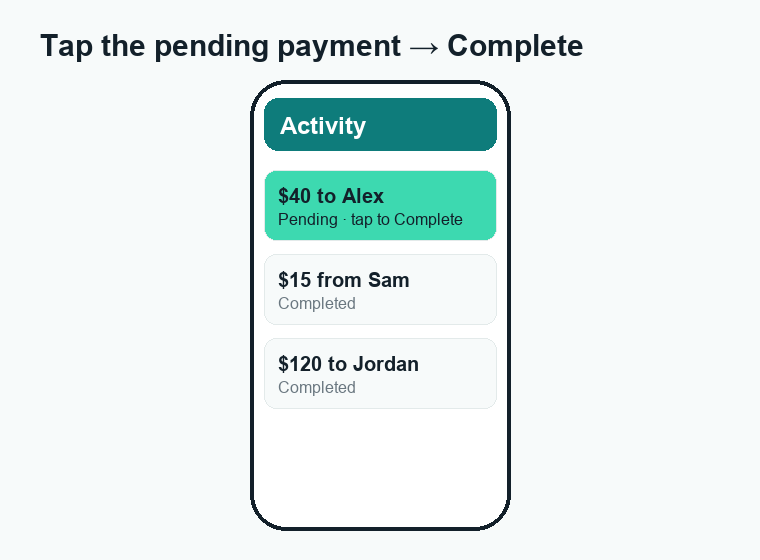
Fix: Open the Activity tab, tap the pending payment, and if you see a “Complete” button, tap it to push the transfer through. If there’s no such button, the delay is one of the other causes on this list.
4. Your account isn’t verified (or you hit a limit)
Unverified Cash App accounts can only send a limited amount — historically around $250 per week. Try to send more than your limit allows and the payment will pend until you verify your identity and raise the limit.
Fix: Go to your profile → Personal and add your full legal name, date of birth, and the last four digits of your SSN. Verification usually completes within minutes, your sending limit jumps significantly, and held payments typically release on their own. (For more, see our guide to Cash App fees and limits.)
5. The linked bank or card hasn’t released the funds
If you funded the payment from a linked debit card or bank account rather than your Cash App balance, the transfer can pend while those funds clear — particularly for a first payment from a newly linked account.
Fix: Confirm the linked account actually has enough money and isn’t frozen. The most reliable workaround is to add money to your Cash App balance first and pay directly from that, since balance payments don’t depend on an outside bank clearing.
6. The app is outdated or glitching
An old version of Cash App can cause payments to stall, and occasionally the app just needs a reset.
Fix: Update Cash App from the App Store or Google Play, then force-close it and reopen. If the payment is still stuck, log out and log back in to refresh your session.
7. Cash App is having an outage
Sometimes the problem isn’t on your end at all — Cash App’s servers are down. When that happens, payments across the whole platform pend until service is restored.
Fix: Check a site like Downdetector or Cash App’s status updates on X (formerly Twitter). If there’s a confirmed outage, there’s nothing to fix on your side — your payment will process automatically once Cash App is back up.
Pending vs. failed vs. completed: what each status means
| Status | What it means | What to do |
|---|---|---|
| Pending | Started but not finished; money is on hold | Wait or complete the action |
| Failed | Cash App couldn’t process it; money is returned | Check details and resend |
| Completed | Money has been delivered | Nothing — it’s done |
How long does a Cash App payment stay pending?
Most pending payments clear within a few minutes to a few hours. A security review can take up to 24 hours. Payments that depend on a bank transfer can take 1–3 business days to settle. If a payment has been pending for more than 24–48 hours with no movement, it’s worth contacting Cash App support, because it may need to be canceled and resent.
How to cancel or get a refund on a pending payment
You can sometimes cancel a pending payment before it processes. Open the Activity tab, tap the payment, and look for a Cancel option. If you see it, tap it and the hold is released back to you.
If there’s no Cancel button, the payment is already processing and can’t be stopped — at that point your option is to wait for it to complete and then request a refund. To do that, open the completed payment, tap the “…” menu, and choose Refund, or ask the recipient to send the money back. See our step-by-step Cash App guides for more.
Watch out: “pending payment” scams
Scammers love the word “pending.” A common scam: someone claims they’ve sent you a large payment that’s “pending,” and says it will only release once you send them a smaller “fee” or “verification” payment first. Cash App never works this way. A real incoming payment never requires you to send money to “release” it. If anyone asks you to do that, it’s a scam — stop and don’t send anything. Cash App will also never ask for your PIN or sign-in code.
How to stop payments from pending in the future
- Verify your account so you’re not constantly bumping into low limits.
- Keep a Cash App balance and pay from it instead of relying on a linked bank to clear.
- Send on a strong, private connection — not public Wi-Fi or a VPN.
- Keep the app updated so glitches don’t stall transfers.
- Double-check recipient details before sending so payments don’t hang waiting to be claimed.
When to contact Cash App support
If a payment has been pending for more than 24–48 hours, or money has left your balance but the recipient never received it, reach out: in the app go to Profile → Support → Start a chat, or call the official line at 1-800-969-1940. ⚠️ Cash App support will never ask for your PIN, sign-in code, or for you to “test” a payment — anyone who does is a scammer.
Frequently asked questions
Why is my Cash App payment pending when I have money?
A balance is rarely the issue. A pending payment with money available is almost always a security review or a verification hold. Check the Activity tab for a “Complete” button, and make sure your account is verified.
Will a pending Cash App payment go through automatically?
Usually, yes. Most pending payments clear on their own within a few hours. Only take action if there’s a “Complete” button to tap, or if it’s been pending for more than 24 hours.
Does a pending payment take the money out of my balance?
The funds are typically held (reserved) but not finalized until the payment completes. If the payment is canceled or fails, that hold is released back to you.
Can I cancel a pending Cash App payment?
Sometimes. If a Cancel option appears on the payment in your Activity tab, you can stop it. If there’s no Cancel option, it’s already processing and you’ll need to wait and then request a refund.
Why is my Cash App direct deposit pending?
Direct deposits can show as pending until your employer’s or sender’s scheduled release date, or while Cash App verifies a first-time deposit. These usually post on the expected pay date.
Can I get scammed through a “pending” payment?
Yes, if you’re tricked into sending money to “release” an incoming payment. Cash App never requires that. Never send money to receive money.
Last updated: June 2026. Fees, limits, and features can change — always confirm current details in the Cash App app. WalletWisp is an independent guide and is not affiliated with Cash App or Block, Inc. This article is general information, not financial advice.
Related: Cash App fees explained · How to delete your Cash App account · All Cash App guides