If you want to know how to delete Cash App account access for good, the short version is this: open the Cash App, tap your profile icon, go to Support, choose “Delete Your Account,” and confirm — your account closes and your data is removed after a short hold period. You can also do the same thing from a web browser if the app is acting up. Below we walk through every step for both methods, plus what happens to your balance, your payment history, and your Cash Card.
Quick answer: Cash off your full balance first, then go to Profile icon → Support → Delete Your Account → confirm with the code Cash App texts or emails you. Cash App keeps your account for a short period in case you change your mind, then permanently closes it. There is no fee to close your account, and you can usually reactivate by signing back in soon after.
How to delete your Cash App account (the quick path)
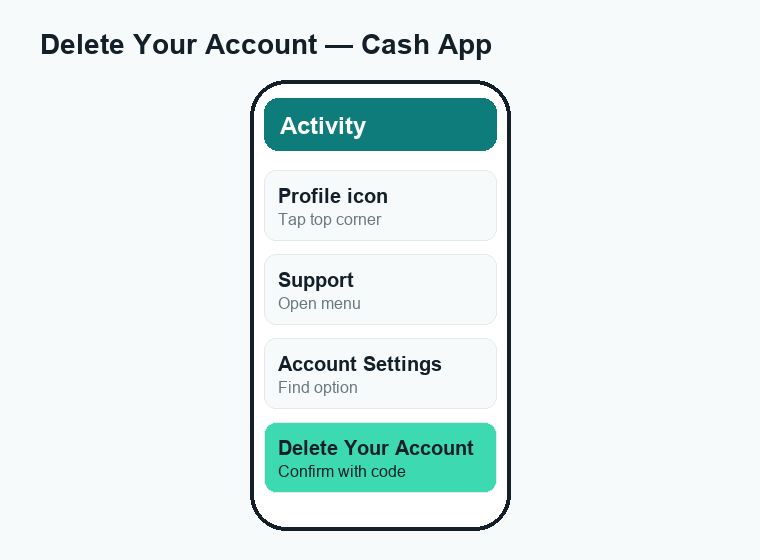
Cash App does not have a big red “delete” button on the home screen. The option lives inside the Support menu, which is why a lot of people can’t find it. Here is the fastest route on a phone:
- Open the Cash App on your iPhone or Android device.
- Tap your profile icon (your photo or initials) in the top corner of the screen.
- Scroll down and tap Support.
- Tap Account Settings, then look for Delete Your Account (on some app versions it appears under “Something Else” or the help search).
- Tap Delete Your Account and confirm.
- Cash App sends a verification code by text or email. Enter it to finish.
Once you confirm, your profile is closed. But before you tap that final button, there are a few things worth doing first so you don’t lose money or get stuck.
Before you delete: 5 things to do first
Deleting is permanent, and it can lock up money or break things you still rely on. Run through this checklist before you close the account.
1. Cash out your balance
Any money sitting in your Cash App balance needs to go somewhere before you close the account. Tap the Money tab, choose Cash Out, pick your linked bank, and transfer it. A standard cash-out is free but can take 1–3 business days; an instant cash-out is faster but charges a small percentage fee. If you want a full breakdown of those charges, see our guide to Cash App fees.
2. Wait for pending payments to clear
If you have a payment that hasn’t settled yet, deleting your account can complicate it. Let any pending transfers finish first. If something is stuck, read why a Cash App payment is pending before you do anything drastic.
3. Download your transaction history
Once the account is gone, you lose easy access to your statements. You may need them for taxes, budgeting, or a dispute. Request your account statement from the app or the cash.app/account web portal and save the file somewhere safe.
4. Move your Bitcoin and stocks
If you bought Bitcoin or stocks inside Cash App, you must sell them or transfer them out before closing. Bitcoin can be withdrawn to an external wallet; stocks usually have to be sold and the cash withdrawn. Don’t skip this — these assets won’t follow you automatically.
5. Cancel any direct deposits or auto-pays
If your paycheck, government benefits, or bills route through your Cash App account or Cash Card, redirect them to another account first. A deleted account can’t receive a deposit, and the money may bounce back to the sender or get held.
| Before you delete | Why it matters | Typical timing |
|---|---|---|
| Cash out your balance | You can’t withdraw after closing | Instant or 1–3 business days |
| Clear pending payments | Deleting can complicate disputes | Usually within a few days |
| Download statements | Needed for taxes/records | Save before you close |
| Sell or move Bitcoin/stocks | Assets don’t transfer automatically | Same day to a few days |
| Redirect direct deposits | Closed accounts can’t receive money | Allow 1–2 pay cycles |
How to delete your Cash App account on the app (full steps)
This is the most common method. Make sure you’ve done the checklist above first.
- Open Cash App and tap the profile icon in the top corner.
- Select Support from the menu.
- Tap Account Settings (or use the search bar and type “delete account”).
- Choose Delete Your Account.
- Read the on-screen notice about what gets removed, then tap Confirm or Continue.
- Enter the verification code Cash App sends to your phone or email.
- You’ll see a confirmation that your account is scheduled for closure.
After this, you may still get a confirmation email. Cash App typically holds the account for a short window in case you log back in, then deletes the data on its servers.
How to delete your Cash App account on a computer (web method)
If the app is crashing, you lost your phone, or you simply prefer a browser, you can close your account from the Cash App website. The steps are similar.
- Go to cash.app/account in any browser.
- Sign in with your phone number or email. Cash App texts or emails you a one-time code to log in.
- Enter the code to reach your account dashboard.
- Look for Settings or the support/help area.
- Find Close My Cash App Account (sometimes shown as “Delete Account”) and follow the prompts.
- Confirm with the verification code when asked.
The web flow is handy when you can’t access the app, but you still need to be able to receive a code by text or email — so keep that phone number or inbox accessible.
What happens after you delete your Cash App account
Closing isn’t always instant, and a few things keep working in the background for a while. Here’s what to expect.
Your balance and Cash Card
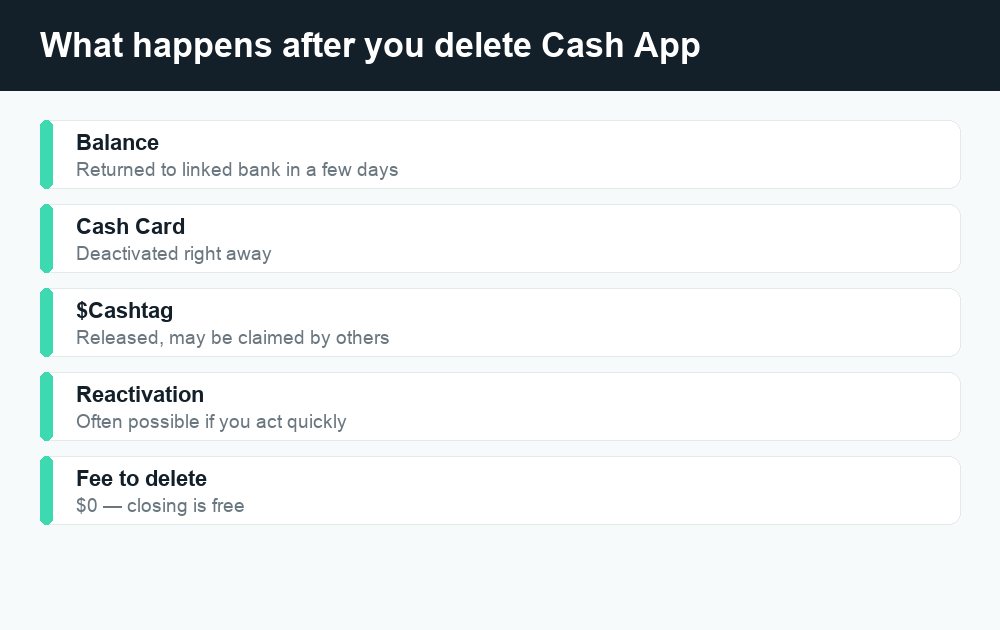
Any money you didn’t cash out should be returned to you, usually to your linked bank account, but this can take several business days. Your Cash Card is deactivated and can no longer be used for purchases or ATM withdrawals. Cut it up once you’re sure everything has settled.
Your $Cashtag and payment history
Your unique $Cashtag is released. After deletion you may not be able to claim the exact same tag again right away if someone else grabs it. Your transaction history is removed from your view, which is exactly why downloading statements beforehand matters.
Data and privacy
Cash App and its parent company keep some records even after closure, because financial laws require them to retain certain transaction data for a set number of years. So “delete” removes your access and profile, but it does not erase every legal record. That’s normal for any regulated money app.
| What you delete | Result | How long |
|---|---|---|
| Cash App balance | Returned to linked bank | A few business days |
| Cash Card | Deactivated, can’t be used | Right away |
| $Cashtag | Released, may be taken by others | Right away |
| Transaction history | Removed from your view | At closure |
| Legal/transaction records | Retained by Cash App for compliance | Years (by law) |
Can you reactivate a deleted Cash App account?
Often, yes — if you act quickly. Cash App usually keeps your account recoverable for a short period after you request deletion. If you change your mind, try signing back in with the same phone number or email and the verification code. If the app lets you in and restores your profile, you’re back in business.
If too much time has passed, the account is permanently closed and you’ll need to start fresh by creating a new account with your phone number or email. A brand-new account won’t have your old history, your old $Cashtag may be gone, and you’ll have to re-verify your identity and re-link your bank.
Common problems when deleting Cash App (and fixes)
“I can’t find the delete option”
App menus change. If you don’t see Delete Your Account under Account Settings, use the in-app Support search bar and type “delete account,” or use the web portal at cash.app/account. As a last resort, contact Cash App support directly through the app and ask them to close it.
“It won’t let me delete — I have a balance”
Cash App may block closure until your balance is zero and pending items clear. Cash out every cent, sell any Bitcoin or stock, and try again.
“I’m not getting the verification code”
Make sure your phone has signal and your number is current. Check spam folders for the email code. If the number on the account is old, you may need to update it first, or use the email option instead.
“My account is restricted or locked”
If Cash App froze your account over a dispute or security flag, you may need to resolve that with support before you can close it. Don’t ignore an open dispute — closing around it can cost you money.
Alternatives to deleting your Cash App account
Deleting is a big step. If your real goal is to stop using Cash App or cut down on notifications, you might not need to close anything at all.
- Just stop using it. An idle account with a zero balance costs you nothing. You can leave it dormant and come back later with your history intact.
- Remove your bank and card. Unlink your debit card and bank account so no money can move, then mute notifications.
- Switch your $Cashtag or change settings. If privacy is the concern, tighten your settings instead of nuking the account.
- Move to a different app. Many people switch to Venmo or Zelle. If you’re comparing, our guides on Venmo fees and whether Zelle is safe can help you choose.
And if it turns out you’d rather delete a different app, we have a full walkthrough for how to delete a Venmo account too.
Frequently asked questions
Does deleting Cash App cost money?
No. There is no fee to close or delete your Cash App account. You only deal with normal cash-out fees if you choose an instant transfer when withdrawing your balance.
Will deleting the app from my phone close my account?
No. Uninstalling the Cash App from your phone only removes the app — your account, balance, and $Cashtag stay active on Cash App’s servers. To truly close it, you must go through the Delete Your Account flow in the app or on the web.
How long does it take to delete a Cash App account?
The request is processed quickly, often within a day or two, but Cash App typically holds your account for a short recovery window before fully removing your data. Any balance refund to your bank can take several business days on top of that.
Can I get my money back after I delete my account?
Any leftover balance is normally returned to your linked bank account. The safest move is to cash out everything yourself before you delete, so nothing gets stuck waiting on a refund.
Can I reuse my phone number or email on a new account?
Usually yes. After your old account is closed, you can typically create a new Cash App account with the same phone number or email, but you’ll start with a clean slate and may lose your old $Cashtag.
What happens to my Cash Card when I delete my account?
Your Cash Card is deactivated immediately and can’t be used for purchases or ATM withdrawals. Destroy the physical card once you’ve confirmed your balance has transferred out.
Will deleting my account cancel a pending payment?
Don’t count on it. Closing your account while a payment is pending can complicate refunds and disputes. Let pending payments clear first — see our guide on pending Cash App payments.
Can Cash App delete my account for me?
Yes. If you can’t reach the menu yourself, you can contact Cash App support through the app and ask them to close your account. They’ll usually verify your identity before doing it.
Last updated: June 2026. Fees, limits, and features can change — always confirm current details in the app. WalletWisp is an independent guide and is not affiliated with any app mentioned. This article is general information, not financial advice.
Related: Cash App fees explained · Why is my Cash App payment pending? · How to delete your Venmo account