Zelle has no single, universal limit. Each bank or credit union sets its own daily and monthly send limits, so what you can send depends entirely on where you bank. In 2026, most large banks cap personal Zelle transfers somewhere between $2,000 and $3,500 per day, with monthly ceilings of roughly $16,000 to $20,000. There is no separate limit on the money you receive.
Below is a plain-English breakdown of how Zelle limits actually work, a 2026 comparison table for Chase, Bank of America, Wells Fargo, Capital One, U.S. Bank and Citi, and the exact steps to find and (occasionally) raise your own limit.
Why Zelle Daily Limits Vary by Bank
Zelle is a payment network, not a bank. It is operated by Early Warning Services, which is owned by a group of large U.S. banks. Zelle moves the money and provides the technology, but it does not hold your funds and it does not set your spending cap.
Your bank does. Every participating financial institution decides its own Zelle send limits based on fraud risk, account type, how long you have been a customer, and its internal policies. That is why a Chase customer and a Bank of America customer can have very different daily limits even though they both use the same purple Zelle button inside their apps.
Three things follow from this:
- There is no “Zelle limit” you can look up in one place. You have to check with your specific bank.
- Limits apply to sending, not receiving. In almost all cases there is no cap on how much you can accept, though your bank may hold large or unusual incoming payments for review.
- Limits can change. Banks adjust them periodically and may lower a limit temporarily if they detect risk on your account.
The Standalone Zelle App Is Gone in 2026
One important change to know: the standalone Zelle app was discontinued in 2025. Previously, people whose bank did not offer Zelle could download the Zelle app, link a Visa or Mastercard debit card, and send up to about $500 per week. That option no longer exists.
As of 2026, you can only use Zelle through a bank or credit union that participates in the network. If your financial institution is not part of Zelle, you cannot enroll, and you will need an alternative such as your bank’s own transfer tools, PayPal, Venmo or a wire. If you are comparing options, our guide to Zelle transfer limits covers the full picture in more detail.
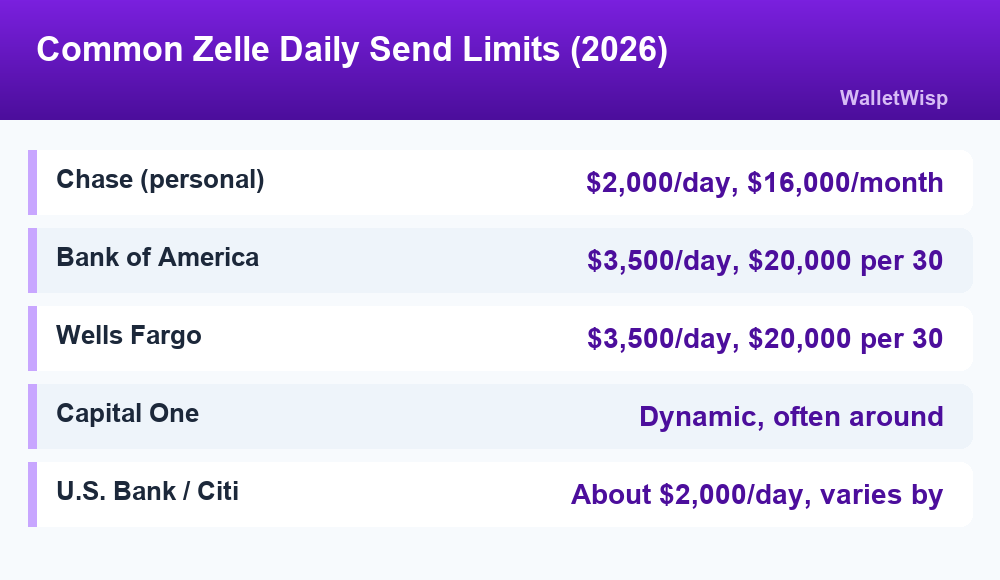
Zelle Daily Limits by Bank: 2026 Comparison Table
The figures below reflect standard personal checking accounts at each bank as published for 2026. Premium, private-client and business accounts often get higher limits, and exact numbers can differ by account and are subject to change. Always confirm inside your own app.
| Bank | Daily send limit | Monthly (30-day) send limit | Can you raise it? |
|---|---|---|---|
| Chase (personal) | $2,000 | $16,000 | No (fixed for most personal accounts) |
| Bank of America | $3,500 | $20,000 | No (limits are set by the bank) |
| Wells Fargo | $3,500 | $20,000 | No (not customer-adjustable) |
| Capital One | Dynamic, often ~$2,000 | ~$10,000 | Varies (limits are risk-based) |
| U.S. Bank | $2,000 | Varies by account | Sometimes, by request |
| Citi | $2,000 (standard) | Varies by account | Higher tiers get higher limits |
A few notes on reading this table:
- Chase publishes clear numbers: standard personal accounts are capped at $2,000 per day and $16,000 per calendar month. These are generally not adjustable.
- Bank of America and Wells Fargo are the most generous of the big three for everyday accounts at $3,500 per day, but both measure the longer limit over a rolling 30-day window rather than a calendar month.
- Capital One does not publish one fixed number. It uses a dynamic, risk-based limit that can vary from customer to customer and even change over time, so your in-app limit is the only accurate source.
- U.S. Bank and Citi commonly start personal customers around $2,000 per day, with higher ceilings for premium relationships.
Premium and Private-Client Accounts Get Higher Limits
If you have a premium checking product or a private banking relationship, your Zelle limits are often significantly higher than the standard figures above. Banks reward larger relationships with more sending headroom. Here is how the tiers typically compare.
| Account tier | Typical daily limit | Typical monthly limit |
|---|---|---|
| Standard personal checking | $2,000 – $3,500 | $16,000 – $20,000 |
| Chase Private Client / premium | Up to $5,000 | Up to $40,000 |
| Bank of America Preferred Rewards | $3,500+ | $20,000+ |
| Small business accounts (where offered) | $5,000+ | $40,000+ |
Not every bank offers Zelle for business accounts, and business limits are set separately from personal ones. If you run a business and need to move larger sums, ask your bank directly whether business Zelle is available and what the ceiling is.
How to Check Your Own Zelle Limit
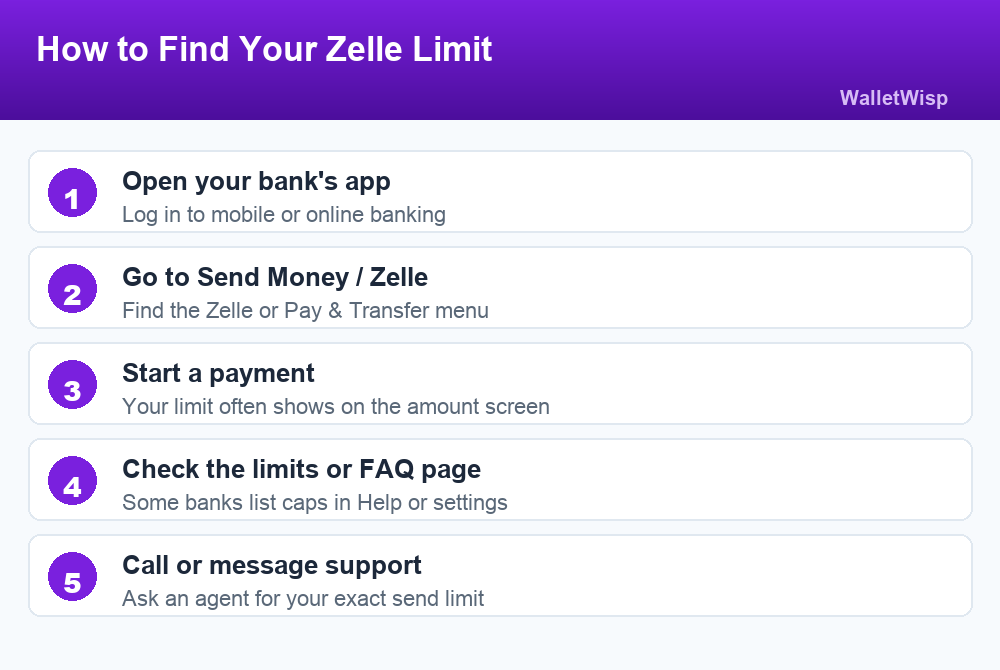
Because limits are account-specific, the only truly accurate number is the one your bank shows you. Here is how to find it in most banking apps.
1. Open your bank’s mobile app or online banking
Zelle in 2026 lives inside your bank’s app, not a separate one. Log in the way you normally would.
2. Find the Zelle, Send Money, or Pay & Transfer section
Different banks label it differently. Chase calls it “Pay & transfer,” Bank of America and Wells Fargo place Zelle under “Transfer” or “Send & receive money.”
3. Start a payment to reveal your limit
Many apps display your remaining daily or monthly limit right on the screen where you enter the amount. You can begin a payment and back out before confirming just to see the number.
4. Look for a “Limits” or FAQ page
Some banks list Zelle limits in their help center, service agreement or a dedicated limits page within the app’s settings.
5. Call or message support if it is not shown
If you cannot find the figure, a customer service agent can tell you your exact send limit and whether it can be changed.
Can You Increase Your Zelle Daily Limit?
For most large banks, the honest answer is no. Chase, Bank of America and Wells Fargo generally treat Zelle limits as fixed security controls that individual customers cannot raise, because the limits exist to reduce fraud on an irreversible payment rail. That last point matters: Zelle payments usually cannot be reversed once sent, which is exactly why banks keep the caps conservative.
That said, you have a few levers:
- Upgrade your account. Moving to a premium or private-client tier is often the only reliable way to unlock a higher Zelle limit at a big bank.
- Ask anyway, especially at smaller banks and credit unions. Community banks and credit unions sometimes adjust limits case by case for established customers.
- Wait out the window. Limits reset. A daily limit refreshes each day and a 30-day limit rolls forward continuously, so a large payment you could not send today may fit tomorrow.
- Split the payment across days. If you are under a monthly cap but over the daily one, send part now and the rest after the daily limit resets.
For anything above your Zelle ceiling, a wire transfer, an ACH transfer or a bank check is usually the better tool. Zelle is built for fast, everyday person-to-person payments, not large one-time transfers.
What Counts Against Your Limit
Your Zelle limit is measured by the total dollars you send, added up across all recipients within the time window. A few practical points:
- Sending $1,000 to one person and $1,000 to another uses $2,000 of your daily limit, not two separate $2,000 allowances.
- Pending or scheduled payments may count toward your available limit before they clear.
- A payment to a recipient who has not yet enrolled in Zelle still counts once you send it. If they do not enroll and claim it in time, it will be canceled and returned. Here is how long a Zelle transfer takes and when unclaimed payments expire.
- If you send to the wrong person, act fast. Our guide on how to cancel a Zelle payment explains the narrow window you have before the money is gone.
Zelle Limits vs. Other Payment Apps
Zelle’s limits are relatively conservative compared with some competitors, but its speed is the tradeoff. Money typically lands in the recipient’s account within minutes when both people are enrolled, whereas a standard Venmo or PayPal balance transfer to a bank can take one to three business days unless you pay an instant-transfer fee.
If your main goal is to move a large amount at once, Zelle is rarely the right choice because of the caps. If your goal is to split a dinner bill, pay rent to a roommate or send a quick reimbursement, the daily limits at most banks are more than enough.
Key Takeaways
- Zelle sets no universal limit; your bank does.
- Most 2026 personal limits fall between $2,000 and $3,500 per day and $16,000 to $20,000 per month.
- The standalone Zelle app is discontinued, so you must bank with a Zelle partner to use it.
- Receiving money generally has no cap.
- Big banks rarely let you raise personal limits; upgrading your account or using a wire is the workaround.
- Always confirm your exact limit inside your own bank app, because published figures can change.
Frequently Asked Questions
Does Zelle have a maximum daily limit?
Zelle itself does not set a maximum. Each participating bank or credit union sets its own daily and monthly send limits. In 2026, most personal accounts at major banks cap daily Zelle sends between $2,000 and $3,500.
What is the Zelle limit for Chase, Bank of America and Wells Fargo?
For standard personal accounts, Chase caps sends at $2,000 per day and $16,000 per calendar month. Bank of America and Wells Fargo both allow up to $3,500 per day and around $20,000 over a rolling 30-day period. Premium accounts can be higher.
Can I increase my Zelle daily limit?
Usually not at large banks, where limits are fixed for fraud protection. Your best options are upgrading to a premium or private-client account, asking a smaller bank or credit union directly, or splitting a payment across multiple days as the limit resets.
Is there a limit on how much Zelle I can receive?
In most cases, no. Zelle limits apply to money you send, not money you receive. Your bank may still review or briefly hold unusually large incoming payments as a security measure.
What happens if I hit my Zelle limit?
The app will block the payment and usually tell you that you have reached your send limit. You will need to wait for the limit to reset, send a smaller amount, or use another method such as a wire or ACH transfer for larger sums.
Can I still use the standalone Zelle app in 2026?
No. The standalone Zelle app was discontinued in 2025. You can only use Zelle through a bank or credit union that participates in the network. If your bank does not offer Zelle, you will need a different payment service.
Do Zelle limits reset daily or monthly?
Both. Banks apply a daily limit that refreshes each day and a longer limit measured over a calendar month or a rolling 30-day window. A payment blocked by the daily cap may go through the next day if you are still under the monthly cap.
How do I find my exact Zelle limit?
Open your bank’s mobile app, go to the Zelle or Send Money section, and start a payment; many apps show your remaining limit on the amount screen. If it is not displayed, check the help or limits page or contact customer service for your exact figure.