Chime Pay Anyone is a free feature inside the Chime app that lets you send money to almost anyone in the US using just their phone number or email address. If the recipient also has Chime, the money arrives in their balance instantly at no cost. If they do not, they get a link by text or email and claim the cash with any US-issued debit card within 14 days, or the money bounces back to you.
Below is a full 2026 breakdown of how Pay Anyone works, what it costs, the sending and claiming limits, how non-members get paid, and how to keep your transfers safe.
What is Chime Pay Anyone?
Pay Anyone is Chime’s built-in person-to-person (P2P) payment tool. It replaced the older “Pay Friends” feature and expanded it so you are no longer limited to sending money only to other Chime members. Now you can pay a friend, split a bill, or send rent to a roommate whether or not they use Chime.
The core idea is simple. As a Chime member, you send an amount to a phone number or email. Chime figures out whether that contact already has a Chime account. Members get paid instantly. Everyone else gets a claim link and pulls the money onto a debit card. There is no fee on either side, and no requirement for you to link an outside bank account to send.
You do need an active Chime Checking Account with money available to use Pay Anyone. It is a sending tool for Chime members, not a standalone app that non-members can download to originate payments.
How to send money with Pay Anyone
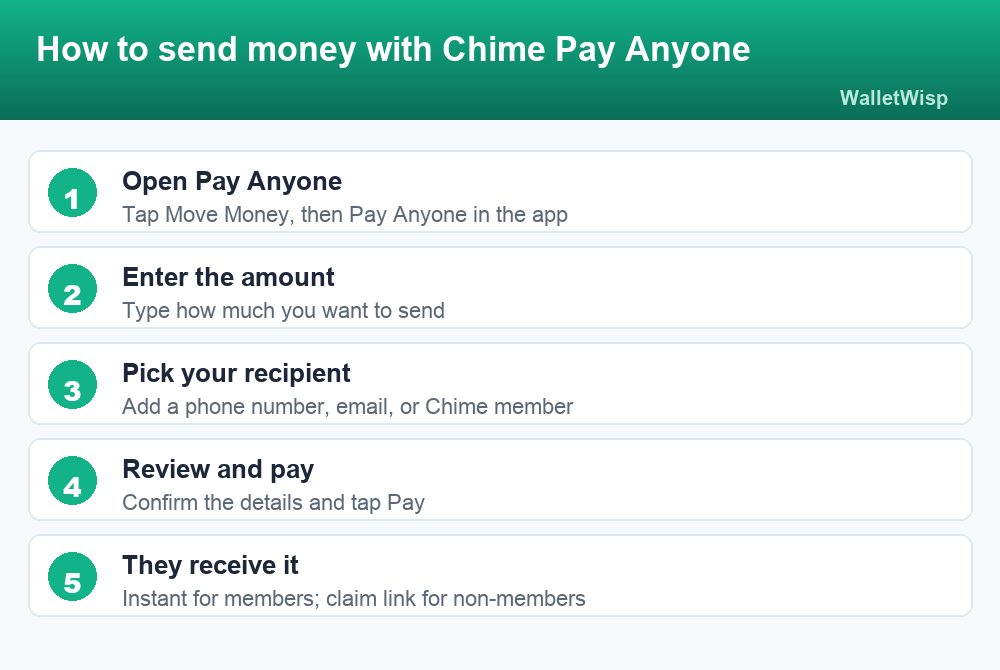
Sending a payment takes about a minute. Here is the step-by-step flow inside the current Chime app:
- Open Pay Anyone. From the home screen, tap Move Money, then Pay Anyone.
- Enter the amount. Type how much you want to send. The app checks it against your available balance and your personal limit.
- Choose your recipient. Pick someone from your contacts, or type in a phone number or email address manually.
- Add a note (optional). You can include a short memo so the recipient knows what the payment is for.
- Review and pay. Confirm the amount and recipient, then tap Pay. Double-check the number or email, because payments can be hard to reverse once claimed.
Once you send, the recipient is notified right away. A Chime member sees the funds land in their balance; a non-member receives a text or email with a link to claim. You can also request money the same way, which sends the other person a prompt to pay you.
How recipients get the money
What happens next depends entirely on whether the person you paid already has Chime. This is the part that trips up most first-time senders, so it is worth understanding both paths.
If they are a Chime member
The transfer is instant and free. The money appears in the recipient’s Chime Checking balance within seconds, and they get a notification. There is nothing for them to claim and no deadline to worry about. This is the smoothest experience and works much like sending money between two accounts at the same bank.
If they are not a Chime member
The recipient gets a message (text if you used a phone number, email if you used an email) with a secure link. To collect the cash, they choose one of two options:
- Enter a debit card. They tap the link and type in any valid US-issued debit card. The money is deposited to that card, usually within minutes.
- Join Chime. They can instead open a Chime account, and the payment lands in their new balance.
The catch is the clock. A non-member has 14 days to claim the transfer. If they do not act within that window, the payment is automatically returned to your Chime Checking Account. Claiming is free for them too, with no fee to receive funds instantly.
One practical tip: if the recipient is claiming on a computer and the debit-card form will not load, Chime recommends turning off ad blockers, which can interfere with the claim page.
| Detail | Chime member recipient | Non-Chime recipient |
|---|---|---|
| How they get it | Lands in Chime balance automatically | Link by text or email to claim |
| Action needed | None | Enter a US debit card or join Chime |
| Speed | Instant | Usually minutes after claiming |
| Deadline to claim | None | 14 days, then returned to sender |
| Monthly cap | Personalized account limit | Up to $5,000 per month via debit card |
Does Pay Anyone charge any fees?
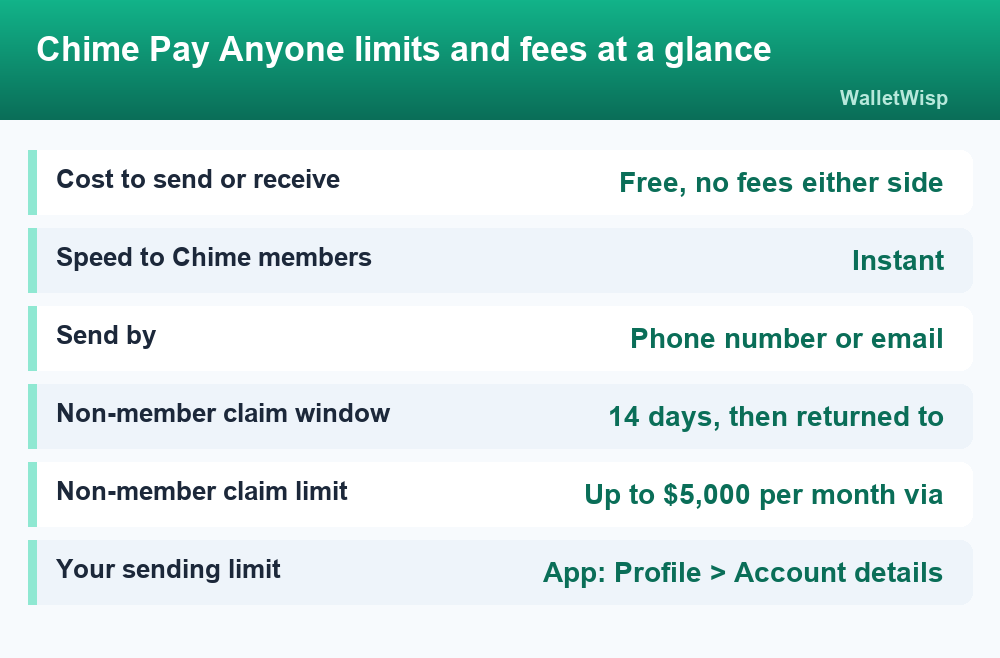
No. Pay Anyone is fee-free in both directions. You are not charged to send, and the recipient is not charged to receive or to claim funds instantly. Unlike some competing apps, Chime does not add an “instant transfer” surcharge and does not require you to link an external debit card or bank account just to send money.
That fee-free model is one of Chime’s biggest selling points against rivals. Cash App and PayPal, for example, can charge a percentage fee for instant transfers to a linked card in certain situations. If you want a deeper side-by-side on features and costs, see our Chime vs Cash App 2026 comparison.
| Action | Fee | Speed |
|---|---|---|
| Send to a Chime member | $0 | Instant |
| Send to a non-member | $0 | Minutes after they claim |
| Receive as a Chime member | $0 | Instant |
| Claim as a non-member | $0 | After entering a debit card |
| Request money | $0 | Paid when the other person sends |
Chime Pay Anyone limits in 2026
Here is where a lot of people expect a single published number, but Chime handles limits differently. There is no universal sending cap that applies to every account. Instead, your Pay Anyone limit is personalized, based on factors like your account history, activity, and verification status.
To see your own limit, open the app and tap Profile > Account details > View limits. That screen shows the maximum you can send and receive. Keep two things in mind:
- Limits can change over time. As your account matures and shows healthy activity, Chime may raise them.
- Limits may differ depending on whether you are using your Chime balance or an external debit card, and some members have a combined limit across both.
The one figure Chime does publish clearly applies to the recipient side: a non-member can claim up to $5,000 per month using a US-issued debit card. If someone is receiving a lot of Pay Anyone transfers to a card, that monthly ceiling is what to watch.
Because sending limits are account-specific, do not trust a random figure you see quoted online. The number in your own app is the only one that governs your transfers. If a payment is blocked, hitting your limit is one of the most common reasons.
Is Chime Pay Anyone safe?
Pay Anyone uses Chime’s standard account security, and payments are protected by encryption. But like every instant P2P tool, the biggest risk is not hacking, it is user error and scams. Money sent to the wrong number or to a scammer can be very difficult to recover once it is claimed.
Follow these habits to stay safe:
- Only pay people you know and trust. Treat Pay Anyone like cash. If you would not hand someone a stack of bills, do not send it.
- Double-check the phone number or email before you tap Pay. A single wrong digit can route money to a stranger.
- Never send money to “claim a prize,” unlock a deposit, or pay a stranger promising to send more back. Those are classic P2P scams.
- Turn on account alerts so you see every transaction as it happens.
- Enable your device lock and any in-app security so no one can send from your phone if it is lost.
If you send to a non-member and realize you made a mistake, the good news is the 14-day claim window gives you a buffer. If they never claim, the money returns to you automatically. For anything suspicious, contact Chime Member Services at 844-244-6363, available 24/7.
How Pay Anyone compares to other apps
Pay Anyone is Chime’s answer to Venmo, Cash App, and Zelle. Its standout advantages are that it is genuinely free and that it can reach non-Chime users through the debit-card claim flow, so you are not locked into a walled garden.
A common point of confusion is whether Chime works with Zelle. The short version is that Chime is not a native Zelle bank, so the integration is different from what you get at a big traditional bank. We cover the details and workarounds in does Chime work with Zelle.
It is also worth separating Pay Anyone from Chime’s other money features. Pay Anyone moves your own available funds to another person. If you are short on cash, that is a different product: Chime SpotMe is the fee-free overdraft feature that can cover debit purchases up to your personal limit. The two work together, but they are not the same thing.
Common Pay Anyone problems and quick fixes
Most Pay Anyone issues fall into a handful of buckets. Here is how to troubleshoot the ones people hit most:
- “I can’t send money.” Usually this means you have hit your personal sending limit, your balance is too low, or your account needs additional verification. Check View limits first.
- The recipient never got the link. Confirm you used the exact phone number or email they gave you, and have them check spam or message filters.
- The claim page won’t load. If they are on a computer, ask them to disable ad blockers and try again, or switch to their phone.
- The payment expired. After 14 days, unclaimed funds return to your account automatically. You can then re-send.
- Wrong card entered. Non-members must use a valid US-issued debit card. Prepaid or non-US cards may be declined.
Frequently Asked Questions
Is Chime Pay Anyone free?
Yes. There is no fee to send with Pay Anyone and no fee for the recipient to receive or claim funds instantly. Chime does not charge an instant-transfer surcharge or require you to link an outside account to send money.
Can I use Pay Anyone if the recipient doesn’t have Chime?
Yes. That is the main upgrade over the old Pay Friends feature. Non-Chime recipients get a link by text or email and claim the money with any valid US-issued debit card, or by opening a Chime account. They have 14 days to claim before the funds return to you.
How long does a Pay Anyone transfer take?
Transfers to other Chime members are instant. For non-members, the money typically arrives within minutes after they enter their debit card details on the claim page. The delay is on their side, based on how quickly they claim.
What is the Pay Anyone sending limit?
There is no single universal sending limit. Your limit is personalized to your account and can change over time. To see your exact number, open the Chime app and go to Profile > Account details > View limits.
How much can a non-member receive through Pay Anyone?
Non-members can claim up to $5,000 per month using a US-issued debit card. That monthly cap applies to the receiving side and is separate from the sender’s personalized limit.
What happens if the recipient never claims the money?
If a non-member does not claim the transfer within 14 days, the payment is automatically returned to your Chime Checking Account. You are not charged, and you can re-send once the funds are back.
Can I cancel a Pay Anyone payment?
Once a payment is claimed, it generally cannot be reversed, so double-check the recipient before sending. If a non-member has not claimed it yet, the built-in 14-day window means an unclaimed payment will come back to you on its own. For urgent issues, contact Chime Member Services at 844-244-6363.
Is Pay Anyone the same as Zelle or SpotMe?
No. Pay Anyone is Chime’s own P2P transfer tool for moving your available funds to another person. Zelle is a separate network, and Chime’s compatibility with it is limited, which we cover in our Zelle guide. SpotMe is Chime’s fee-free overdraft feature, not a way to send money to others.