To make a Cash App Bitcoin withdrawal, open the Bitcoin (BTC) tab in Cash App, verify your identity to enable withdrawals, then tap the send option and paste or scan your external wallet’s Bitcoin address. Cash App lets you withdraw up to $2,000 of BTC in any 24-hour period and up to $5,000 in any 7-day period, and you pay a variable network (miner) fee that is shown before you confirm. On-chain transfers usually settle in about 10 to 60 minutes, while Lightning Network sends are near-instant.
The rest of this guide walks through exactly how to enable withdrawals, why identity verification is required, the current 2026 limits and fees, how long a transfer takes, and how to avoid the most common reasons a withdrawal stalls.
What “withdrawing” Bitcoin from Cash App actually means
When you buy Bitcoin inside Cash App, that BTC sits in the wallet Cash App custodies for you. “Withdrawing” means moving that Bitcoin off Cash App and onto the blockchain, to an address you control in an external wallet such as a hardware wallet, a self-custody app, or another exchange account. This is different from selling BTC for dollars, which keeps the funds inside Cash App.
Two things make a withdrawal permanent and worth double-checking. First, once a Bitcoin transaction is broadcast to the network it cannot be reversed or canceled by Cash App or anyone else. Second, you must send to a valid Bitcoin address on the correct network. Pasting the wrong address or an address for a different asset means the coins are gone. Always confirm the first and last few characters of the destination address, or scan the recipient’s QR code, before you approve.
Before you can withdraw: enable Bitcoin and verify your identity
Buying Bitcoin on Cash App requires only light verification, but sending or withdrawing it to an outside wallet requires full identity verification. This is a compliance requirement, not an optional upgrade, and it applies to every U.S. account that wants to move crypto off the platform.
Identity verification requirements
To enable Bitcoin withdrawals and deposits, Cash App typically asks you to confirm:
- Your full legal name and date of birth
- The last four digits of your Social Security number (sometimes the full SSN)
- Your U.S. address
- In some cases, a photo of a government-issued ID and a quick selfie for identity matching
Verification is usually instant, but it can take anywhere from a few minutes to a day or two if Cash App needs to manually review your documents. You only have to complete this once. After it clears, the “Withdraw Bitcoin” and “Deposit Bitcoin” options unlock inside the BTC tab.
Why there can be a waiting period
For security, Cash App may hold your first outbound Bitcoin transfer for a short review, or briefly restrict withdrawals right after you make account changes such as a new sign-in, a password reset, or a new device. If you plan to move BTC on a deadline, verify your identity and make any first small test send a day ahead rather than at the last minute. Withdrawal limits are separate from these security holds and are covered below.
How to withdraw Bitcoin from Cash App (step by step)
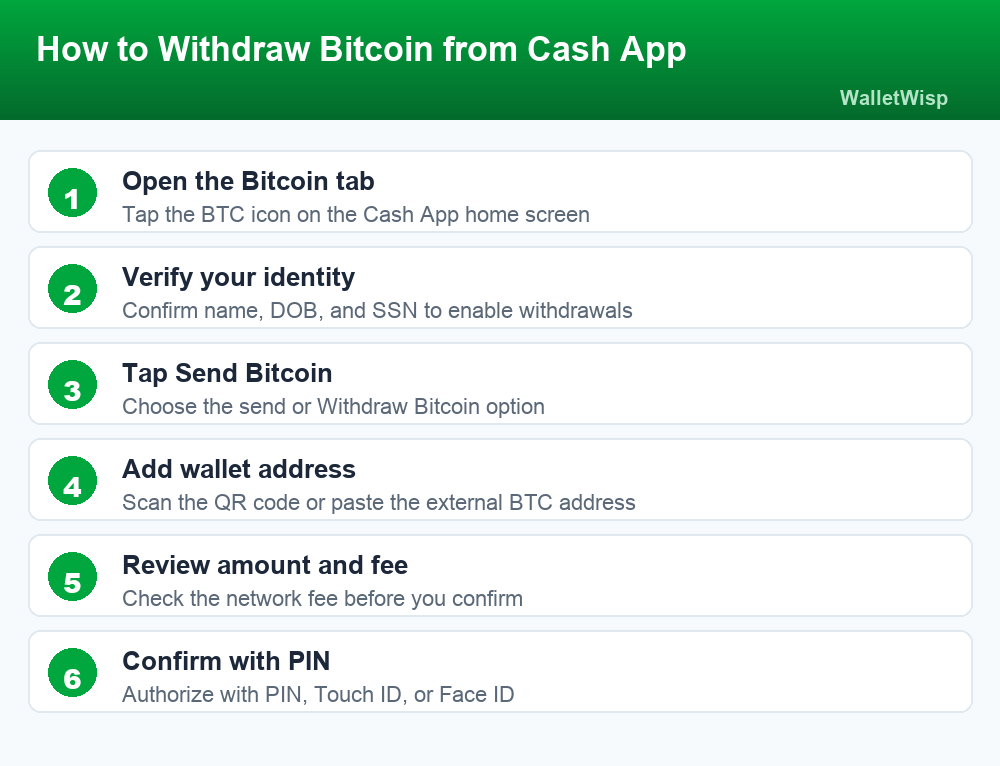
Once your identity is verified, sending Bitcoin to an external wallet takes under a minute. Have the destination address or its QR code ready before you start.
- Open the Bitcoin tab. From the Cash App home screen, tap the Bitcoin (BTC) icon to open your Bitcoin balance.
- Tap the send or withdraw option. Look for the paper-airplane icon, “Send Bitcoin,” or “Withdraw Bitcoin.” If you do not see it, you still need to finish identity verification.
- Enter the amount. Type a dollar amount or switch to enter an amount in BTC. Make sure it is above the network fee and within your rolling withdrawal limits.
- Add the destination address. Scan the recipient wallet’s QR code or paste the Bitcoin address. Choose on-chain or Lightning if prompted, based on what the receiving wallet supports.
- Review the network fee and details. Cash App shows the network fee and the total before you commit. Verify the address one more time here.
- Confirm and authorize. Approve with your PIN, Touch ID, or Face ID. Cash App broadcasts the transaction and gives you a transaction ID you can track on the blockchain.
To confirm it went through, you can view the transaction in your Cash App activity, or paste the transaction ID into any public block explorer to watch confirmations roll in.
Cash App Bitcoin withdrawal limits
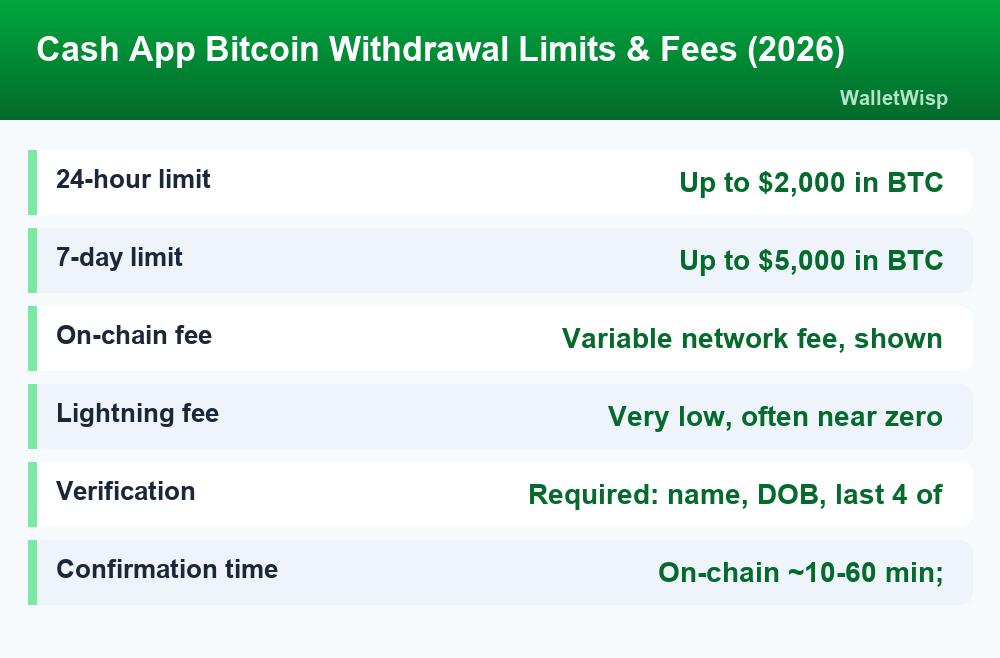
Cash App applies rolling limits to how much Bitcoin you can withdraw. These are measured by the dollar value of the BTC at the time you send, not by a fixed number of coins, so a volatile market can change how much crypto that dollar cap represents. The standard 2026 limits are shown below.
| Withdrawal window | Maximum amount | Notes |
|---|---|---|
| Any 24-hour period | Up to $2,000 in BTC | Rolling window, based on USD value at send time |
| Any 7-day period | Up to $5,000 in BTC | Resets on a rolling basis, not a calendar week |
| Practical minimum | Must exceed the network fee | Very small “dust” sends are blocked |
| Identity verification | Required | Withdrawals stay locked until verified |
These withdrawal caps are specific to moving Bitcoin off the platform and are separate from your everyday sending and receiving caps. If you also send and receive dollars, it is worth reviewing the broader Cash App limits for 2026 so you know how verification affects each type of transaction.
Cash App Bitcoin withdrawal fees
Cash App does not charge a flat percentage service fee just to withdraw Bitcoin to an external wallet. What you pay is a network fee, and how much depends on whether you send on-chain or over the Lightning Network.
On-chain network fees
An on-chain withdrawal is a standard Bitcoin blockchain transaction. It carries a miner fee that goes to the network, not to Cash App, and that fee rises and falls with how congested the blockchain is at that moment. During busy periods the fee is higher; during quiet periods it is lower. Cash App always displays the exact fee before you confirm, so you can decide whether the timing is worth it. Because the fee is deducted from the transaction, always leave enough room above it when you set your amount.
Lightning Network sends
If the receiving wallet supports the Lightning Network, Cash App can send smaller amounts of Bitcoin almost instantly and for a fraction of the cost of an on-chain transfer. Lightning is ideal for everyday-size amounts, while on-chain is better suited to larger transfers or wallets that do not support Lightning. The table below compares the two.
| Method | Typical fee | Speed | Best for |
|---|---|---|---|
| On-chain (blockchain) | Variable network fee, shown before you confirm | About 10 to 60 minutes | Larger transfers; hardware or exchange wallets |
| Lightning Network | Very low, often near zero | Near-instant | Small everyday amounts; Lightning-ready wallets |
Note that buying and selling Bitcoin inside Cash App can involve a separate service fee plus the spread, which is different from a withdrawal. For a full breakdown of what Cash App charges across the app, see our guide to Cash App fees.
How long does a Cash App Bitcoin withdrawal take?
Timing depends on the method and the state of the network:
- Lightning sends usually complete in seconds once you confirm.
- On-chain sends are broadcast quickly, but the receiving wallet may wait for a set number of block confirmations before showing the funds as spendable. In normal conditions this is roughly 10 to 60 minutes; during heavy congestion it can take several hours.
- First-time or flagged sends can be delayed by a security review before they are even broadcast.
Once a transaction has a transaction ID, the ball is largely in the blockchain’s court. You can monitor confirmations on any block explorer using that ID; there is no way to speed it up after it is sent.
Tips to avoid failed or delayed withdrawals
- Finish verification early. Do not wait until you need to move funds to complete identity checks.
- Double-check the address. Scan a QR code when possible and confirm the first and last characters. Wrong-address sends are irreversible.
- Match the network. Use Lightning only with Lightning-capable wallets, and on-chain addresses for on-chain sends.
- Stay within limits. Keep each transfer inside the $2,000 per 24 hours and $5,000 per 7 days caps.
- Leave room for the fee. Your amount plus the network fee cannot exceed your available BTC balance.
- Send during quieter periods. On-chain fees and delays drop when the network is less congested.
Is your Bitcoin on Cash App protected?
It is important to understand that Bitcoin is not insured the way a bank balance is. While eligible U.S. dollar balances held with Cash App’s partner banks may qualify for pass-through FDIC coverage, that protection does not extend to cryptocurrency. Your BTC value can rise or fall, and crypto holdings are not FDIC insured. If you want the details on which balances are and are not covered, read our explainer on whether Cash App is FDIC insured. For many long-term holders, this is a strong reason to withdraw Bitcoin to a self-custody wallet you control rather than leaving large amounts on any app.
Frequently Asked Questions
Can I withdraw Bitcoin from Cash App to another wallet?
Yes. Cash App supports withdrawing Bitcoin to any external wallet, including hardware wallets, self-custody apps, and other exchanges. You must verify your identity first, then use the send option in the Bitcoin tab and provide the destination address.
Do I need to verify my identity to withdraw Bitcoin?
Yes. Buying Bitcoin needs only light verification, but sending or withdrawing it off the platform requires full identity verification, including your name, date of birth, and Social Security number. Withdrawals stay locked until this is complete.
What are the Cash App Bitcoin withdrawal limits in 2026?
You can withdraw up to $2,000 worth of Bitcoin in any rolling 24-hour period and up to $5,000 in any rolling 7-day period. Limits are based on the dollar value of the BTC at the time you send.
How much does it cost to withdraw Bitcoin from Cash App?
You pay a network (miner) fee rather than a flat service fee. On-chain fees vary with blockchain congestion and are shown before you confirm. Lightning Network sends cost far less, often close to zero.
How long does a Cash App Bitcoin withdrawal take?
Lightning transfers are near-instant. On-chain transfers typically confirm in about 10 to 60 minutes but can take several hours when the network is congested. A first-time or flagged send may also face a short security review.
Why is my Cash App Bitcoin withdrawal pending or delayed?
Common causes include waiting for blockchain confirmations, network congestion, a low fee, or a first-time security review. If it has a transaction ID, it has been broadcast, and you can track confirmations on a block explorer.
Can I cancel a Bitcoin withdrawal on Cash App?
No. Once a Bitcoin transaction is broadcast to the network, it cannot be reversed or canceled by Cash App or anyone else. This is why verifying the destination address before confirming is essential.
Is Bitcoin held on Cash App FDIC insured?
No. Cryptocurrency is not FDIC insured, and its value can go up or down. Only eligible U.S. dollar balances may qualify for pass-through FDIC coverage through partner banks, which is a key reason many users move BTC to a wallet they control.