If you’re wondering how long does a Zelle transfer take, the short version is this: when the person you’re paying is already enrolled in Zelle, the money usually arrives in minutes — often within seconds. If they are not yet enrolled, the payment sits and waits for them to sign up, which can take anywhere from a few minutes to 1-3 business days, and it expires after 14 days if they never claim it.
Quick answer: An enrolled recipient typically gets your Zelle money in minutes (most banks say “within minutes”). An unenrolled recipient must accept the payment first, so it can take 1 to 3 business days and will expire after 14 days if not claimed. First-time payments, large amounts, or a security review can add a short hold, and a few banks only release funds during business hours.
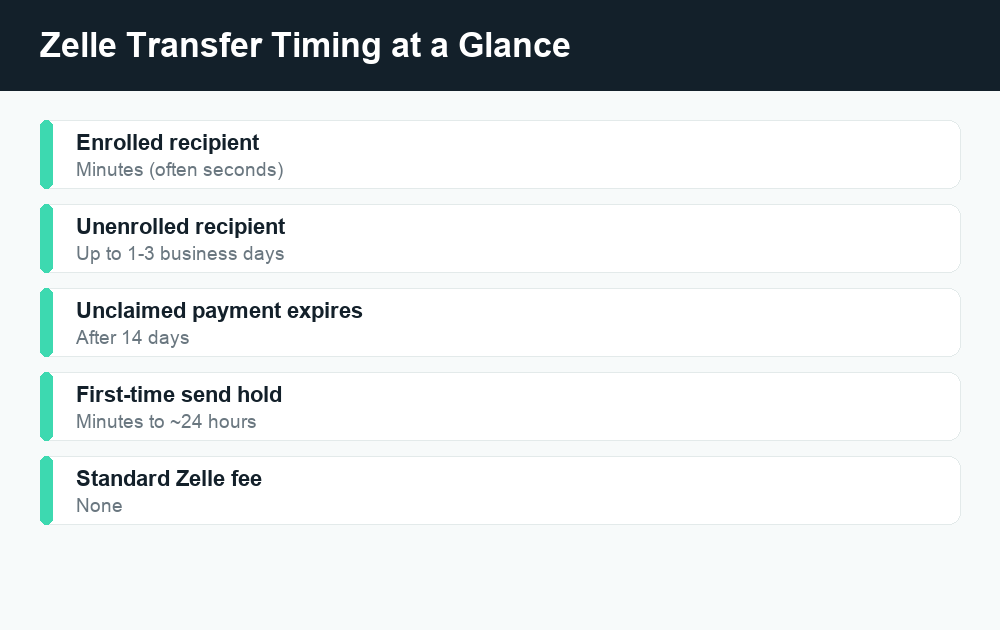
Zelle is built for speed, and most of the time it delivers. But “minutes” assumes everything lines up: the recipient is enrolled, your bank isn’t holding the payment for review, and you’re not running into a first-time-send delay. Below, we break down every situation that affects timing so you know exactly what to expect — and what to do when a transfer is taking longer than it should.
How long does a Zelle transfer take in each situation?
Timing depends almost entirely on one thing: whether the recipient is already enrolled in Zelle. Here’s a quick comparison of the common scenarios.
| Situation | Typical timing | What’s happening |
|---|---|---|
| Recipient already enrolled | Seconds to a few minutes | Money moves directly between bank accounts |
| Recipient not enrolled | Up to 1-3 business days | They must enroll and accept before funds release |
| First-time payment to a new contact | A few minutes to ~24 hours | Some banks hold a first send for safety |
| Payment flagged for security review | Minutes to a few business days | Bank verifies the payment is legitimate |
| Sent outside bank business hours | Next business day (rare) | A small number of banks batch transfers |
| Recipient never enrolls | Expires after 14 days | Money is returned to your account |
For most people sending to someone they’ve paid before, the answer to “how long does a Zelle transfer take” is simply: almost instantly. The delays below are the exceptions, not the rule.
Enrolled recipients: money in minutes
When the person you’re sending to has already linked their bank account or debit card to Zelle, the transfer is direct and fast. Zelle moves money straight from your bank account to theirs without a middle “wallet” or holding balance — so there’s nothing to “cash out” afterward.
In practice, this means:
- The recipient usually gets a notification within seconds.
- The money lands in their account within minutes.
- There’s no fee from Zelle itself for a standard transfer.
This is one of the biggest differences between Zelle and apps like Cash App or Venmo, where money often sits in an app balance until you move it to a bank. With Zelle, the bank account is the destination. If you’re comparing how these apps handle holds, our guides on Cash App payments showing pending and Venmo payments stuck on pending explain those differences in more detail.
Unenrolled recipients: 1-3 days and a 14-day clock
If you send money to someone who hasn’t set up Zelle yet, the transfer can’t complete instantly — because there’s no enrolled account to receive it. Instead, the recipient gets a text or email telling them someone sent them money and inviting them to enroll.
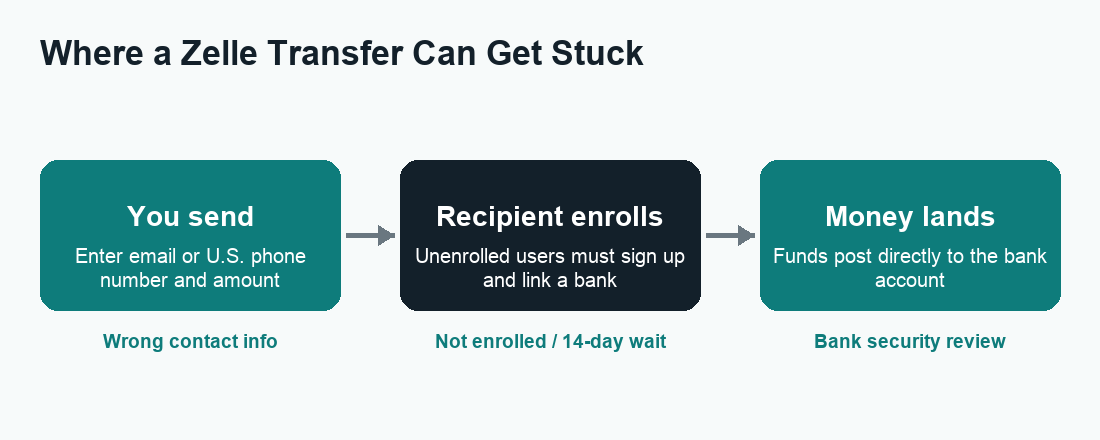
Here’s how that timeline works:
- You send the payment using the recipient’s email or U.S. mobile number.
- They receive a notification with a link to enroll with Zelle.
- They enroll by connecting their bank account or debit card.
- Once enrolled, the money typically lands within minutes.
If the recipient enrolls quickly, the whole thing can still wrap up in a few minutes. If they wait, it can stretch to 1-3 business days. And if they never enroll, the payment expires after 14 days and the money goes back to your account automatically. You don’t lose it — but you also can’t force the recipient to claim it faster.
Tip: Double-check the email address or phone number before sending. Sending to the wrong (but valid) contact is one of the few situations where money can be hard to get back. See our guide on how to cancel a Zelle payment for the steps to take if you catch a mistake.
Why is my Zelle transfer taking so long?
If your payment isn’t moving as fast as expected, one of these is almost always the reason.
1. First-time payment hold
Many banks place a short hold on your first payment to a new recipient, or on your first few Zelle payments overall. This is an anti-fraud measure. The hold is usually brief — anywhere from a few minutes up to around 24 hours — and only applies the first time. After that, payments to that same person go through at normal speed.
2. Security or fraud review
Banks monitor Zelle activity for signs of scams. A large amount, an unusual pattern, or a brand-new recipient can trigger a review. During a review, the bank may pause the transfer, send you a verification text or call, or ask you to confirm the payment in-app. Once you confirm, it usually releases quickly.
3. The recipient hasn’t enrolled
As covered above, this is the single most common cause of a “stuck” Zelle payment. If you see a status like “pending” for more than a few minutes, it’s very likely the recipient simply hasn’t accepted yet.
4. Wrong email or phone number
If you sent to an address or number the recipient hasn’t registered with Zelle, the money waits at that unenrolled contact. The recipient may need to enroll using that exact email or number to claim it.
5. Bank processing windows
Most banks process Zelle in real time, 24/7. A small number still batch transfers and may only release funds during business hours, meaning a late-night or weekend payment posts the next business day. This is uncommon, but worth knowing if your bank is on the slower side.
6. Daily or weekly limits reached
If you’ve hit your bank’s Zelle sending limit, a payment may be declined or delayed rather than sent. Limits vary widely by bank, so check yours in your banking app.
Zelle timing vs. other payment apps
Speed is Zelle’s main selling point, but it helps to see how it stacks up against the apps people compare it to.
| App | Standard speed | Instant option | Where money lands |
|---|---|---|---|
| Zelle | Minutes (enrolled) | Built in — no extra step | Directly in bank account |
| Venmo | 1-3 business days to bank | Yes, for a fee | App balance, then bank |
| Cash App | 1-3 business days to bank | Yes, for a fee | App balance, then bank |
The key difference: Zelle skips the “app balance” step entirely, so there’s usually no instant-transfer fee to worry about. With Venmo and Cash App, the money lands in an in-app balance first, and moving it to your bank fast often costs a small percentage. If fees matter to you, compare our breakdowns of Venmo fees and Cash App fees.
What to do if your Zelle transfer is slow
If a payment hasn’t gone through and you want to move things along, work through these steps in order.
- Check the status in your banking app. Look at your Zelle activity. A “pending” status almost always means the recipient hasn’t enrolled or accepted yet.
- Confirm the recipient’s details. Make sure you used the email or phone number they actually registered with Zelle. A typo or an old number is a common culprit.
- Ask the recipient to enroll. If they’re new to Zelle, they need to sign up and connect a bank account before money can land. Remind them to use the exact contact info you sent to.
- Look for a verification request. If your bank flagged the payment, you may have a text, email, or in-app prompt waiting. Responding usually releases the hold.
- Wait out a first-time hold. If this is your first payment to that person, give it up to a day before worrying.
- Contact your bank. Because Zelle runs inside your bank’s app, your bank — not Zelle — handles most issues. They can see the status and explain any hold.
If 14 days pass and the recipient never enrolls, you don’t need to do anything — the money returns to your account on its own.
A quick note on safety and timing
Because Zelle is fast and payments to enrolled users are generally not reversible, treat it like cash. Only send to people you know and trust, and never send money to someone promising to “send it back” or claiming you’ll get a refund later — that’s a classic scam. The speed that makes Zelle convenient is the same speed scammers rely on. For more on protecting yourself, read is Zelle safe? and browse our full Zelle guides.
Frequently asked questions
How long does a Zelle transfer take to an enrolled user?
Usually just minutes — often within seconds. When both people are enrolled in Zelle, the money moves directly between bank accounts with no waiting balance, so it’s one of the fastest ways to send money between U.S. banks.
Why is my Zelle payment still pending?
The most common reason is that the recipient hasn’t enrolled in Zelle or hasn’t accepted the payment yet. It can also be a first-time-payment hold or a security review by your bank. Pending payments to unenrolled recipients expire after 14 days and return to your account.
Does Zelle work on weekends and at night?
For most banks, yes — Zelle runs 24/7, including weekends and holidays, and payments to enrolled users still arrive in minutes. A small number of banks batch transfers and may only post them on business days, so check with your bank if timing matters.
How long before an unclaimed Zelle payment is returned?
If the recipient never enrolls, the payment expires after 14 days and the money is automatically returned to your account. You don’t need to do anything to get it back.
Can I make a Zelle transfer faster?
Zelle is already designed to be near-instant for enrolled recipients, so there’s no paid “instant” upgrade like on Venmo or Cash App. The fastest path is making sure the recipient is enrolled and that you used their correct registered email or phone number.
Why does my first Zelle payment take longer?
Many banks place a short hold on a first payment to a new recipient as a fraud-prevention step. This is usually brief — from a few minutes up to about a day — and it only applies the first time you pay that person.
Can I cancel a slow Zelle transfer?
If the recipient isn’t yet enrolled, you can usually cancel the payment from your Zelle activity before they accept it. Once an enrolled recipient receives the money, it generally can’t be canceled. See our guide on canceling a Zelle payment for the exact steps.
Is Zelle faster than a regular bank transfer?
Usually, yes. A standard ACH bank transfer can take 1-3 business days, while Zelle to an enrolled user typically arrives in minutes. That speed is the main reason people use Zelle for quick payments between friends, family, and trusted contacts.
Last updated: June 2026. Fees, limits, and features can change — always confirm current details in the app. WalletWisp is an independent guide and is not affiliated with any app mentioned. This article is general information, not financial advice.
Related: How to cancel a Zelle payment · Is Zelle safe? · All Zelle guides