If you’re staring at a Venmo payment pending message, here’s the short version: the money usually isn’t lost — it’s just waiting on something, most often the recipient to accept it, a security review by Venmo, or your bank to clear the transfer. Most pending payments sort themselves out within a few minutes to a few business days, and many you can fix or cancel yourself right from the app.
Quick answer: A Venmo payment goes “pending” when it’s been sent but not yet completed. The four most common reasons are: (1) the recipient hasn’t accepted it yet, (2) Venmo flagged it for a security or fraud review, (3) your linked bank is still verifying or clearing the funds, or (4) one of the accounts is frozen or restricted. Check the payment’s status in your transaction feed, make sure your account is verified, and confirm the recipient’s username is correct. If a payment stays pending and never completes, you can usually take it back.
What “pending” actually means on Venmo
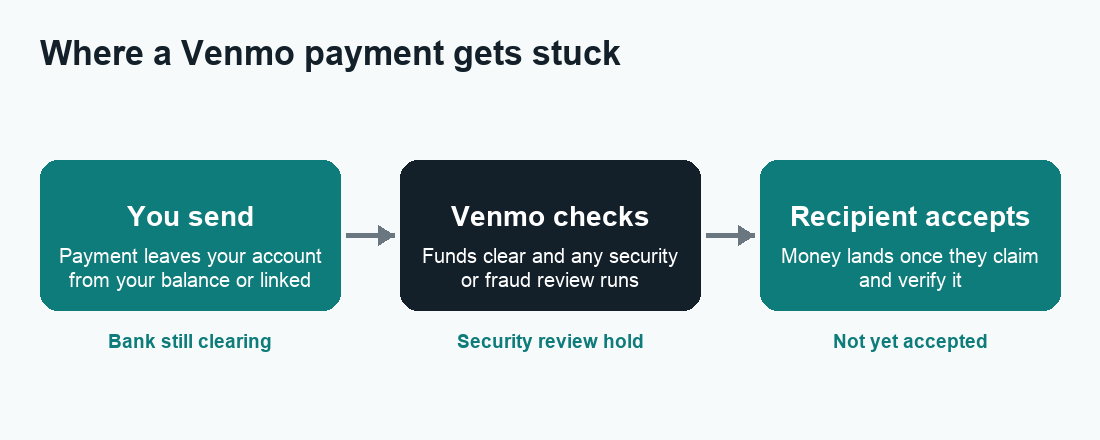
On Venmo, “pending” simply means the payment has left your side but hasn’t fully landed on the other side yet. The app is holding the transaction in a middle state while it waits for one more thing to happen. That “one more thing” is what we’re going to troubleshoot below.
It helps to know there are really two different kinds of pending:
- Pending to a new or unverified recipient — the person hasn’t signed up, verified, or accepted the payment yet. The money sits in limbo with their account.
- Pending under review — Venmo itself paused the payment to run a security or compliance check, or your bank transfer is still settling.
Knowing which type you’re dealing with tells you whether you need to act or whether you just need to wait.
Why is my Venmo payment pending? The 6 common causes
1. The recipient hasn’t accepted the payment
This is the number-one reason. If you paid someone who is brand new to Venmo, hasn’t finished setting up their profile, or hasn’t opened the app, the payment will stay pending until they accept it. New users often have a short window to claim a first payment before it bounces back to you.
It can also happen with existing users if you sent money to the wrong username, an old phone number, or an email that isn’t linked to their account. In that case the real person never sees it.
2. Venmo flagged the payment for a security review
Venmo runs automated fraud and risk checks on payments. A transaction can be paused if it looks unusual — for example, a large amount, a payment to someone you’ve never paid before, activity from a new device or new location, or rapid back-to-back transfers. This is the same kind of protection your bank uses, and it’s there to stop scams and account takeovers.
During a security review the money is held, not lost. Reviews often clear on their own within a few hours to a couple of business days. Sometimes Venmo will email or message you asking for more information or identity verification before it releases the payment.
3. Your bank or card is still verifying
If you funded the payment straight from a linked bank account (rather than your Venmo balance), the transfer has to clear through the banking network. New bank links especially can hold things up — Venmo may still be verifying ownership with those small test deposits, or your bank may take a business day or two to confirm the debit. Weekends and bank holidays stretch this out because banks don’t process on those days.
4. Your account (or the recipient’s) is frozen or restricted
If Venmo has frozen, limited, or restricted an account, payments tied to it can hang in pending. Accounts get restricted for things like suspected fraud, a disputed payment, unverified identity, or a violation of Venmo’s user agreement. If your account is restricted, you’ll usually see a notice in the app. If the recipient’s account is restricted, your payment to them may stall on their end.
5. You hit a sending or verification limit
Unverified Venmo accounts have lower weekly sending limits than verified ones. If a payment would push you over your limit, or your identity isn’t fully verified yet, the app may hold the transaction. Completing identity verification (name, date of birth, and the last four digits of your Social Security number) raises your limits and clears many of these holds.
6. Payment to a business or for goods and services
Payments tagged for goods and services, or sent to certain business profiles, can carry extra processing or review steps for buyer/seller protection. These may show as pending a bit longer than a quick payment to a friend.
How long does a Venmo payment stay pending?
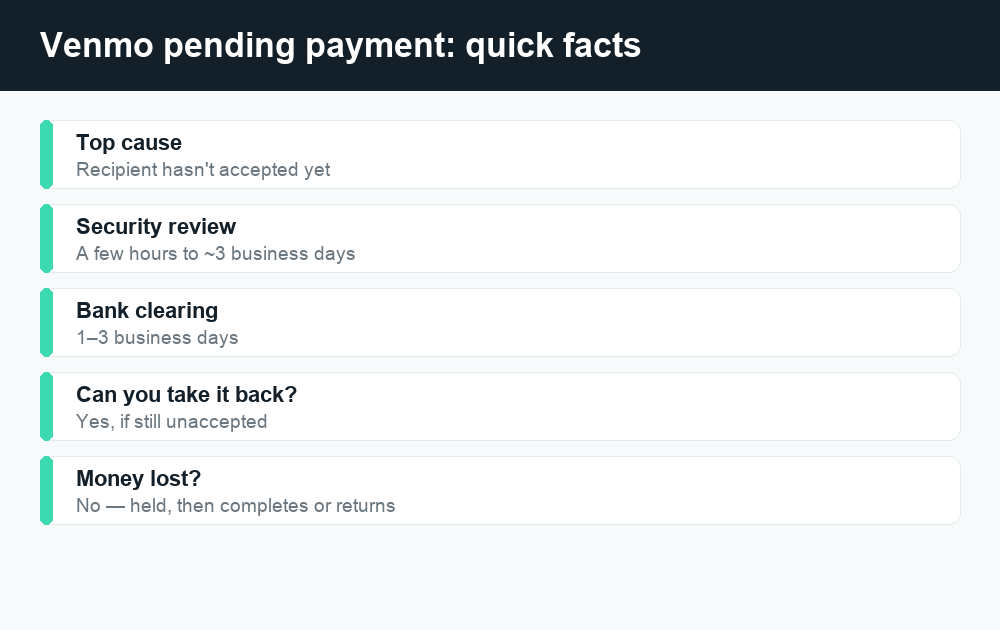
It depends entirely on why it’s pending. Here’s a realistic guide. These are typical ranges, not guarantees — always confirm current timing in the app, since Venmo can change how it processes payments.
| Reason it’s pending | Typical time to clear | Who needs to act |
|---|---|---|
| Recipient hasn’t accepted | Until they accept; often auto-returns after a few days if unclaimed | The recipient (or you can cancel) |
| Security / fraud review | A few hours to ~3 business days | Venmo (you may need to verify ID) |
| Bank verification or clearing | 1–3 business days | Wait; bank/Venmo processing |
| New bank link (test deposits) | 1–3 business days to verify | You confirm the test deposits |
| Account frozen / restricted | Until resolved with Venmo support | You (contact support) |
| Hit a sending limit / unverified | Until you verify identity | You (complete verification) |
How to fix a pending Venmo payment
Work through these in order. Most pending payments are solved in the first three steps.
- Open the transaction and read the status. Tap the payment in your activity feed. Venmo usually tells you exactly why it’s held — “pending,” “under review,” or “waiting for [recipient] to accept.”
- Confirm the recipient is correct. Check the username, profile photo, and the last digits of their phone number. If you paid the wrong person or an unclaimed contact, that explains the hold.
- Ask the recipient to accept. Have them open the app, finish signing up or verifying if needed, and accept the payment. A first-time user may need to add a bank or card before they can claim it.
- Check your email and Venmo notifications. If a security review needs action, Venmo will tell you what to send — often identity verification. Respond promptly so it doesn’t expire.
- Verify your identity in the app. Go to Settings, then Identity Verification, and complete any missing steps. This clears limit-related and verification holds and raises your sending limits.
- Confirm your bank link. If you just added a bank, finish verifying it (confirm the micro-deposits) so transfers can clear.
- Wait out the business days. If it’s a bank or review hold, give it the full window in the table above. Pending over a weekend? It likely won’t clear until the next business day.
- Cancel and resend if needed. If the payment is stuck because it was never accepted, take it back (see below) and resend to the correct person — ideally from your Venmo balance, which clears instantly.
- Contact Venmo support. If your account is frozen or the payment is stuck with no explanation, reach out through the app’s Help section. For a restricted account, support is the only way to lift it.
How to cancel or take back a pending Venmo payment
If a payment is still pending because the recipient never accepted it, you can usually take it back. Here’s how:
- Open Venmo and tap the Me tab to find your activity feed.
- Find the pending payment and tap to open it.
- Look for a Take Back or Cancel option. If it’s there, the payment hasn’t been claimed and you can reverse it.
- Confirm. The money returns to your Venmo balance or original funding source.
Important: You can only take back a payment that’s still pending and unaccepted. Once the recipient accepts it, the payment is complete and you can’t cancel it — you’d have to ask them to send the money back, or open a dispute if it was for goods and services and something went wrong. This is exactly why it pays to double-check the username before you hit pay.
When a pending payment is a red flag (scam awareness)
Scammers sometimes use “your payment is pending” as bait. Watch out for these:
- Fake “pending” emails or texts telling you to click a link or “verify” to release a payment. Venmo activity lives in the app — don’t trust links in messages claiming a payment is stuck.
- A seller insisting you “send again” because the first one is pending. Never double-send. Cancel the pending one or check your balance first.
- Anyone asking you to switch a “goods and services” payment to “friends and family” to dodge a hold. That strips your buyer protection.
When in doubt, close the message and open the Venmo app yourself to check the real status. If you’re weighing safety overall, our guide on whether peer-to-peer payment apps are safe covers the same warning signs across apps.
Pending on Venmo vs. other apps
Pending payments aren’t unique to Venmo. The causes are similar across the major apps, but the take-back rules differ. Here’s a quick comparison so you know what to expect.
| App | Common pending cause | Can you cancel if unaccepted? |
|---|---|---|
| Venmo | Recipient not accepted, security review, bank clearing | Yes, while still pending and unaccepted |
| Cash App | Security review, new/unverified recipient, bank hold | Sometimes — see our Cash App pending guide |
| Zelle | Recipient not enrolled, first-payment review | Usually only if recipient isn’t enrolled — see canceling a Zelle payment |
If you’re a Cash App user too, the troubleshooting steps for a stuck transfer overlap closely with what we covered here. And if you want to understand Venmo costs before sending, our Venmo fees breakdown explains when instant transfers and credit-card payments cost extra.
How to avoid pending payments going forward
- Verify your identity early. A fully verified account has higher limits and fewer holds.
- Keep your Venmo balance funded for payments you need to clear instantly, instead of pulling from a bank each time.
- Double-check the recipient — username, photo, and phone digits — before paying.
- Send during business days if a bank transfer is involved, so it isn’t stranded over a weekend.
- Keep the app updated and your contact info current so security messages reach you.
Frequently asked questions
Will a pending Venmo payment come back to me automatically?
Often, yes. If you sent money to someone who never claimed it, Venmo typically returns it to your account after a set number of days. If it’s held for a bank or security reason, it will either complete once the check clears or be reversed — you don’t lose the money in either case.
Why is my Venmo payment pending when I have the money in my balance?
A funded balance clears instantly to friends, so if it’s still pending, the cause is usually on the other side — the recipient hasn’t accepted, their account is restricted, or Venmo paused the payment for a security review. Check the transaction’s status note for the exact reason.
How long does a Venmo security review take?
Most reviews finish within a few hours to about three business days. If Venmo needs information from you, respond quickly — the review can’t finish until you complete any requested identity verification.
Can I cancel a pending Venmo payment?
Yes, as long as it’s still pending and the recipient hasn’t accepted it. Open the payment in your feed and look for a Take Back or Cancel option. Once it’s accepted, you can’t cancel it yourself.
Does pending mean the recipient already got the money?
No. Pending means the payment hasn’t completed, so the recipient does not have the funds yet. Never send a second payment because the first one is “pending” — that’s a common way people get double-charged.
Why does Venmo keep holding my payments?
Repeated holds usually point to an unverified account, low sending limits, a recently added bank, or a pattern that keeps tripping fraud checks. Completing identity verification and keeping a verified, well-established account history reduces how often this happens.
My account is frozen and a payment is stuck. What do I do?
Contact Venmo support through the Help section in the app. A frozen or restricted account can only be resolved by Venmo, and any pending payments tied to it will stay held until the restriction is lifted. If you ultimately want out, see our guide on how to delete a Venmo account — but resolve any pending funds first.
Will the recipient know the payment is pending?
Usually yes — if they have an account, they’ll see a notification that a payment is waiting to be accepted. If they’re brand new to Venmo, they may need to sign up and verify before they can see and claim it.
Last updated: June 2026. Fees, limits, and features can change — always confirm current details in the app. WalletWisp is an independent guide and is not affiliated with any app mentioned. This article is general information, not financial advice.
Related: Venmo fees explained · Why is my Cash App payment pending? · How to cancel a Zelle payment