If you bank with Huntington and you want to split a dinner bill or pay a friend back, you’re probably wondering: does Huntington Bank have Zelle? Yes — Huntington National Bank offers Zelle directly inside its mobile banking app and online banking, so you can send and receive money using just a U.S. phone number or email address, with no separate Zelle app needed. Because Zelle is built right into Huntington’s banking, the money typically moves straight between bank accounts within minutes once both people are enrolled.
Quick answer: Yes, Huntington Bank has Zelle. It lives inside the Huntington mobile app and online banking — open the app, find “Send Money with Zelle,” enroll your email or U.S. mobile number, then add a recipient and send. Transfers between enrolled users are usually available in minutes, and there’s no fee from Huntington to use it.
Below, we’ll walk through exactly where to find Zelle in the Huntington app, how to enroll, how to send and receive money step by step, the limits you should expect, and what to do when a payment gets stuck. We’ll also flag the safety rules that matter most, because Zelle moves money fast and that speed cuts both ways.
Does Huntington Bank have Zelle, and how does it work?
Huntington National Bank is a participating Zelle institution, which means Zelle is integrated into the bank’s own digital channels rather than being a bolted-on extra. So when people ask “does Huntington Bank have Zelle,” the practical answer is that you access Zelle through the same login you already use for Huntington mobile and online banking — there’s nothing extra to download.
Zelle itself is a peer-to-peer payment network owned by Early Warning Services, a company created by several large U.S. banks. The idea is simple: instead of writing a check or handing over cash, you send money from your Huntington checking or money market account to someone else’s U.S. bank account using their email or mobile number as the “address.” When both sides are enrolled with Zelle through their own banks, the funds usually land within minutes.
A few things to keep in mind about how Huntington’s Zelle works:
- It pulls from a Huntington deposit account. Zelle is designed for personal checking and similar deposit accounts, not credit cards.
- It’s for people you trust. Zelle is built for paying friends, family, and people you know — not for buying goods from strangers online.
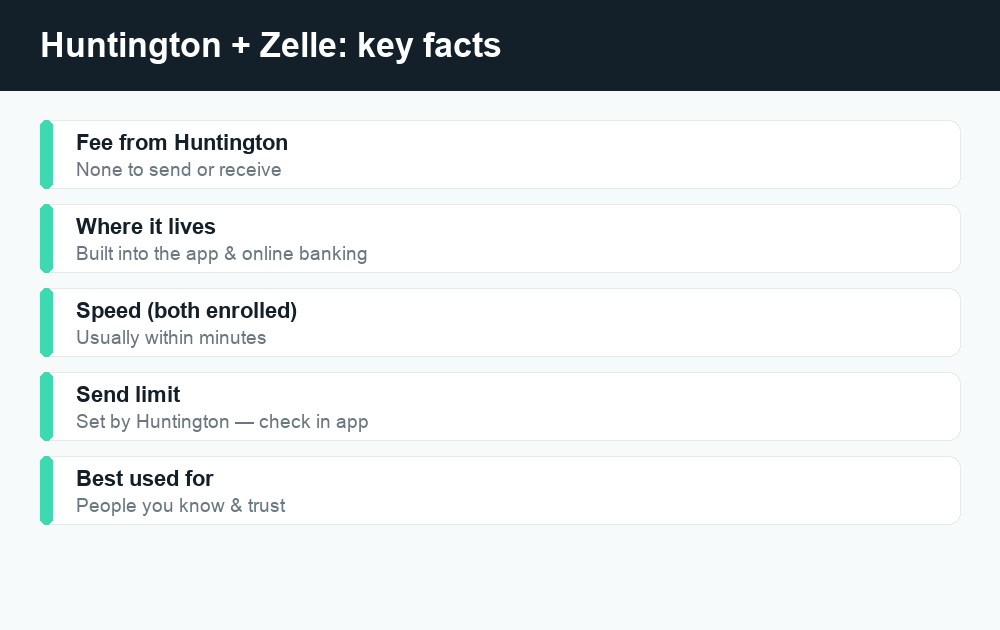
- It’s typically free. Huntington does not charge a fee to send or receive money with Zelle. (Standard account terms still apply, so always confirm in the app.)
- It’s near-instant and usually final. Once a payment is delivered to an enrolled recipient, it generally can’t be reversed — so accuracy matters.
Where to find Zelle in the Huntington app
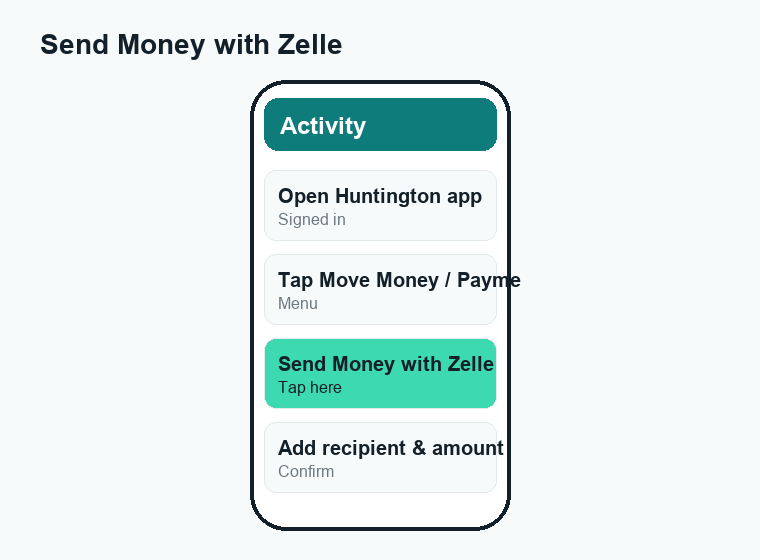
If you’ve never used it, the Zelle option can be easy to miss. In the Huntington mobile app, look for a “Move Money,” “Payments,” or “Transfer” area, and within it you should see “Send Money with Zelle” (sometimes shown simply as the Zelle logo). In online banking on a desktop browser, the same feature usually sits under a payments or transfers menu.
If you don’t see Zelle at all, the most common reasons are an out-of-date app, an account type that isn’t eligible, or a profile that hasn’t finished setup. Updating the app from the App Store or Google Play resolves a surprising number of “I can’t find Zelle” problems.
How to set up (enroll in) Zelle with Huntington Bank
Enrolling takes a couple of minutes. You only do this once per email or mobile number. Here’s the step-by-step:
- Update and open the Huntington app. Make sure you’re on the latest version, then sign in with your usual online banking credentials.
- Find “Send Money with Zelle.” Tap into the Move Money, Payments, or Transfer section and select the Zelle option.
- Choose your U.S. mobile number or email. This becomes your Zelle “tag” — the contact detail other people use to pay you. Pick the one friends are most likely to have.
- Verify with a one-time code. Zelle sends a verification code by text or email. Enter it to confirm you own that number or address.
- Pick the deposit account that receives money. Select which Huntington checking account incoming Zelle payments should land in.
- Confirm and finish. Once you accept the terms, you’re enrolled and ready to send and receive.
Already enrolled in Zelle somewhere else? If your email or phone number is already registered with Zelle through a different bank or the standalone Zelle app, you may be asked to move (re-register) that contact detail over to Huntington. Doing so points future payments to your Huntington account instead of the old one. You can only have one email or phone number tied to one bank in Zelle at a time.
How to send money with Zelle through Huntington
Once you’re enrolled, sending is quick:
- Open the Huntington app and go to Send Money with Zelle.
- Tap Send and choose or add a recipient by their email address or U.S. mobile number. You can usually pick from your phone’s contacts too.
- Double-check the recipient’s details. Money sent to the wrong (but valid) number or email is hard to recover.
- Enter the amount and an optional note (like “rent” or “pizza”).
- Review everything, then confirm. The recipient gets a notification, and if they’re already enrolled, the money typically arrives in minutes.
If the person you’re paying hasn’t enrolled in Zelle yet, they’ll get a prompt to do so. The payment completes once they enroll — usually within a day or two. If they don’t enroll within the window Zelle allows, the payment expires and the money returns to your account.
How to receive money with Zelle at Huntington
Receiving is even simpler. When someone sends you money and you’re already enrolled with your email or mobile number at Huntington, the funds are deposited automatically into your linked Huntington account — usually within minutes, with no action required from you.
If you’re not yet enrolled, you’ll get a text or email from Zelle telling you someone sent you money, with a link to receive it. Follow that link, choose Huntington (or enroll through the Huntington app), and the money will be deposited once setup is complete. To stay safe, it’s best to enroll directly through the official Huntington app rather than tapping unfamiliar links.
Huntington Zelle limits and fees at a glance
Two questions come up constantly: what does it cost, and how much can I send? Huntington does not charge a fee to use Zelle. Send limits, however, are set by the bank and can depend on your account type, your account history, and how long you’ve banked with Huntington — so the safest move is to check your specific limit inside the app under the Zelle area. The table below summarizes what to expect and where to verify it.
| Detail | What to expect | Where to confirm |
|---|---|---|
| Fee to send/receive | No fee charged by Huntington | Huntington app + account agreement |
| Daily send limit | Set by Huntington; varies by account & history | Zelle screen in the Huntington app |
| Monthly/rolling limit | Set by Huntington; varies by account | Zelle screen in the Huntington app |
| Receiving limit | Generally no set limit to receive | Zelle / Early Warning policies |
| Speed (both enrolled) | Typically minutes | Zelle network standard |
| Speed (recipient not enrolled) | Up to a few days until they enroll | Zelle enrollment window |
Because exact dollar limits change and differ from customer to customer, we’re intentionally not quoting a specific number here — checking the live limit in your app takes seconds and is always accurate. If you need to send more than your limit allows, consider a regular bank transfer (ACH) or wire instead, or split the payment across a couple of days. For more on how fast funds move across the network, see our guide on how long a Zelle transfer takes.
Zelle vs. other ways to send money from Huntington
Zelle isn’t your only option, and it isn’t always the right one. Here’s how it compares to the alternatives for everyday payments:
| Method | Best for | Typical speed | Fee |
|---|---|---|---|
| Zelle (in Huntington app) | Paying people you know & trust | Minutes | None from Huntington |
| Bank transfer (ACH) | Moving money between your own accounts | 1–3 business days | Usually free |
| Wire transfer | Large, time-sensitive payments | Same/next business day | Often a fee applies |
| Cash App / Venmo | Casual splitting, social payments | Minutes (instant may cost) | Some transfers carry fees |
The big takeaway: use Zelle for trusted person-to-person payments where speed matters and you don’t want a fee. For comparison shoppers, our breakdowns of Venmo fees and Cash App fees show where those apps charge for instant transfers and business activity — costs Zelle generally avoids.
Troubleshooting common Huntington Zelle problems
Most Zelle hiccups fall into a handful of buckets. Here’s how to fix them.
I can’t find Zelle in the Huntington app
Update the app to the latest version first — old versions sometimes hide newer features. Then look under Move Money, Payments, or Transfers. If it’s still missing, your account type may not be eligible; contact Huntington to confirm.
My enrollment won’t complete
Make sure the email or mobile number you’re enrolling actually belongs to you and can receive the verification code. If the code never arrives, check spam, confirm you typed the contact detail correctly, and request a new code. A number already tied to another bank in Zelle must be moved over to Huntington first.
My payment is “pending” or hasn’t arrived
The most common cause is that your recipient hasn’t enrolled in Zelle yet — the payment sits pending until they do. Ask them to check their texts or email for the Zelle enrollment prompt. Pending payments can also reflect a first-time payment review or a weekend/holiday timing gap. If it stays stuck for days, contact Huntington. (Our explainers on Cash App payment pending and Venmo payment pending cover the same “stuck transfer” logic on other apps.)
I sent money to the wrong person
This is the one to be careful about. If you sent money to an enrolled recipient, Zelle payments are generally final and can’t be canceled — your best step is to politely ask that person to send it back. If the recipient hasn’t enrolled yet, you can often cancel the payment before it’s claimed. See how to cancel a Zelle payment for the exact conditions.
The recipient says they didn’t get it
Confirm you used the exact email or mobile number they have registered with Zelle. A small typo sends money to a different (or nonexistent) tag. Also check that they’ve fully enrolled and that the deposit account on their end is set up.
Staying safe with Zelle
Because Zelle moves money in minutes and payments are usually irreversible, scammers love to target it. Treat Zelle like cash: once it’s gone to an enrolled stranger, getting it back is difficult. Follow these rules:
- Only send to people you personally know and trust. Never use Zelle to pay strangers for marketplace items, “deals,” pets, tickets, or rentals you haven’t verified.
- Ignore “verification” requests. Huntington and Zelle will never ask you to send yourself money or send a payment to “reverse fraud,” “fix” your account, or “unlock” anything. That’s always a scam.
- Don’t share codes. No legitimate bank employee will ask for your one-time passcode, password, or PIN over the phone or text.
- Double-check the recipient. Confirm the email or number before you hit send — there’s no undo for a delivered payment.
- Report fraud fast. If you think you’ve been scammed, contact Huntington immediately through the number on the back of your card or the official website.
If you want a deeper look at the risks and protections, our overview of whether Zelle is safe walks through the most common scams and how the network’s protections actually work.
Frequently asked questions
Does Huntington Bank have Zelle?
Yes. Zelle is built into the Huntington mobile app and online banking. You enroll once with your email or U.S. mobile number, then send and receive money directly from your Huntington account — no separate Zelle app required.
Is Zelle free at Huntington Bank?
Huntington does not charge a fee to send or receive money with Zelle. Your standard account terms still apply, so it’s always worth confirming the current details in the app or your account agreement.
How long does a Huntington Zelle transfer take?
When both you and the recipient are already enrolled in Zelle, the money typically arrives within minutes. If the recipient hasn’t enrolled yet, the payment completes after they do — usually within a day or two.
What are the Zelle limits at Huntington Bank?
Send limits are set by Huntington and can vary based on your account type and history, so a single fixed figure isn’t accurate for everyone. Check your exact daily and monthly limits on the Zelle screen inside the Huntington app.
Can I use Zelle with a Huntington savings account?
Zelle is designed primarily for personal checking and similar deposit accounts. During setup, you choose an eligible Huntington account to send from and receive into. If an account isn’t eligible, it won’t appear as an option in the Zelle setup screen.
Can I cancel a Huntington Zelle payment?
If the recipient hasn’t enrolled in Zelle yet, you can often cancel the payment before it’s claimed. If the recipient is already enrolled, the payment is usually delivered instantly and can’t be canceled — you’d have to ask them to send it back.
Why can’t I see Zelle in my Huntington app?
Usually it’s an outdated app or an ineligible account. Update to the latest version and look under Move Money, Payments, or Transfers. If it’s still missing, contact Huntington to confirm your account is eligible for Zelle.
Is Zelle through Huntington safe?
The technology is secure, but Zelle’s speed and finality make it a favorite target for scams. Only send to people you know and trust, never send money to “reverse fraud” or “verify” your account, and report anything suspicious to Huntington right away.
Last updated: June 2026. Fees, limits, and features can change — always confirm current details in the app. WalletWisp is an independent guide and is not affiliated with any app mentioned. This article is general information, not financial advice.
Related: How long does a Zelle transfer take? · How to cancel a Zelle payment · More Zelle guides