If you want to reach a Venmo customer service real person, the fastest and safest route is the in-app chat: open the Venmo app, tap the menu, go to Get Help or Contact Us, and ask to speak with an agent so the chatbot hands you off to a human. You can also call Venmo’s official support line at 1-855-812-4430 during published phone hours, or email support through the app’s Contact Us form. Those are the only legitimate ways in — and as you’ll see below, almost every “Venmo support number” you find on Google or social media is a scam.
Quick answer: The most reliable way to reach a human at Venmo is in-app chat (Menu → Get Help → Contact Us → Chat with us, then ask for an agent). Venmo’s official phone number is 1-855-812-4430, available during business hours on weekdays. Email goes through the in-app Contact Us form. Venmo will never call you out of the blue, ask for your PIN, password, or a verification code, or tell you to “move money to keep it safe.” Always start from inside the app, not from a number you found in a search result.
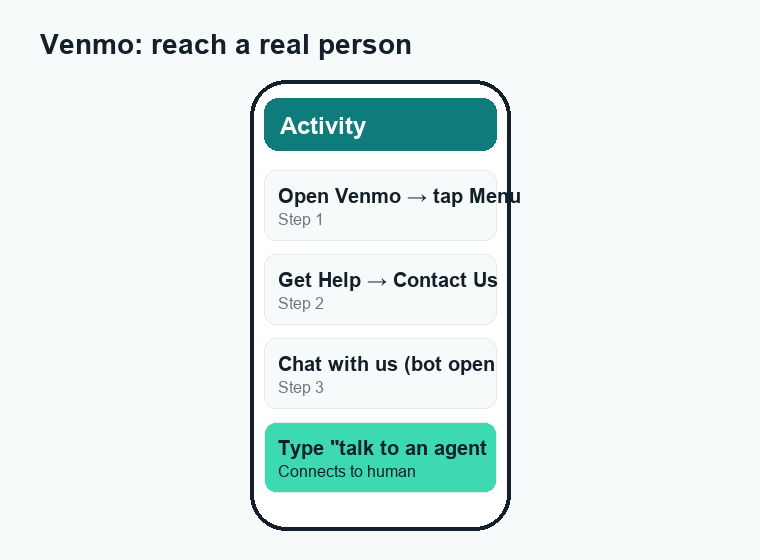
The fastest way to get a Venmo customer service real person
Venmo, like most modern fintech apps, leans heavily on automated chat and a help center first. That’s frustrating when you have a real problem — a frozen account, a payment that vanished, or a charge you don’t recognize. The good news is that a human is reachable; you just have to navigate past the bot. Here is the path that works most consistently.
- Open the Venmo app and make sure you’re signed in to the account you need help with.
- Tap the menu icon (usually three lines or your profile area, depending on your app version).
- Select Get Help, then Contact Us.
- Choose Chat with us. The automated assistant will greet you first.
- Type a short, clear description of your issue. If the bot loops you in articles, reply with phrases like “talk to an agent,” “speak to a person,” or “this didn’t solve my problem.”
- Wait to be connected to a live agent, or request a callback/email follow-up if one is offered.
Chat is usually faster than phone because you can attach screenshots, you have a written record, and you’re already verified by being logged in. For sensitive issues — like a locked account or a disputed transaction — chat and phone are both fine, but never hand over codes or passwords in either channel (more on that below).
Why the in-app route matters so much
When you contact Venmo from inside the app, the company already knows who you are. That means an agent can pull up your account without asking you to “verify” with a code that a scammer could intercept. Starting from a phone number you found on a random website removes that built-in protection — and that’s exactly the gap fraudsters exploit. If you only remember one thing from this guide, make it this: begin every support request from within the official Venmo app.
Venmo phone support: number and hours
Venmo does operate a phone line, but it’s smaller and more limited than the chat channel, and hold times can be long. The official number is 1-855-812-4430. Phone support is generally available on weekdays during U.S. business hours; Venmo does not run a 24/7 call center, so late-night and weekend coverage is limited or unavailable. Because hours and availability can change, the smartest move is to confirm the current phone hours on Venmo’s official Contact Us page or in the app before you call.
A few realistic expectations for calling:
- You’ll likely hit an automated menu first; listen for the option that matches your issue rather than mashing zero.
- Have your account email or phone number ready, but never read out a verification code to anyone — even an agent. Venmo’s real agents won’t ask for it.
- If the queue is long, the in-app chat will usually get you to a person sooner.
| Channel | Best for | Typical availability | Speed to a human |
|---|---|---|---|
| In-app chat | Most issues; sending screenshots; account-specific help | Extended hours, including some evenings/weekends | Usually fastest |
| Phone (1-855-812-4430) | Urgent or complex account problems; talking it through | Weekday business hours (no 24/7) | Moderate; possible hold times |
| Email (via Contact Us form) | Non-urgent issues; detailed write-ups; paper trail | Submit anytime; reply within a few business days | Slowest |
| Help Center / chatbot | Quick “how do I…” answers | 24/7 self-service | No human (self-help only) |
How to email Venmo (and what to include)
There isn’t a public “type-an-email-address” mailbox you should rely on for support; the proper way to email Venmo is through the Contact Us form in the app or on venmo.com. Submitting through the form routes your message to the right team and ties it to your account. Email is best for issues that aren’t time-sensitive and where you want a written record — for example, following up on a dispute or providing documentation.
To get a faster, more useful reply, include:
- A clear one-line summary of the problem in the subject or first sentence.
- The exact date, amount, and recipient/sender of any payment involved.
- What you already tried (restarted the app, checked your bank, etc.).
- Screenshots of error messages — but crop out any sensitive numbers.
- The outcome you want (refund, account unlock, charge reversed, etc.).
Never put your password, full card number, Social Security number, or a one-time verification code in any message. A legitimate support team does not need those to help you.
How to skip the bot and get to a person faster
The chatbot exists to deflect simple questions, so the trick is to signal quickly that yours isn’t simple. These tactics consistently shorten the path to a human:
- Be specific immediately. Instead of “I have a problem,” type “My account is frozen and I can’t withdraw $X.” Specific keywords route you better.
- Ask plainly for a human. “Connect me to an agent” or “I need to speak to a representative” are recognized phrases.
- Decline the article suggestions. When the bot offers help articles, say they didn’t resolve your issue. Repeated “no” answers escalate you.
- Pick the closest menu category. If asked to choose a topic, choose the one nearest your issue — “account,” “payments,” “disputes” — to land in the right queue.
- Try during business hours. Live agents are more available midday on weekdays than late at night.
- Stay in one thread. Opening multiple new chats can send you back to the start of the queue each time.
What Venmo support can — and can’t — do
Agents can help unlock or review accounts, explain holds, guide you through verification, look into payments that look stuck, and open disputes for unauthorized charges. What they generally can’t do is force another user to refund you for a payment you sent on purpose (a peer-to-peer payment to a person is usually treated like cash), instantly reverse a completed bank transfer, or bypass identity verification rules. Knowing this in advance saves frustration: if you paid the wrong person, your best first step is to politely request the money back through the app, and only escalate to support if it was truly unauthorized.
Warning: fake “Venmo support numbers” are a scam
This is the most important section in this guide. Search “Venmo customer service number” and you’ll find dozens of results, social posts, and even paid ads listing phone numbers that are not Venmo. Scammers buy those numbers, post them everywhere, and wait for stressed people to call. When you do, a friendly “agent” walks you straight into losing your money or your account.
Here’s how the scam typically unfolds, and why it’s so effective:
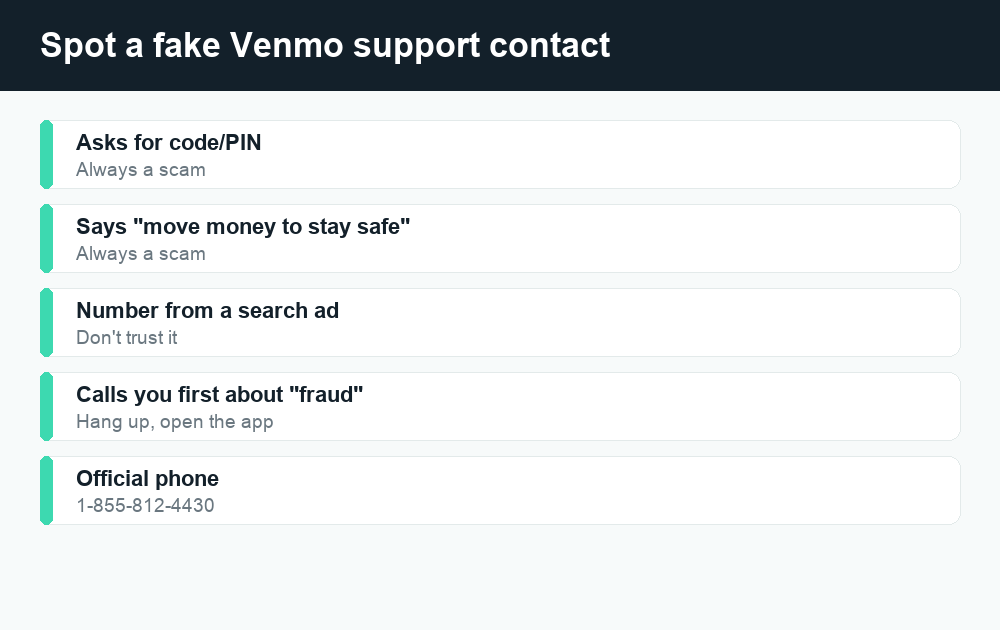
| Red flag | What the scammer says | The truth |
|---|---|---|
| Asks for your PIN or password | “I need to verify your identity.” | Real Venmo agents never ask for your PIN or password. |
| Asks for a code texted to you | “Read me the 6-digit code I just sent.” | That code is a login/2FA code. Sharing it hands over your account. |
| Tells you to move money | “Transfer funds to a ‘safe’ account to protect it.” | Venmo will never tell you to move money elsewhere. |
| Wants remote access | “Install this app so I can fix it for you.” | No legitimate agent needs remote control of your phone. |
| Pressures you to hurry | “Act now or your account is closed forever.” | Urgency is a manipulation tactic, not a policy. |
| Calls or texts you first | “This is Venmo security calling about fraud.” | Treat unsolicited contact as suspicious; verify in the app. |
The golden rules that keep you safe:
- Never share your password, PIN, or any verification code with anyone — full stop. Codes are the keys to your account.
- Never move money “to keep it safe.” That instruction is always a scam.
- Don’t trust a number you found in a search ad or social post. Get contact details only from the official app or venmo.com.
- Venmo contacts you inside the app or from official channels — not via surprise calls demanding codes or transfers.
- When in doubt, hang up and open the app yourself. Start the conversation from your side, where you control the channel.
If you think you’ve already shared something or sent money to a scammer, act fast: change your Venmo password, turn on or reset two-factor authentication, contact Venmo through the in-app help, and notify your linked bank or card issuer. You can also report fraud to the U.S. Federal Trade Commission at reportfraud.ftc.gov, and if a bank account or card was involved, your bank’s official number (printed on your card) is a legitimate place to start a dispute.
If Venmo support can’t resolve it: official escalation paths
Sometimes the front-line team can’t fix your issue, or you disagree with the outcome. There are real, official escalation options — and none of them involve a random phone number.
- Ask to escalate within Venmo. Politely request that your case be reviewed by a supervisor or specialized team, and keep your case or reference number.
- File a complaint with the CFPB. The Consumer Financial Protection Bureau accepts complaints about money-transfer apps at consumerfinance.gov/complaint. Companies are expected to respond, and it creates an official record.
- Use your bank’s dispute process for unauthorized charges that touched your linked card or bank account.
- Report fraud to the FTC (reportfraud.ftc.gov) and, for crimes, your local police or the FBI’s IC3 (ic3.gov).
Be cautious of any website or “recovery service” promising to claw back lost money for an upfront fee — recovery scams target people who were already victimized once. Stick to the free, official channels above.
Common issues people contact Venmo about
Many support requests fall into a handful of buckets. If your issue is one of these, you may be able to solve it yourself faster than waiting for an agent — and our linked guides walk through each one.
- A payment is stuck or pending. Often it clears on its own or needs a verification step; see our breakdown of why a Venmo payment is pending and how to fix it.
- Unexpected charges or fees. Instant transfers and certain payment types carry costs; our guide to Venmo fees explains what’s normal so you can tell a real fee from a problem.
- Account frozen or under review. This usually requires identity verification through the app — a perfect example of when to use official in-app chat, never an outside number.
- Sent money to the wrong person. Request it back in the app first; escalate to support only if it was unauthorized.
Using a different app? Our Cash App guides and Zelle guides cover the same kinds of questions for those services.
Frequently asked questions
What is Venmo’s official customer service phone number?
Venmo’s official support line is 1-855-812-4430, available during weekday business hours. There is no 24/7 phone line. Always confirm current hours in the app or on venmo.com, and ignore any other “Venmo number” you find in search ads or social posts — those are commonly scams.
Can I talk to a real person at Venmo?
Yes. The most reliable way is in-app chat: Menu → Get Help → Contact Us → Chat with us, then ask the bot to connect you to an agent. You can also reach a person by phone during business hours. Email through the Contact Us form does not give you a live person but does get a written reply.
Does Venmo have 24/7 customer service?
Venmo’s self-service Help Center and chatbot are available around the clock, but live human support (chat agents and phone) runs on more limited hours and is not truly 24/7. For the current schedule, check Venmo’s official Contact Us page, since hours can change.
How do I get past the Venmo chatbot to a human?
Describe your issue specifically, then clearly type “talk to an agent” or “speak to a representative.” Decline the suggested help articles by saying they didn’t solve your problem. Choosing the closest topic category and contacting Venmo during business hours also speeds up the handoff.
Is the “Venmo support number” I found on Google safe to call?
Probably not. Scammers flood search results, ads, and social media with fake Venmo support numbers. Only trust contact details you find inside the official Venmo app or on venmo.com. A real agent will never ask for your password, PIN, or a verification code, or tell you to move money to a “safe” account.
Will Venmo ever call me or ask for a verification code?
Venmo will not call you out of the blue and demand a code, password, or fund transfer. Verification codes are essentially the keys to your account — anyone asking you to read one aloud is trying to take it over. If you get such a call or text, hang up and contact Venmo yourself through the app.
What should I do if I think I was scammed by fake Venmo support?
Immediately change your Venmo password, reset two-factor authentication, and contact Venmo through in-app help. Notify your linked bank or card issuer using the number on your card, and report the fraud to the FTC at reportfraud.ftc.gov. Avoid any “recovery service” that asks for an upfront fee.
What if Venmo support can’t resolve my problem?
Ask Venmo to escalate your case and keep your reference number. If you’re still stuck, you can file a complaint with the CFPB at consumerfinance.gov/complaint, dispute unauthorized charges through your bank, and report fraud to the FTC. These official channels are free.
Last updated: June 2026. Fees, limits, and features can change — always confirm current details in the app. WalletWisp is an independent guide and is not affiliated with any app mentioned. This article is general information, not financial advice.
Related: Why your Venmo payment is pending (and how to fix it), Venmo fees explained, and Is Zelle safe to use?