Venmo only reports your activity to the IRS when you receive goods & services (business) payments that cross the federal reporting threshold or a lower state threshold. Ordinary friends & family payments—splitting dinner, paying rent, sending a gift—are not taxable income and are not reported, as long as they’re tagged correctly.
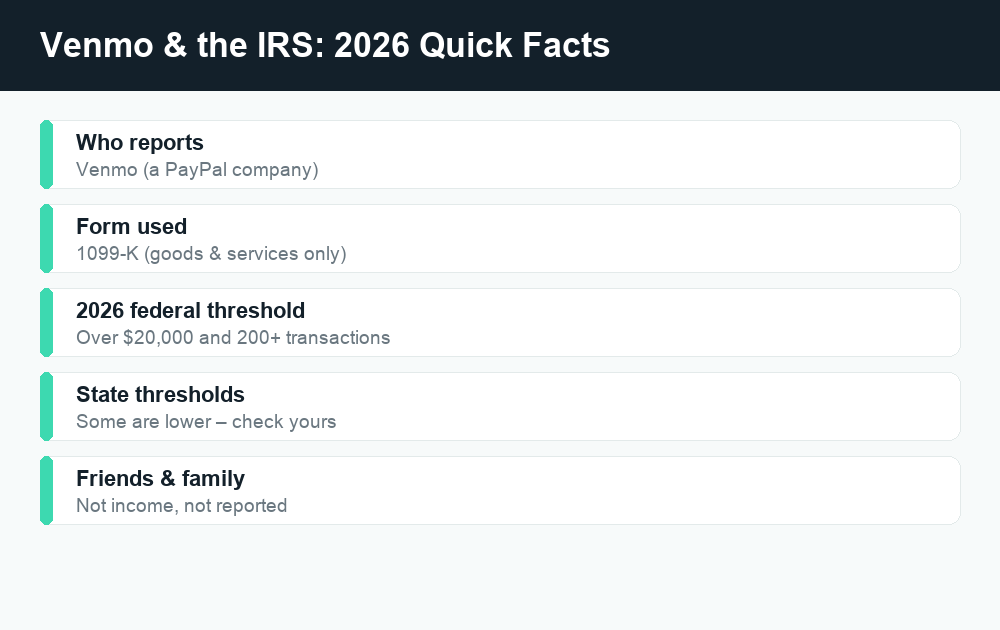
Quick answer: Venmo (a PayPal company) issues a Form 1099-K only for goods & services payments that exceed the federal threshold ($20,000 in payments and 200+ transactions for 2026) or a lower state threshold. Friends & family transfers are personal and aren’t reported as income. The single most important thing you can do is tag each payment correctly—a personal payment mistakenly marked “goods & services” can get counted. Always confirm current thresholds at IRS.gov and in Venmo’s help center.
If you’ve heard rumors that Venmo is suddenly “watching every $600 you send,” you’re not alone—and the confusion is understandable. The rules around payment-app tax reporting have shifted, been delayed, and been widely misreported over the past few years. This guide cuts through the noise with a plain-English look at exactly when Venmo reports to the IRS, the all-important difference between goods & services and friends & family, where to find your tax documents, and what to do if a 1099-K lands in your inbox.
Does Venmo report to the IRS?
Yes—but only in specific situations. Venmo is a licensed money-transfer service owned by PayPal, and like other third-party payment platforms it is required to report certain business payment volume to the IRS using Form 1099-K. The key word is business. The IRS reporting rules apply to payments for goods and services—money you receive for selling something or providing a service—not to personal transfers between friends and family.
So the question isn’t really “Does Venmo report to the IRS?” It’s “Which of my Venmo activity counts as reportable business income?” For the vast majority of casual users who only use Venmo to split bills and pay back friends, the honest answer is: none of it.
How Venmo decides what to report
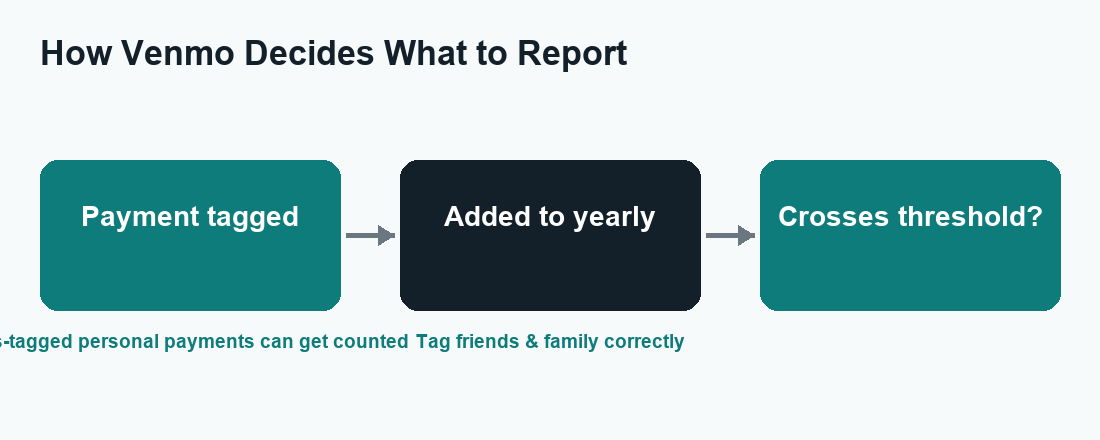
Venmo doesn’t read your mind or guess your intentions. It decides what to report based on two simple things:
- How the payment was tagged. When money moves on Venmo, it is classified either as a personal (friends & family) payment or as a goods & services (business) payment. Only goods & services payments count toward your 1099-K total.
- Whether your goods & services total crosses a reporting threshold. If your business payments exceed the federal or your state’s threshold for the year, Venmo generates a 1099-K and sends a copy to both you and the IRS.
This is why correct tagging matters so much. The classification on each transaction—not what you privately meant—is what feeds the reporting math.
The federal 1099-K threshold for 2026
For the 2026 tax year, the federal threshold for a 1099-K is more than $20,000 in goods & services payments and more than 200 transactions. Both conditions generally have to be met at the federal level. That’s a meaningful bar—most occasional sellers won’t reach it.
However, thresholds have been a moving target, and there have been proposals and phased changes over recent years. Just as importantly, some states set their own, much lower thresholds, and Venmo must follow whichever rule applies to you. Because these numbers can change, always verify the current federal and state thresholds at IRS.gov and in Venmo’s help center before assuming you’re under (or over) the line.
| Payment type | Example | Counts toward 1099-K? | Taxable income? |
|---|---|---|---|
| Friends & family | Splitting a dinner bill | No | No |
| Friends & family | Sending rent to a roommate | No | No |
| Friends & family | A birthday gift | No | No |
| Goods & services | Selling a handmade item | Yes | Yes (if it’s income) |
| Goods & services | Getting paid for freelance work | Yes | Yes |
One crucial nuance: a 1099-K reports the gross amount of your goods & services payments. It does not automatically mean you owe tax on every dollar. Your actual taxable income depends on your costs, your basis in items you sold, and other factors. A 1099-K is an information return—a starting point for your tax return, not the final word on what you owe.
Goods & services vs. friends & family
This single distinction is the heart of the whole topic, so it’s worth slowing down on.
Friends & family (personal payments)
Friends & family is the default for everyday peer-to-peer use: reimbursing a buddy for concert tickets, chipping in for a group gift, paying your share of the utilities, or sending cash to a family member. These are personal transfers. Money you receive this way is not income and is not reported to the IRS by Venmo. There is no purchase protection on these payments—Venmo treats them as you handing cash to someone you trust.
Goods & services (business payments)
Goods & services is for transactions where you’re buying from or selling to someone you may not know personally. When a payment is tagged this way, Venmo adds purchase protection for the buyer (and charges the seller a small fee). Because these are commercial payments, they’re the ones that count toward your 1099-K total.
The tradeoff to understand: Goods & services gives the buyer protection if something goes wrong, but it’s reportable and carries a seller fee. Friends & family is free and not reportable—but offers no protection. Use goods & services for real purchases from strangers; use friends & family only for genuine personal transfers between people you trust.
Why correct tagging protects you
Here’s the scenario to avoid: a friend pays you back for a vacation rental and accidentally marks it “goods & services.” Now that personal reimbursement is sitting in your goods & services bucket, where it could be counted toward a 1099-K—even though it was never income. That’s why both senders and receivers should be deliberate about how each payment is classified.
If a personal payment was mis-tagged, don’t panic. You can keep your own records showing it was a reimbursement or gift, and if it ends up on a 1099-K in error, you can address it on your tax return or by contacting Venmo (more on that below). The goal is simply to make sure your reported figures reflect reality.
Where to find your Venmo tax documents
If Venmo issues you a 1099-K, you don’t have to go hunting for it in the mail. Venmo makes tax documents available digitally inside your account. In general, you’ll find them in the Settings or Tax Documents area of the Venmo app or website, typically under a section related to your statements, identity, or tax information.
A few practical tips:
- Keep your account info current. If your goods & services activity approaches a reporting threshold, Venmo may ask for tax information (like your taxpayer ID) to comply with IRS rules. Providing accurate details avoids backup withholding and delays.
- Download and save your forms. If you receive a 1099-K, save a copy with your other tax records for the year.
- Check the exact location in Venmo’s help center. App menus change over time, so the most reliable directions are always in Venmo’s official help articles.
What to do if you receive a 1099-K from Venmo
Receiving a 1099-K is not a punishment and it’s not automatically a tax bill. It simply means your goods & services payments crossed a reporting threshold and the IRS has a copy too. Here’s a calm, step-by-step approach.
| Step | What to do |
|---|---|
| 1. Read it carefully | Confirm the gross amount and that it reflects business payments you actually received. |
| 2. Reconcile with your records | Match the total against your own logs; flag anything personal that was mis-tagged. |
| 3. Separate income from non-income | Gross payments aren’t all profit—account for costs, refunds, and basis. |
| 4. Report correctly | Include genuine business income on your return; document any non-income amounts. |
| 5. Get help if unsure | For anything complex, consult a tax professional or the IRS. |
If the form includes amounts that were truly personal (a reimbursement or gift that got mis-tagged), don’t just ignore the form—the IRS has a copy. Instead, keep documentation, follow IRS guidance for reporting and then backing out non-taxable amounts, and consider contacting Venmo about correcting an error. When in doubt, a qualified tax preparer can make sure it’s handled cleanly.
Tips to keep personal and business activity separate
If you use Venmo for both your personal life and any side income, mixing the two on one profile is the fastest way to create a confusing 1099-K. A little structure now saves a lot of headache at tax time.
- Tag every payment intentionally. Treat the goods & services vs. friends & family choice as a deliberate decision, not an afterthought—both when sending and when requesting money.
- Consider a Venmo business profile. If you regularly sell or get paid for services, Venmo offers business profiles designed for commercial use. Keeping business activity on a separate profile makes your records—and any tax forms—far cleaner.
- Ask payers to use the right type. Tell friends to send personal reimbursements as friends & family, and ask customers to pay your business as goods & services.
- Keep your own simple log. A basic spreadsheet of what was income vs. personal makes reconciling a 1099-K trivial.
- Don’t use Venmo as a substitute for a bank for a real business. For meaningful business volume, a dedicated business account and proper bookkeeping will serve you better.
Watch out for tax-season scams
Tax topics attract scammers, and payment apps are a favorite hook. Be skeptical of any message claiming to be from “Venmo Tax” or the “IRS” that pressures you to click a link, “verify” your account, or pay a fee to release a tax form. A few rules of thumb:
- The IRS does not initiate contact by text, email, or social media demanding immediate payment or personal information.
- Venmo will not ask you to pay a fee to receive your own 1099-K.
- When you need a tax document or have a question, open the Venmo app or go to IRS.gov directly—don’t click links from unsolicited messages.
Frequently asked questions
Does Venmo report friends & family payments to the IRS?
No. Friends & family (personal) payments—like splitting a check, sending rent, or giving a gift—are not income and are not reported on a 1099-K. Only goods & services payments that cross a reporting threshold are reported. The catch is that a personal payment mistakenly tagged as goods & services can get counted, so always tag correctly.
What is the Venmo 1099-K threshold for 2026?
For the 2026 federal threshold, Venmo issues a 1099-K when your goods & services payments exceed $20,000 and 200 transactions. Some states set lower thresholds, and Venmo follows whichever applies to you. Because these numbers have changed in recent years, confirm the current figures at IRS.gov and in Venmo’s help center before relying on them.
I got a 1099-K but the money wasn’t business income. What now?
Don’t ignore it—the IRS has a copy. Most likely some payments were mis-tagged as goods & services. Keep records showing the amounts were reimbursements or gifts, follow IRS guidance for reporting and then backing out non-taxable amounts on your return, and consider contacting Venmo to correct an error. A tax professional can help if it’s complicated.
Will Venmo report me if I receive more than $600?
Not on the $600 figure alone for 2026 at the federal level—the federal threshold is more than $20,000 and 200+ transactions. The widely shared “$600” number reflects a lower threshold that was proposed and repeatedly delayed, plus some state-level rules. Because thresholds can change, verify the current rule at IRS.gov rather than relying on viral posts.
Should I use a Venmo business profile for selling?
If you regularly sell goods or get paid for services, yes—a business profile is built for that and keeps commercial activity separate from your personal payments. That separation makes your records cleaner and makes any 1099-K easier to reconcile. For occasional, truly personal transfers, a standard personal account using friends & family is fine.
The bottom line
Venmo reports to the IRS only for goods & services payments that cross the federal or your state’s threshold—not for the everyday friends & family transfers that make up most people’s activity. The smartest move you can make is also the simplest: tag every payment correctly, keep your own light records, and use a business profile if you genuinely sell or get paid through the app. If a 1099-K does arrive, treat it as an information return to reconcile, not an automatic tax bill, and confirm any time-sensitive thresholds at IRS.gov or Venmo’s help center.
For more plain-English money-app guidance, explore related WalletWisp guides on PayPal friends & family vs. goods & services, Venmo limits and fees, and how other apps like Cash App and Zelle handle tax reporting.