
For the 2026 tax year, PayPal will issue you a federal Form 1099-K only if your goods-and-services payments are more than $20,000 AND you had more than 200 transactions — both conditions, not just one. Getting a 1099-K does not mean you owe tax on the full amount; the form reports gross sales, while you only pay tax on your actual net profit after expenses.
Quick answer: The federal 1099-K reporting threshold is back to over $20,000 and more than 200 goods-and-services transactions for 2026. PayPal sends the form to sellers who cross that line — and to sellers in certain states with lower thresholds. A 1099-K shows gross payments received, not profit, so you can deduct legitimate business costs like fees, shipping, and what you paid for the items. Friends & Family transfers are not sales and are not reported. Always verify current rules at IRS.gov.

What is a Form 1099-K, and why did PayPal send me one?
Form 1099-K is an IRS information return that payment platforms — PayPal, Venmo, eBay, Etsy, and similar services — use to report the money they processed on your behalf. It is the same kind of “we told the IRS about this” document you might get from a bank or brokerage, except it covers payments you received for selling goods or services through the platform.
If you got a PayPal 1099-K, it means PayPal believes your business-type activity crossed a reporting threshold for the year. The form lists the gross amount of payments you received, usually broken down by month. The IRS gets a copy too, which is why the numbers matter: the agency can match what’s on your tax return against what PayPal reported.
Receiving the form is not an accusation and not a bill. It is simply a record. What you actually owe depends entirely on your real income and expenses, which we’ll walk through below.
The 2026 threshold: over $20,000 AND more than 200 transactions
For the 2026 tax year, the federal threshold for a 1099-K is back to the long-standing higher level. PayPal is required to send you a 1099-K when both of these are true for your goods-and-services payments:
- You received more than $20,000 in total, and
- You had more than 200 separate transactions.
The key word is “and.” If you sold $30,000 across only 150 transactions, or you had 400 transactions that added up to $12,000, you fall below the federal threshold and PayPal generally won’t issue a federal 1099-K based on those numbers alone. You need to clear both bars.
| Your 2026 PayPal goods & services activity | Over $20,000? | Over 200 transactions? | Federal 1099-K? |
|---|---|---|---|
| $25,000 across 240 sales | Yes | Yes | Yes |
| $30,000 across 150 sales | Yes | No | No (federal) |
| $12,000 across 400 sales | No | Yes | No (federal) |
| $8,000 across 90 sales | No | No | No (federal) |
One important caveat: this is the federal rule. Some states set their own, lower 1099-K thresholds, and PayPal will issue a form to residents of those states even if you didn’t hit $20,000 and 200 transactions. If you live in a state with a lower threshold, you may receive a 1099-K for a much smaller amount. Check your state’s department of revenue site, or look at the help center on PayPal’s website, to see whether a state rule applies to you.
Important: Tax thresholds have changed several times in recent years and can change again. The numbers above reflect the rule for 2026 as written, but always confirm the current-year threshold at IRS.gov before you file.
Business vs. personal: Friends & Family isn’t reportable
PayPal lets you send money two very different ways, and the difference is central to the 1099-K.
Goods and Services (G&S) payments are the ones that count. These are payments for things you sold or services you provided — the buyer is purchasing something and gets purchase protection. PayPal tracks these as commercial activity, and they’re what feed into your 1099-K totals.
Friends & Family (F&F) transfers are personal money movements: splitting a dinner bill, sending your cousin cash for a gift, paying back a friend. These are not sales, they’re not commercial income, and they are not reported on a 1099-K. Personal reimbursements and gifts between people don’t belong on the form at all.
This distinction is exactly why you should never accept business payments as Friends & Family — and why you shouldn’t have buyers pay you that way to “avoid taxes.” Beyond the fact that it strips the buyer of purchase protection (a common scam setup), miscategorized payments create messy records. If genuine personal transfers somehow end up on your 1099-K, that’s a problem to fix (more on that below), not something to ignore.
Where to find your 1099-K in PayPal
If you qualify, PayPal makes the form available in your account, typically early in the year for the prior tax year. The exact menu names can change as PayPal updates its interface, so treat these as a general guide rather than an exact script:
- Log in to your PayPal account on the website (the full site tends to be easier than the app for tax documents).
- Go to your Settings or account menu and look for Statements or Tax Documents.
- Select the relevant tax year. If a 1099-K was generated for you, you’ll be able to view and download it as a PDF.
If you expected a form and don’t see one, it may simply mean you didn’t cross the threshold. If you think you should have received one and didn’t, contact PayPal support through its official help center — never through a phone number or link from an unsolicited email or text, which are frequent phishing tactics around tax season.
Gross vs. net: the most misunderstood part
This is where most sellers panic unnecessarily. A 1099-K reports gross payments — the total dollar amount that came in before anything is subtracted. It does not account for:
- PayPal’s processing fees
- What you originally paid for the items you sold (your cost of goods)
- Shipping costs you covered
- Refunds you issued
- Other legitimate business expenses
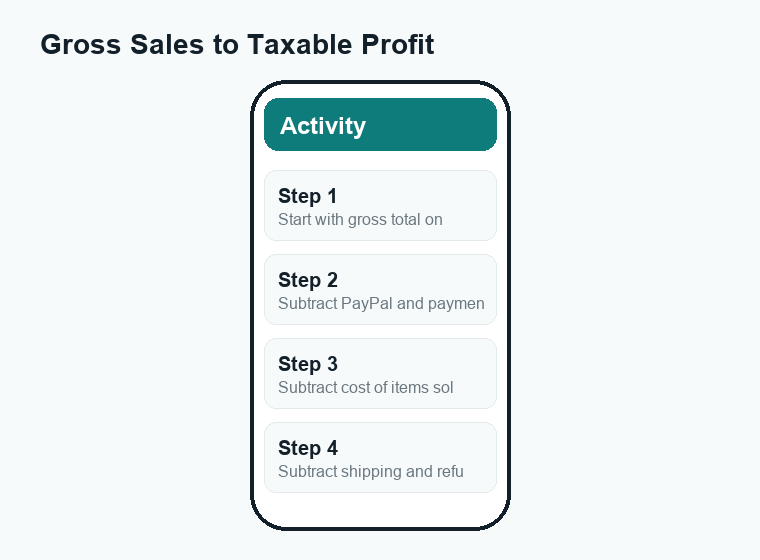
You owe income tax only on your net profit, not the gross figure on the form. Here’s a simplified illustration of how a scary-looking gross number can shrink to a modest taxable profit.
| Line item | Amount (example) |
|---|---|
| Gross payments on 1099-K | $22,000 |
| Less: cost of items you sold | −$11,000 |
| Less: PayPal & payment fees | −$700 |
| Less: shipping you paid | −$1,800 |
| Less: refunds issued | −$500 |
| Approximate net profit (taxable) | ≈ $8,000 |
In this example, the seller doesn’t owe tax on $22,000 — they owe it on roughly $8,000 of actual profit. The figures above are illustrative only; your numbers will be different. The point is that the 1099-K is a starting line, not the finish line.
One more thing to know: if you sold purely personal items at a loss — say, used furniture or old electronics you sold for less than you paid — that generally isn’t taxable income, but it can still show up on a 1099-K because PayPal only sees the payment, not the backstory. That’s a situation where good records and, often, a tax professional matter, because how you report it correctly can take a few extra steps.
Recordkeeping and deductions: keep more of what’s yours
The way to make sure you’re taxed on profit and not gross sales is simple in concept: keep records. Throughout the year, hold on to anything that documents your costs. Common deductible items for online sellers include:
- Cost of goods sold — receipts or invoices showing what you paid for inventory.
- Payment processing fees — PayPal’s fees are a real business expense.
- Shipping and packaging — postage, boxes, mailers, tape, labels.
- Platform or listing fees from marketplaces you sell on.
- Supplies and other ordinary business costs tied to your selling activity.
PayPal’s own transaction and activity reports can help you reconcile the 1099-K against your records — you can download a detailed transaction history and confirm the totals line up. The IRS expects you to be able to back up your numbers, so a shoebox of receipts or a simple spreadsheet beats trying to reconstruct everything in April.
If selling is a real business for you, this is the point where a tax professional earns their fee. They can help you decide how to report (for example, on a Schedule C if you’re a sole proprietor), which deductions you qualify for, and whether you should be making quarterly estimated tax payments. Tax rules around self-employment income are detailed, and good advice usually pays for itself.
What to do if your 1099-K looks wrong
Errors happen. A 1099-K might overstate your sales, include personal Friends & Family money that shouldn’t be there, or show the wrong taxpayer name or ID. Don’t ignore it — but don’t panic either. A practical approach:
- Compare it to your own records first. Download your PayPal transaction history for the year and check whether the gross total actually matches. Remember the form is gross, before fees and refunds, so it will look higher than your profit — that part is normal, not an error.
- Identify the specific problem. Is it a personal transfer wrongly tagged as a sale? A duplicate? The wrong amount entirely? The wrong name or Taxpayer Identification Number?
- Contact PayPal through its official help center to request a correction if the form is genuinely wrong. If a corrected 1099-K is warranted, the payer (PayPal) is the one who issues it.
- Don’t simply omit it from your return. Because the IRS already has a copy, leaving a 1099-K off your return can trigger a notice. The IRS provides guidance on how to report a 1099-K and how to handle amounts that shouldn’t be taxable (such as personal items sold at a loss). Review the official instructions at IRS.gov or work with a tax pro.
A quick scam note: tax season brings a flood of fake “your 1099-K is ready” or “IRS tax problem” emails, texts, and calls. PayPal and the IRS will not demand immediate payment by gift card, wire, or cryptocurrency, and the IRS does not initiate contact by text or social media. Always go directly to PayPal.com or IRS.gov by typing the address yourself rather than clicking links.
Frequently asked questions
Will I get a PayPal 1099-K for 2026 if I only sold a few things?
Under the federal rule, no — you’d need more than $20,000 in goods-and-services payments and more than 200 transactions. A handful of casual sales won’t trigger a federal 1099-K. However, if you live in a state with a lower threshold, you could receive one for a smaller amount, so check your state’s rules.
Does a 1099-K mean I owe tax on the whole amount?
No. The 1099-K shows gross payments before any costs. You owe income tax only on your net profit after subtracting legitimate expenses like fees, shipping, refunds, and what you paid for the items. Keeping good records is how you make sure you’re taxed on profit, not on gross sales.
Are PayPal Friends & Family payments reported on a 1099-K?
No. Friends & Family transfers are personal — reimbursements, gifts, splitting bills — and are not commercial sales, so they don’t appear on a 1099-K. Only Goods and Services payments count toward the threshold. Just don’t use Friends & Family to dodge taxes on real sales; it removes buyer protection and muddies your records.
What if I sold personal items for less than I paid?
Personal items sold at a loss are generally not taxable, but they can still show up on a 1099-K because PayPal only sees the payment, not your original cost. You’ll typically still report the form and then show that the amount isn’t taxable income. The IRS offers instructions for this situation, and a tax professional can make sure it’s handled correctly.
My 1099-K total is higher than my actual income — is that normal?
Usually, yes. Because the form reports gross payments before fees, refunds, and your costs, it will almost always look larger than your real profit. Compare it against your PayPal transaction history. If the gross figure itself is wrong — duplicates, personal transfers, or an incorrect amount — contact PayPal through its official help center to request a correction.
The bottom line
For 2026, a PayPal 1099-K shows up only when your goods-and-services activity tops $20,000 and 200 transactions at the federal level (lower in some states). The form reports gross payments, not profit, so the number that matters for your taxes is your net income after legitimate business expenses. Keep clean records, know that Friends & Family transfers aren’t sales, double-check any form that looks off, and verify current rules at IRS.gov — and if selling is a real business for you, a tax professional is well worth it.
For more plain-English money guidance, explore WalletWisp’s other PayPal guides on fees, transfers, and the difference between Friends & Family and Goods and Services.