
A PayPal Business account is a free-to-open account that lets you accept card and PayPal payments, send professional invoices, and sell online under your business name — in exchange for a per-transaction fee on each sale you receive. It is the version of PayPal built for people who get paid rather than just send money to friends, and you can open one in a few minutes or upgrade an existing personal account.
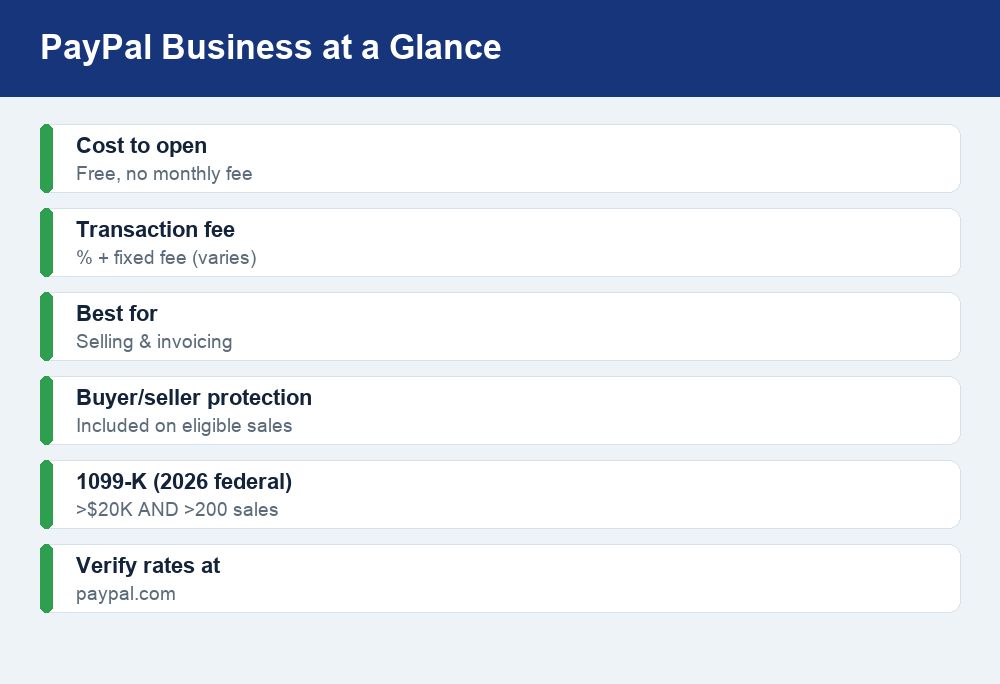
Quick answer: A PayPal Business account costs nothing to open and gives you invoicing, checkout buttons, and buyer/seller protection. You pay a per-transaction fee — a percentage plus a small fixed fee — only when a customer pays you for goods or services, and the exact rate depends on the transaction type. If you cross the federal 1099-K threshold (over $20,000 AND more than 200 transactions for 2026, with some states using lower limits), PayPal reports those payments to the IRS. Always confirm today’s fee rates at paypal.com before you rely on any number.
What is a PayPal Business account?
A PayPal Business account is a merchant account designed for anyone who sells products, offers services, or otherwise collects money from customers. Unlike a personal account, it operates under your business or brand name, supports multiple logins for employees, and unlocks tools built for getting paid: itemized invoices, shopping-cart checkout, payment buttons, subscription billing, and reporting you can hand to your accountant.
The account itself is free. There is no monthly subscription and no charge to sign up, keep it open, or send an invoice. PayPal makes its money on the transaction fees it charges when money comes in for goods and services. That model makes a Business account low-risk to try: you only pay when you actually get paid.
It is worth understanding early that PayPal treats “goods and services” payments differently from casual “friends and family” transfers. Business payments carry a fee and come with seller protection; personal transfers between people usually do not. If you want the full picture, our guide to the difference between friends and family and goods and services payments walks through when each one applies and why it matters at tax time.
Personal vs. Business account: which do you need?
Many people start with a personal PayPal account and wonder whether they really need the Business version. The short answer: if you are selling anything regularly, a Business account is the right home for that activity. Here is how the two compare.
| Feature | Personal account | Business account |
|---|---|---|
| Cost to open | Free | Free |
| Account name shown | Your personal name | Your business / brand name |
| Send money to friends | Yes | Yes |
| Accept card payments | Limited | Yes, full checkout tools |
| Send invoices | Basic | Yes, branded and itemized |
| Multiple user logins | No | Yes |
| Seller protection | Limited | Yes, on eligible sales |
| Best for | Personal transfers | Selling and getting paid |
You do not need to keep both. If your side hustle grows, you can upgrade a personal account into a Business account and keep the same email, balance, and transaction history. The reverse is harder, so if you are unsure, opening a Business account first is the cleaner path for anyone who expects to invoice clients or list products for sale.
How to open or upgrade to a Business account
Setting up a PayPal Business account is straightforward and can usually be done in one sitting. You will need your business details, a bank account to link, and information to confirm your identity. If you are converting an existing personal account, look for the “Upgrade to a Business account” option in your settings instead of creating a brand-new profile.
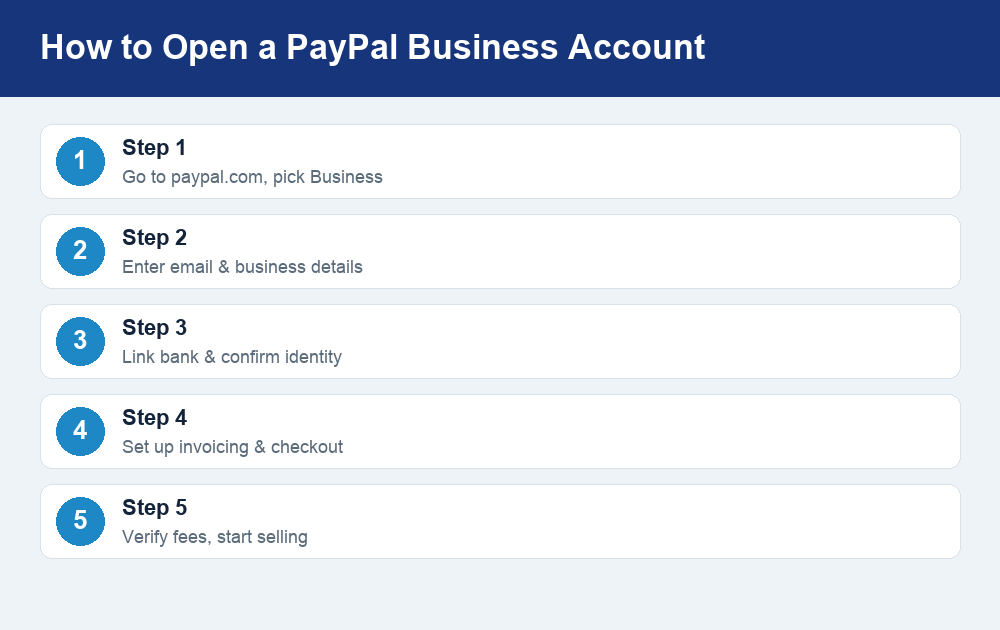
Here is what the process looks like from start to finish:
- Go to paypal.com and choose “Business.” On the sign-up screen, select the Business option rather than Personal. If you already have a personal account, sign in and look for the upgrade link in your account settings.
- Enter your email and business information. You will provide a business name, type (sole proprietor, LLC, corporation, and so on), and contact details. Sole proprietors and freelancers can use their own name as the business name.
- Link a bank account and confirm your identity. PayPal will ask for a bank account or debit card for payouts and may request your Social Security number or EIN and other details to comply with U.S. financial regulations.
- Set up your payment tools. Turn on invoicing, create checkout buttons, or connect PayPal to your online store or shopping cart so customers can pay you.
- Verify current fees, then start selling. Before you send your first invoice, check the live fee schedule so you know exactly what each sale will cost.
Approval is often instant, though PayPal sometimes needs a day or two to review new business accounts or request extra documentation. Once you are verified, your money typically lands in your PayPal balance immediately and can be transferred to your linked bank.
PayPal Business fees explained
This is the part most sellers care about, so let’s be precise about how the pricing works — and clear about why you should confirm the exact numbers yourself. PayPal charges a per-transaction fee on payments you receive for goods and services. That fee is made up of two parts: a percentage of the sale plus a small fixed fee. The percentage and fixed amount vary depending on how the payment was made.
Different transaction types carry different rates. A standard online checkout payment, a QR-code sale in person, an international payment, and a donation can each be priced differently, and PayPal updates its schedule from time to time. Because of that, this article deliberately does not quote a single “one size fits all” rate. For a current, itemized breakdown, see our full explanation of PayPal’s fees, and always cross-check against the official schedule at paypal.com before you price your products.
| Fee type | How it works | What to check |
|---|---|---|
| Account / monthly | None to open or keep | Free |
| Goods & services (domestic) | Percentage + fixed fee per sale | Verify current rate at paypal.com |
| International payments | Higher percentage, may add currency conversion | Verify cross-border rate |
| Currency conversion | Spread added to the exchange rate | Verify conversion margin |
| Chargebacks / disputes | Possible fee if a case goes against you | Verify dispute fee |
| Instant bank transfer out | Small fee to move money instantly | Free if you use standard transfer |
A few practical notes. Fees come out of the payment automatically, so if a customer pays you $100, you receive that amount minus PayPal’s cut. Standard transfers of your balance to a linked bank are typically free but take a business day or two; instant transfers cost a small fee. And refunds work in your favor less than you might hope — when you refund a customer, the original transaction fee treatment can vary, so read PayPal’s current refund policy rather than assuming you get everything back.
Key features worth using
Beyond simply accepting money, a PayPal Business account bundles tools that can replace several separate subscriptions for a small seller:
- Invoicing. Create branded, itemized invoices, email them to clients, and let customers pay with a card or PayPal balance. You can track which invoices are paid, pending, or overdue.
- Checkout and payment buttons. Add “Pay with PayPal” and card checkout to your website, or generate a simple payment link to send by text or email — handy if you don’t have a full online store.
- Buyer and seller protection. Eligible goods-and-services transactions come with dispute mediation. Seller protection can shield you from certain claims and chargebacks when you follow the rules, such as shipping to the confirmed address.
- Subscriptions and recurring billing. Charge customers on a schedule for memberships or ongoing services.
- Reporting and downloads. Export transaction history for bookkeeping and taxes, which makes reconciling your income far easier at year-end.
These features are included at no extra subscription cost — you are effectively paying for them through the per-transaction fees on your sales.
Taxes and the 1099-K in 2026
If you sell through a Business account, you also need to understand how PayPal reports your income to the IRS. Payment platforms issue a form called a 1099-K to sellers who cross certain thresholds. For 2026, the federal threshold has been restored to the older, higher level: PayPal issues a 1099-K when your goods-and-services payments exceed $20,000 AND you have more than 200 separate transactions in the year. Both conditions generally have to be met at the federal level.
There is an important catch: some states set their own, lower thresholds, which means you could receive a 1099-K even if you stay under the federal limits. Because state rules change and vary widely, don’t assume — confirm your state’s requirement and check the details in your PayPal account. Our deep dive on what the 1099-K means for sellers in 2026 breaks down who gets one and what to do when it arrives.
Two things to remember. First, receiving a 1099-K does not automatically mean you owe tax on the full amount — it reports gross payments, and your actual taxable income is what’s left after legitimate business expenses. Second, you are responsible for reporting your business income whether or not a 1099-K is issued. Keeping clean records and using PayPal’s transaction exports will save you headaches when you file. For anything specific to your situation, verify the current rules at IRS.gov or talk to a tax professional.
Pros and cons of a PayPal Business account
No payment tool is perfect. Here is an honest look at the trade-offs so you can decide whether it fits your business.
Pros:
- Free to open with no monthly fee.
- Fast setup and instant name recognition — many buyers already trust and use PayPal.
- Built-in invoicing, checkout, and seller protection in one place.
- Works online, in person, and internationally.
- Easy to accept cards from customers who don’t have a PayPal account.
Cons:
- Per-transaction fees add up on high sales volume, and international or currency-conversion costs can be steep.
- PayPal can place holds or freeze funds if it flags unusual activity, which can disrupt cash flow.
- Dispute outcomes don’t always favor sellers, and chargebacks may carry fees.
- Fee schedules change, so you have to stay current.
Watch out for scams
Because PayPal is so widely used, it’s a favorite target for scammers. Be skeptical of emails claiming your account is “limited” and urging you to click a link and log in — check the real status by typing paypal.com directly into your browser instead. Never accept an “overpayment” where a buyer sends too much and asks you to refund the difference, and be wary of anyone pressuring you to move a goods-and-services sale to a friends-and-family payment to dodge fees, since that strips away your protection. When in doubt, slow down and verify through the official app or website.
Frequently asked questions
Is a PayPal Business account free?
Yes. Opening and maintaining a PayPal Business account is free, with no monthly subscription. You only pay per-transaction fees when customers pay you for goods or services. Confirm the current fee rates at paypal.com before pricing your products.
Can I have both a personal and a Business PayPal account?
You can, but each account needs its own email address and bank details. Many sellers instead upgrade their personal account into a Business account to keep one balance and history. If you sell regularly, a dedicated Business account keeps your personal and business money cleanly separated.
How long does it take to get set up?
Most people finish sign-up in a few minutes, and approval is often instant. PayPal occasionally needs a day or two to review a new business or ask for extra identity documents, so start the process before you actually need to invoice a client.
Will I get a 1099-K from PayPal?
At the federal level for 2026, PayPal issues a 1099-K when your goods-and-services payments top $20,000 AND exceed 200 transactions in the year. Some states use lower thresholds, so you might receive one sooner. Either way, you must report your business income. Verify the latest rules at IRS.gov.
Are PayPal Business fees higher than personal ones?
The fee structure is the same idea — a percentage plus a fixed fee on goods-and-services payments — but a Business account unlocks more ways to get paid, some of which carry different rates. International and currency-conversion transactions generally cost more. Check the live schedule at paypal.com for exact numbers.
The bottom line
A PayPal Business account is a low-commitment way to start accepting payments, sending invoices, and selling online: it’s free to open, quick to set up, and instantly recognizable to customers. The trade-off is the per-transaction fee, which is why it pays to verify current rates at paypal.com and keep an eye on international and dispute costs. Track your sales, understand the 1099-K rules for your state, and stay alert to scams, and PayPal can be a reliable backbone for getting paid in 2026.