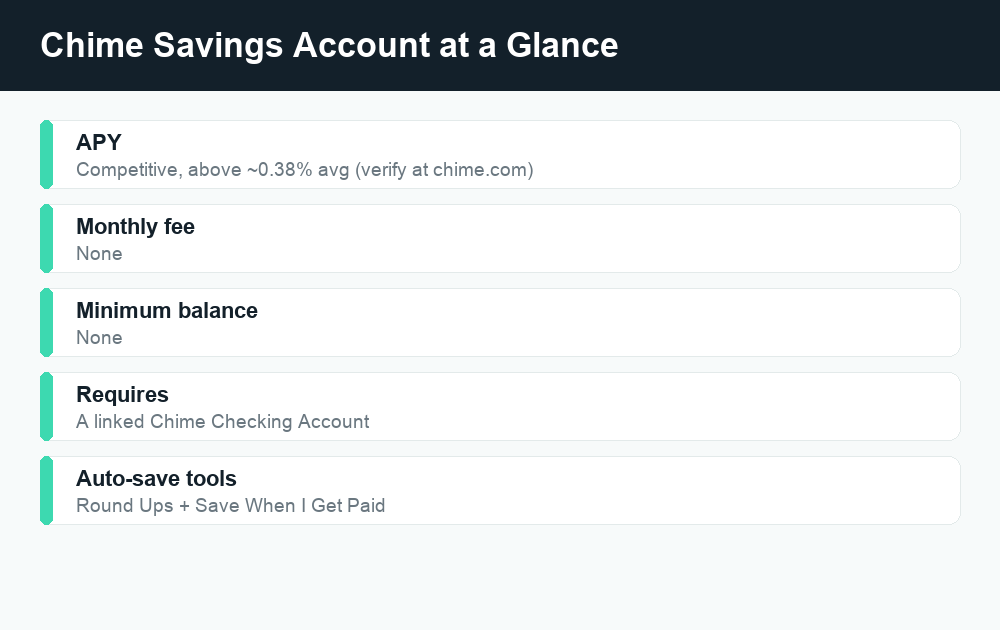
Chime offers a Savings Account that pays a competitive, above-average interest rate, so while Chime doesn’t market it under the exact label “high-yield savings account,” it functions much like one for everyday savers. It has no minimum balance, no monthly fees, and built-in automatic savings tools, but you’ll need a Chime Checking Account to open it.
Quick answer: Chime’s Savings Account earns a competitive APY that’s well above the roughly 0.38% national savings average, with no minimum balance and no monthly fees. It includes automatic savings tools like Round Ups and “Save When I Get Paid.” Chime is a financial technology company rather than a bank, so banking services and FDIC insurance are provided through partner banks. Always confirm the current rate at chime.com before you decide.
So, does Chime have a high-yield savings account?
Yes and no, depending on how strict you want to be with the term. Chime offers a product called the Chime Savings Account. It is not branded as a “high-yield savings account” (HYSA) the way many online banks brand theirs, but it pays an APY that is meaningfully higher than the national average for traditional savings accounts. For most people comparing where to park their cash, that’s the practical definition of high-yield: earning more than the near-zero rates that big brick-and-mortar banks typically offer.
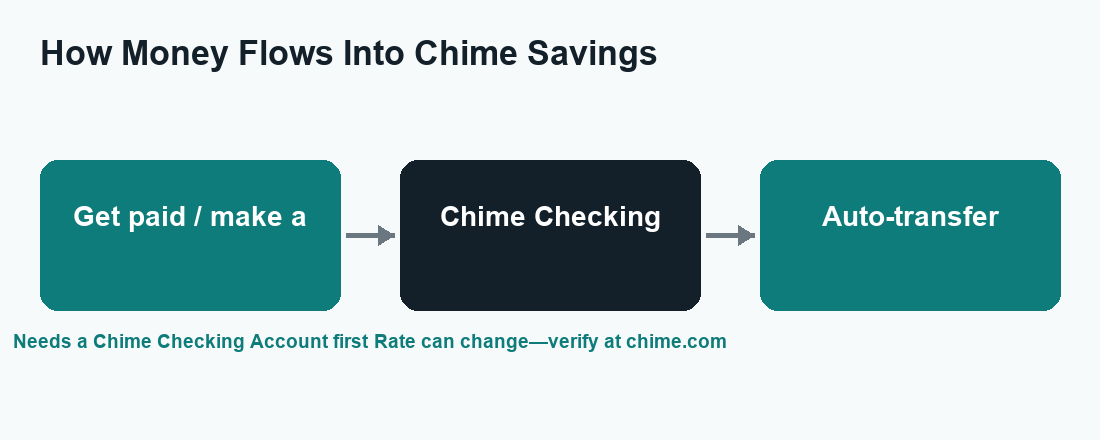
The key thing to understand is that the Chime Savings Account is part of a two-account system. You can’t open it on its own. You first need a Chime Checking Account, and the Savings Account attaches to it. That design is intentional, because Chime’s automatic savings features are built around moving money from your checking activity into savings without you having to think about it.
What is the Chime Savings Account?
The Chime Savings Account is an interest-earning account designed for people who want a simple, low-friction way to set money aside. Its appeal comes down to three things: a competitive rate, the absence of common fees, and automation that does the saving for you.
Here’s what stands out:
- No monthly maintenance fees. You won’t pay a recurring charge just to keep the account open, which is common at traditional banks unless you meet certain balance or deposit requirements.
- No minimum balance requirement. You don’t need to keep a set dollar amount in the account to avoid fees or to earn the advertised rate. You can start with whatever you have.
- An above-average APY. Chime advertises a competitive rate that is higher than the roughly 0.38% national savings average. Because rates change with market conditions, Chime does not lock in a single permanent number—check chime.com for the current APY.
- Automatic savings tools. This is where Chime tries to differentiate itself from a plain savings account. More on that below.
For a saver who wants to build an emergency fund or set aside money for a goal without juggling minimums and monthly fees, that combination is attractive.
Understanding the APY (and why you should always verify it)
APY stands for annual percentage yield. It’s the rate that tells you how much you’ll earn on your balance over a year, including the effect of compounding interest. A higher APY means your money grows faster.
Chime’s Savings Account APY is positioned as competitive and above the national average. To put that in context, the national average rate on savings accounts has hovered around 0.38%, which means a lot of Americans are earning almost nothing on money sitting in a traditional savings account. An account paying several times that average can make a real difference over time, especially on a growing balance.
That said, here’s the honest caveat: savings rates are not fixed. They move up and down based on broader interest-rate conditions, and any specific number you read in an article can be out of date by the time you act on it. Before you open or fund a Chime Savings Account, confirm the current APY directly at chime.com. Don’t rely on a screenshot, a third-party comparison post, or even this article for the exact figure—use the official source.
The automatic savings tools that set Chime apart
A competitive rate is nice, but plenty of online accounts offer that. Where Chime leans in is automation. The idea is to help people who struggle to save manually by moving money quietly in the background.
Round Ups
Round Ups work off your Chime debit card. When you make a purchase, Chime rounds the transaction up to the nearest dollar and transfers the difference from your Checking Account into your Savings Account. Buy a coffee for $3.40, and $0.60 gets swept into savings. Individually those amounts are tiny, but across dozens of purchases a month they add up without you noticing the pinch. It’s a classic “pay yourself first” trick made automatic.
Save When I Get Paid
The second tool is “Save When I Get Paid.” When you set it up, Chime automatically transfers a percentage of each direct deposit—your paycheck, for example—from checking into savings. You choose the percentage. Because the money moves the moment you get paid, you save before you have a chance to spend it. This is the kind of automation personal-finance experts have recommended for decades, packaged into the app.
Together, these two features mean you can build a savings habit largely on autopilot. That’s the core pitch of the Chime Savings Account: a decent rate plus tools that make saving the default instead of something you have to remember to do.
Is Chime a bank? The FDIC detail you should know
This is one of the most important and most misunderstood points about Chime, so it’s worth being precise.
Chime is a financial technology company, not a bank. The app and the experience are Chime’s, but the actual banking services—holding your deposits and providing FDIC insurance—are delivered through partner banks. Chime has publicly named partners such as The Bancorp Bank and Stride Bank, and your deposits are held at one of those FDIC-member institutions.
Why does this matter? Because FDIC insurance is what protects your money (up to the standard $250,000 limit per depositor, per insured bank, per ownership category) if the bank that holds your funds fails. With Chime, that protection flows through the partner bank, not through Chime itself. The practical upshot for most users is that eligible deposits are still FDIC-insured—but the insurance is provided by the partner bank, and it’s a good habit to read Chime’s disclosures so you understand exactly how your money is held.
This fintech-plus-partner-bank structure is common across the modern app-based finance world. It isn’t a red flag on its own. But it does mean you should always confirm the insurance details on the official Chime site rather than assuming Chime is itself a chartered bank.
Eligibility: you need a Chime Checking Account first
You can’t open a standalone Chime Savings Account. The path looks like this:
- Open a Chime Checking Account (this is the entry point to the Chime ecosystem).
- Open the Chime Savings Account, which links to your checking.
- Turn on the automatic savings features—Round Ups and/or Save When I Get Paid—if you want them.
This matters for a couple of reasons. First, if you only want a place to stash savings and have no interest in switching your everyday spending account, the requirement to also hold checking may feel like more than you bargained for. Second, the automation tools are tied to checking activity, so the two accounts really are designed to work as a pair. If you’re already happy with your current checking bank, weigh whether opening a Chime Checking Account is worth it just to access the savings side.
Chime Savings vs. a standalone high-yield savings account
So how does Chime stack up against a dedicated HYSA from an online bank? The table below lays out the practical differences. Treat the rate column as directional, not a quote—verify any current number on the provider’s site.
| Feature | Chime Savings Account | Typical standalone HYSA |
|---|---|---|
| APY | Competitive, above the ~0.38% national average | Competitive; top online banks often lead the market |
| Monthly fees | None | Usually none |
| Minimum balance | None | Often none, but varies by bank |
| Requires a linked checking account | Yes—Chime Checking required | No—can usually open on its own |
| Automatic savings tools | Round Ups + Save When I Get Paid built in | Varies; some offer auto-transfers, fewer offer round-ups |
| Who holds your money | Partner bank (FDIC insurance via partner) | The bank itself (directly FDIC-insured) |
The honest takeaway: Chime is a strong fit if you want an all-in-one app where checking, saving, and automation live together, and you like the idea of saving in the background. A standalone HYSA can be a better fit if you only want a savings account, want to keep your existing checking bank, or want to chase the very highest rate available, since the banks that lead the rate tables change frequently. Some savers even do both—using a standalone HYSA for the bulk of their cash and Chime for automated micro-saving.
How to decide if Chime Savings is right for you
Ask yourself a few plain questions:
- Do I want my checking and savings in one app? If yes, Chime’s integrated setup is a plus. If you’d rather keep them separate, that’s a point against.
- Do I struggle to save manually? Round Ups and Save When I Get Paid are genuinely useful for building a habit. If automation is what you’re missing, Chime delivers it well.
- Am I rate-maxing? If your only goal is the absolute highest APY, compare current rates across several providers, because the leader changes over time.
- Am I comfortable with the fintech model? If you understand that a partner bank holds your money and provides FDIC coverage, and you’ve read the disclosures, that’s the right frame of mind.
A quick word on staying scam-aware
Because Chime is popular, it’s also impersonated. Scammers send fake texts and emails claiming to be “Chime support,” ask for your login or verification codes, or promise to “unlock” your account if you pay a fee. Chime will never ask you to share your password, your one-time verification code, or to move money to “protect” it. When in doubt, don’t click links in messages—open the official Chime app or type chime.com yourself, and use the in-app help center to reach real support. Verifying through the official channel protects both your money and your information.
Frequently asked questions
Does Chime have a high-yield savings account?
Chime offers a Savings Account that pays a competitive APY well above the roughly 0.38% national average, so it functions like a high-yield account even though Chime doesn’t officially brand it “high-yield.” It has no monthly fees and no minimum balance. Check chime.com for the current rate.
What is the current APY on Chime’s Savings Account?
Chime advertises a competitive, above-average rate, but savings APYs change with market conditions, so we won’t quote a fixed number here. Confirm the current APY directly on the official Chime website before opening or funding the account.
Is my money in Chime Savings FDIC-insured?
Chime is a financial technology company, not a bank. Banking services and FDIC insurance are provided through partner banks such as The Bancorp Bank or Stride Bank. Eligible deposits are FDIC-insured up to the standard limits through the partner bank—review Chime’s disclosures for the specifics.
Can I open a Chime Savings Account without a checking account?
No. You need a Chime Checking Account first, and the Savings Account links to it. The automatic savings features, like Round Ups, depend on your checking activity, so the two accounts are designed to work together.
How do Round Ups and Save When I Get Paid work?
Round Ups round each Chime debit card purchase up to the nearest dollar and move the difference into savings. Save When I Get Paid automatically transfers a percentage you choose from each direct deposit into savings. Both run automatically once you enable them.
The bottom line
Chime’s Savings Account delivers most of what people want from a high-yield account—a competitive, above-average APY, no monthly fees, and no minimum balance—plus automatic savings tools that make building a habit nearly effortless. The trade-offs are that you must also hold a Chime Checking Account, and that FDIC insurance comes through a partner bank rather than Chime itself. For an all-in-one, automation-first approach, it’s a solid choice; for pure rate-chasing, compare it against standalone options. Either way, verify the current APY and insurance details at chime.com before you commit. For more, see our related WalletWisp guides on the best high-yield savings accounts, how Chime works, and how to build an emergency fund.