
If your Chime direct deposit is late, the most common reason is simple: Chime can only release your money once your employer or payer actually sends it, and Chime posts it the moment that payment file arrives — so a “late” deposit almost always means the payer submitted it later than usual, not that Chime is holding your funds. The fix is usually to wait until the end of your scheduled payday, confirm with your employer or payroll provider when the payment was actually sent, and contact Chime support only if the money was sent but never showed up.
Quick answer: Chime’s “Get Paid Early” feature posts your direct deposit as soon as it receives the payment instruction from your employer’s bank — which can be up to two days before the official payday. If your deposit is late, it’s nearly always because your employer or payroll company sent the file later than normal, a weekend or federal holiday pushed the date, or it’s your first deposit (which often arrives on the standard schedule, not early). Wait through the full payday, verify the send date with your payroll department, and only escalate to Chime if your employer confirms the money was sent but it never arrived.
How Chime early direct deposit actually works
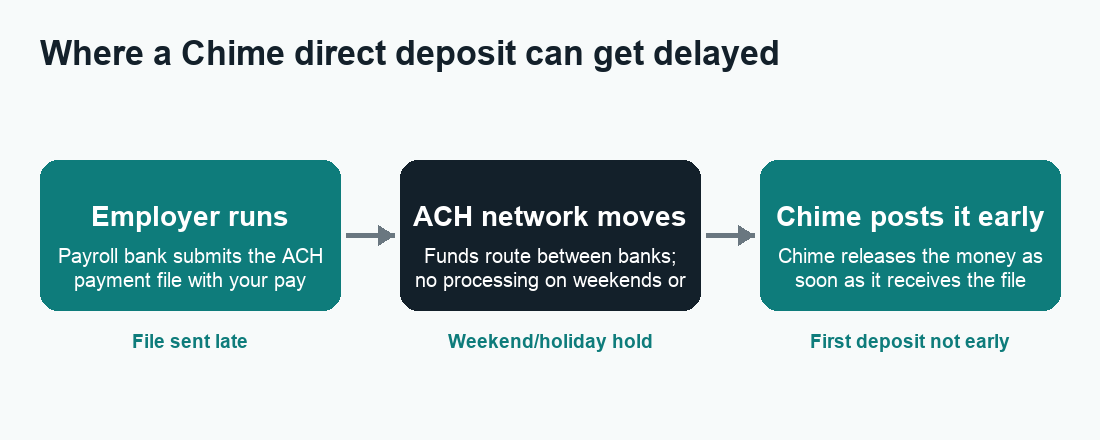
To understand why a deposit is late, it helps to know what “early” really means with Chime. Chime does not magically create your paycheck early. Instead, it uses the timing of the Automated Clearing House (ACH) network — the system U.S. banks use to move payroll money between accounts.
When your employer runs payroll, their bank submits an ACH file that says, in effect, “pay this person on this date.” That file usually goes out one to a few business days before the official payday. Many banks wait until the scheduled payday to release the funds. Chime takes a different approach: when it receives that ACH notice, it makes the money available to you right away rather than holding it until the official date. That is the entire mechanism behind Chime’s “Get Paid Early” promise — it can be up to two days sooner than a traditional bank.
The key takeaway is that Chime’s speed is completely dependent on when your employer’s bank sends the file. Chime cannot pull money that hasn’t been sent yet. So if the file goes out late this pay period, your “early” deposit will look late — even though Chime is doing exactly what it always does.
Why timing varies from one paycheck to the next
You may have noticed your Chime deposit landing on a Wednesday some weeks and a Thursday others. That inconsistency is normal and almost always comes from the payer, not from Chime. Employers, payroll processors, and government agencies each have their own internal cutoffs and processing schedules. A change in payroll software, a new pay cycle, a holiday week, or even a different person running payroll can all shift the send time by a day. Because Chime simply posts whatever it receives whenever it receives it, those upstream shifts show up directly in your account.
The most common reasons your Chime direct deposit is late
Below are the usual culprits, roughly in order of how often they cause a “late” deposit. Most of the time, the answer is on this list and nothing is actually wrong with your account.
1. Your employer or payer sent the payment late
This is the number one reason. If your company’s payroll team submitted the ACH file later than usual — or switched to a payroll provider that batches payments differently — Chime receives the instruction later and posts your money later. You will often see coworkers at other banks getting paid “on time” on the official date while your early deposit, which you’ve come to expect a day or two sooner, simply lines up with the standard payday instead.
2. A weekend or federal holiday is in the way
The ACH network does not process payments on weekends or federal banking holidays. If your payday falls on or right after a holiday — or your usual early-deposit day lands on a Saturday or Sunday — the payment file can’t move until the next business day. Around holidays like New Year’s Day, Memorial Day, July 4th, Labor Day, Thanksgiving, and Christmas, expect deposits to shift later. This is one of the most predictable causes of a delay.
3. It’s your very first direct deposit to Chime
First deposits are a frequent source of confusion. When you set up a new direct deposit, the early-deposit benefit may not apply to that initial payment. The first one often arrives on your employer’s standard payday rather than one or two days early, because Chime and the payroll system are essentially “meeting” each other for the first time. After the first successful deposit establishes the pattern, later paychecks typically start arriving early.
4. Incorrect or outdated direct deposit details
If your routing number or account number was entered incorrectly when you set up direct deposit, the payment can be rejected, delayed, or sent to the wrong place. Chime uses a specific routing number for direct deposits, and your account number is unique to you. A single transposed digit on the payroll form is enough to derail a paycheck.
5. A change in your pay schedule or employer payroll system
If your employer switched payroll providers, changed pay frequency (for example, from weekly to biweekly), or adjusted cutoff times, the first paycheck under the new system can land on a different day. These transitions usually settle within a cycle or two.
6. The payment is still “in transit”
Occasionally the ACH file has been sent but is still moving through the network. In this case the money genuinely isn’t at Chime yet, and there is nothing Chime — or you — can do but wait for it to settle, usually by the end of the business day.
When should you actually expect your Chime deposit?
Because the exact arrival depends on your employer, there is no single guaranteed time. But the table below shows the general pattern of how a normal pay cycle plays out and where delays creep in. Treat these as typical examples, not guarantees — always confirm specifics with your employer and the Chime app.
| Situation | Typical timing | Why |
|---|---|---|
| Regular paycheck, file sent on schedule | Up to ~2 days before official payday | Chime posts the ACH notice as soon as it arrives |
| First-ever direct deposit | On the standard payday (often not early) | Early benefit usually kicks in after the first deposit |
| Payday on/after a federal holiday | Pushed to the next business day or later | ACH doesn’t process on weekends/holidays |
| Employer sent the file late | Lines up with the standard payday or later | Chime can’t post money it hasn’t received |
| Wrong routing/account number | Delayed, returned, or missing entirely | Payment is rejected or misrouted |
How to fix a late Chime direct deposit, step by step
Work through these in order. Most people resolve the question by step 3 or 4 without ever needing to contact support.
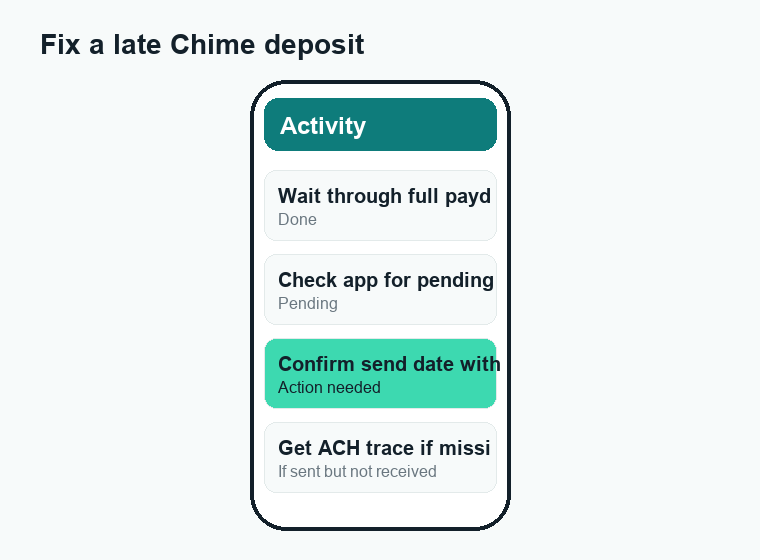
- Wait through the entire payday. Deposits can post at different times of day depending on when the payment file lands. Give it until the end of your normal payday (or the next business day if a weekend/holiday is involved) before assuming something is wrong.
- Check the Chime app for pending deposits. Open the app and look at your recent activity. A deposit that’s been received but not yet settled may show as pending, which means it’s on its way and you don’t need to do anything.
- Confirm the send date with your employer or payroll provider. Ask payroll exactly when the direct deposit file was submitted and what date it was set to pay. This single question resolves most cases — if they sent it late, that fully explains the delay.
- Verify your direct deposit details. In the Chime app, find your direct deposit information (routing number and account number) and compare it character-by-character against what your employer has on file. Fix any mismatch with your payroll department.
- Ask your employer for an ACH trace if the money was “sent” but never arrived. If payroll confirms the deposit was sent on a given date and it still hasn’t shown up after the expected settlement window, request a trace number. This proves where the payment went and is essential for resolving a genuinely missing deposit.
- Contact Chime support with that information. Reach Chime through the app’s support chat or its official member services. Have the pay date, amount, and (ideally) the ACH trace number ready so they can locate the deposit quickly.
What not to do
Don’t repeatedly re-submit your direct deposit form or change your account details mid-cycle — that can create duplicate or conflicting instructions and make the delay worse. And never share your login credentials, card number, or one-time passcodes with anyone who contacts you claiming they can “release” or “unlock” your deposit. Chime will never ask for that, and those requests are a hallmark of scams (more on that below).
How Chime’s timing compares to other money apps
If you also use Cash App, Venmo, or bank transfers via Zelle, you’ve probably noticed each one moves money on its own schedule. Direct deposit through Chime is governed by the ACH network, while peer-to-peer transfers in other apps can be instant or take a few business days depending on the option you choose. If a payment is stuck in one of those apps instead, those situations have their own causes and fixes — for example, see our guides on why a Cash App payment is pending, a Venmo payment showing pending, and how long a Zelle transfer takes. The important point: a “late” P2P transfer is a different problem from a late payroll direct deposit, even though they can feel the same.
Watch out for “late deposit” scams
A late paycheck makes people anxious, and scammers exploit that. Be alert for messages — by text, email, social media, or phone — claiming to be from Chime and offering to “fix” or “expedite” your delayed deposit. Real red flags include:
- Anyone asking for your password, full card number, PIN, or a one-time verification code.
- Requests to “verify” your identity by sending money, buying gift cards, or installing remote-access software.
- Links to lookalike websites or phone numbers that aren’t the official ones inside the Chime app.
- Pressure and urgency (“act now or lose your deposit”).
Only ever contact Chime through the official app or the contact details Chime publishes itself. If you think you’ve been targeted, stop communicating, and report it. For broader background on staying safe with payment apps, our overview of whether Zelle is safe covers the same scam patterns that apply across the board.
How to make late deposits less likely going forward
You can’t control your employer’s payroll cutoffs, but a few habits reduce surprises:
- Learn your real pattern. Track when your deposit actually lands over a few cycles so you know your true “early” day versus the official payday.
- Anticipate holiday weeks. Around federal holidays, plan for deposits to arrive a day or two later than usual.
- Double-check your details after any change. If you switch jobs, banks, or your employer changes payroll systems, re-verify your routing and account numbers right away.
- Keep a small buffer. Because the early benefit isn’t guaranteed every single cycle, avoid scheduling bills to draft on the earliest possible day if a one-day slip would cause an overdraft elsewhere.
Frequently asked questions
Why is my Chime direct deposit late this week but on time before?
The most likely reason is that your employer or payroll provider sent the payment file later than usual this cycle, or a holiday or weekend pushed the processing date. Chime posts deposits as soon as it receives them, so changes in your timing almost always trace back to the payer.
What time does Chime direct deposit usually hit?
There’s no fixed time. Chime makes the money available as soon as it receives the payment instruction from your employer’s bank, which can happen at various times of day. Many people see deposits land in the early morning, but it depends entirely on when the file arrives.
Does Chime really pay two days early?
Chime can make funds available up to two days before the official payday, but only if your employer’s bank sends the ACH file early enough. The “up to two days” is a maximum, not a guarantee — and it often doesn’t apply to your first deposit.
Why didn’t my first Chime direct deposit come early?
First deposits frequently arrive on the standard payday rather than early. The early-deposit benefit typically begins applying to your later paychecks once the first one establishes the pattern between Chime and your payroll system.
My employer says they sent my deposit but it’s not in Chime. What now?
Ask your employer or payroll provider for the ACH trace number and the exact date the payment was sent. Then contact Chime support through the official app with that information so they can locate the deposit. A trace number is the fastest way to resolve a genuinely missing payment.
Will a weekend or holiday delay my Chime deposit?
Yes. The ACH network doesn’t process payments on weekends or federal banking holidays, so deposits scheduled around those days are pushed to the next business day. This is one of the most common and predictable causes of a delay.
Can the wrong routing or account number make my deposit late?
Absolutely. A single incorrect digit can cause the payment to be rejected, returned, or misrouted, which delays it or stops it from arriving. Always compare your Chime direct deposit details character-by-character against what your employer has on file.
Should I contact Chime or my employer first about a late deposit?
Start with your employer or payroll provider, because the delay usually originates there. Confirm when the payment was sent and to which account. Only contact Chime if payroll verifies the money was sent on time but it still hasn’t arrived after the expected settlement window.
Last updated: June 2026. Fees, limits, and features can change — always confirm current details in the app. WalletWisp is an independent guide and is not affiliated with any app mentioned. This article is general information, not financial advice.
Related: More Chime guides · Why is my Cash App payment pending? · How long does a Zelle transfer take?