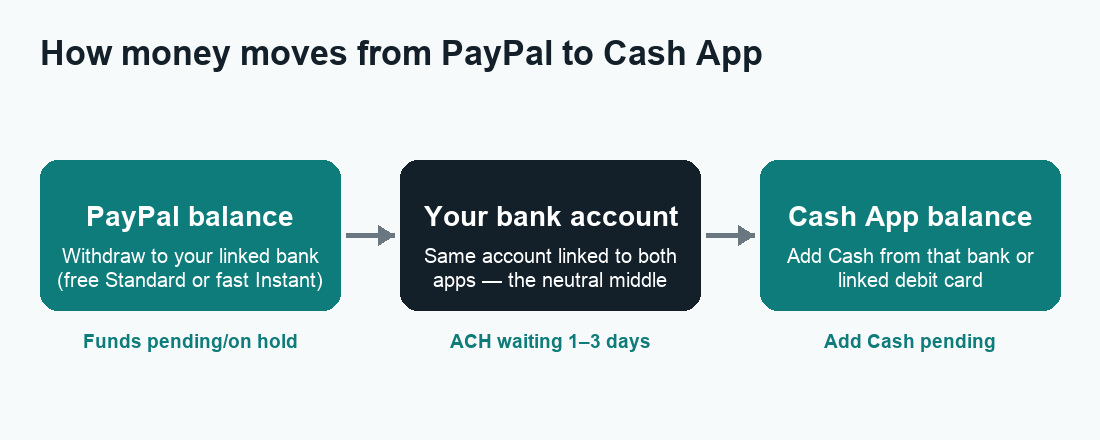
If you want to transfer PayPal to Cash App, here’s the honest truth up front: there is no button that sends money directly from PayPal to Cash App, so you move it through a bank account you control — withdraw from PayPal to your bank, then add that money to Cash App from the same bank. That “bank bridge” is the only reliable way to do it, and once you understand the steps it takes just a few minutes of actual tapping (plus some waiting for transfers to land).
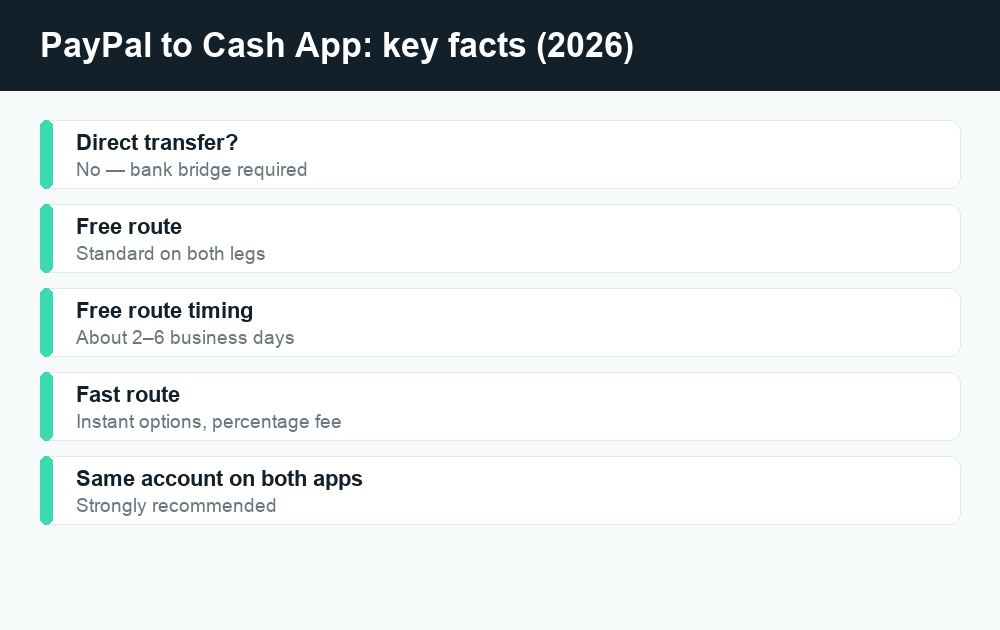
Quick answer: PayPal and Cash App don’t talk to each other directly. To move money between them, link the same bank account to both apps, withdraw your PayPal balance to that bank, then load it onto Cash App from your bank or linked debit card. A standard (free) transfer usually takes 1–3 business days on each leg; instant options arrive in minutes for a percentage-based fee. Always confirm current fees and limits in each app before you send.
Below, I’ll walk through exactly how the bridge works, what it costs, how long each step really takes, and a couple of faster alternatives so you can pick the option that fits your situation. I’ll also flag the spots where people get stuck (pending transfers, mismatched names, fee surprises) so you don’t have to learn them the hard way.
Why you can’t transfer PayPal to Cash App directly
PayPal and Cash App (owned by Block, Inc.) are competitors. They are both “closed-loop” wallets — money inside PayPal can move freely to other PayPal users, and money inside Cash App can move freely to other Cash App users, but neither app lets you punch in someone’s handle on the rival service and send funds across the wall. There is no “Send to Cash App” option inside PayPal, and Cash App can’t pull a balance out of PayPal.
What both apps do share is a connection to the traditional banking system (the ACH network) and to debit cards. That shared plumbing is your bridge. You’re not really sending money “from PayPal to Cash App” at all — you’re cashing PayPal out to a normal bank account, then funding Cash App from that same account. Think of your bank as the neutral middle ground both apps trust.
The two ways to build the bridge
- The bank-account method (most common): Withdraw your PayPal balance to your linked bank account, wait for it to settle, then load Cash App from that bank account. Both legs can be free if you choose standard speed.
- The debit-card method (faster, may cost a little): Withdraw from PayPal to a linked debit card (or your bank), then add cash to Cash App using that same debit card. Card funding into Cash App can be near-instant but standard-transfer rules and any instant fees still apply on the PayPal side.
Most people use the bank-account method because it’s free and reliable. The debit-card route is handy when you need the money on Cash App quickly and don’t mind paying a small instant-transfer fee on the PayPal withdrawal.
What you need before you start
Gather these so the process doesn’t stall halfway:
- An active PayPal account with an available (not pending) balance.
- An active Cash App account that’s verified for the amount you’re moving.
- A bank account (or debit card) that is linked to both apps. This is the key detail — the same account on both sides makes the handoff seamless.
- Names that match. Your PayPal, your bank, and your Cash App should ideally be in the same legal name to avoid verification holds.
If your PayPal balance is showing as “pending” or “on hold,” you can’t withdraw it yet. Wait for PayPal to clear it (often after the buyer’s payment fully settles or after any review), then continue.
How to transfer PayPal to Cash App: step by step
Here’s the full bank-bridge method. I’ve split it into two stages — getting money out of PayPal, then getting money into Cash App — because that’s literally what’s happening.
Stage 1 — Withdraw from PayPal to your bank
- Open the PayPal app and tap your balance on the home screen (or go to Wallet).
- Tap Transfer or Withdraw / Move money.
- Choose the bank account (or eligible debit card) you also use with Cash App. If it isn’t linked yet, add and confirm it first — bank links sometimes need a quick verification.
- Pick your speed: Standard (typically free, 1–3 business days) or Instant (arrives in minutes for a percentage-based fee, up to PayPal’s cap).
- Enter the amount and tap Transfer / Withdraw, then confirm.
Standard withdrawals are free but use the ACH network, so they only process on business days and skip weekends and holidays. If you start one Friday evening, don’t expect it Saturday.
Stage 2 — Add the money to Cash App
- Once the funds land in your bank (check your bank app, not just PayPal), open Cash App.
- Tap the Money tab (the dollar-sign / banking screen).
- Tap Add Cash.
- Enter the amount and tap Add, then confirm with your PIN, Touch ID, or Face ID. Cash App pulls from your linked bank or debit card.
That’s it — the money now sits in your Cash App balance and you can send it, spend it with your Cash Card, or cash it out. If you linked a debit card to Cash App, “Add Cash” is usually instant; a bank (ACH) pull can take 1–3 business days to fully settle even though Cash App may show the balance sooner.
Shortcut: skip the “Add Cash” step entirely
You don’t strictly have to use “Add Cash.” If your money is already in your bank account, you can simply leave it there and spend from your bank, or use your linked bank/debit as the funding source whenever you send a Cash App payment. Cash App can pull from your linked account at the moment you send, so loading the balance ahead of time is optional. People mainly pre-load when they want a ready Cash App balance for instant peer payments.
Fees: what each step really costs in 2026
The bridge has two legs, and each leg has a free option and a fast option. Here’s how the costs generally break down. Treat the fast-option figures as “percentage-based with a small minimum” — the exact percentages can change, so confirm in-app.
| Step | Standard (free) option | Instant / fast option |
|---|---|---|
| Withdraw PayPal balance to bank | Free — 1–3 business days (ACH) | Instant to eligible debit card/bank for a percentage fee (PayPal sets a cap) |
| Money sitting in your bank | Free | n/a |
| Add Cash to Cash App from bank | Free — typically 1–3 business days | Debit-card add is usually instant and free for adding cash |
| Cash out of Cash App later (if needed) | Free Standard cash-out (1–3 business days) | Instant cash-out for a percentage fee |
Bottom line: if you choose Standard on every leg, moving money from PayPal to Cash App can be completely free. You only pay when you choose Instant to skip the wait. Sending money within Cash App from a linked debit card or balance is typically free; funding a payment from a credit card carries a fee. For a fuller breakdown of what Cash App charges, see our guide to Cash App fees.
How long does the whole transfer take?
Add up the two legs:
- Fastest realistic path: Instant PayPal withdrawal (minutes) + instant debit-card Add Cash (minutes) = money on Cash App in well under an hour, but you’ll pay an instant-transfer fee on the PayPal side.
- Free path: Standard PayPal withdrawal (1–3 business days) + Standard bank Add Cash (1–3 business days) = roughly 2 to 6 business days end to end. Weekends and bank holidays don’t count.
- Middle path: Instant PayPal withdrawal to your debit card (minutes, small fee), then instant debit Add Cash (minutes, free) = fast and only one fee.
Banks process ACH transfers in batches on business days, so the calendar matters more than the clock. A “1–3 business day” transfer started on a Friday afternoon may not show up until the middle of the following week.
Faster alternatives to the bank bridge
The bank bridge is the standard answer, but depending on what you’re trying to do, one of these may be simpler.
Use your PayPal or Cash App debit card directly
If the goal is just to spend the money, you may not need to move it at all. Spend straight from your PayPal balance with the PayPal debit card, or load Cash App only when you specifically need a Cash App balance. Moving money between apps purely to spend it is often an unnecessary step.
Withdraw to a debit card instead of a bank
PayPal lets you push your balance to an eligible debit card in minutes (for a fee). If that same debit card is linked to Cash App, you’ve effectively shortened the bridge — the money is reachable by Cash App almost immediately.
Consider whether another app fits better
If you’re regularly moving money between people, you might lean on whichever app the other person already uses. Venmo (also closed-loop) has the same “no direct transfer” limitation — see how Venmo fees work. Zelle is different: it moves money bank to bank, so if both people bank with Zelle-supported institutions it can be faster and free — read how long a Zelle transfer takes before relying on it.
Common problems (and how to fix them)
The PayPal withdrawal won’t go through
Usually this means your balance is still pending, your bank link needs re-verification, or you’ve hit a sending/withdrawal limit. Confirm the balance is “Available,” re-link the bank if needed, and check your account limits in PayPal settings.
Cash App says the payment is pending
A pending status on the Cash App side usually clears on its own, but sometimes it needs a tap in the app or signals a network/verification hiccup. Our walkthrough on a Cash App payment pending covers exactly what each pending state means and what to do.
Name mismatch holds things up
If your PayPal, bank, and Cash App aren’t all in the same name, you may trigger extra verification. Keeping everything in your own legal name is the smoothest path and helps avoid frozen funds.
The money “disappeared” between apps
It didn’t — it’s parked in your bank account between the two legs. Always check your bank app to confirm the PayPal withdrawal landed before you try to add it to Cash App. Transfers showing in one app but not the other are almost always just mid-flight on the ACH network.
Safety tips when moving money between apps
- Only move your own money between your own accounts. Be wary of anyone who insists you route a payment “through PayPal to Cash App” on their behalf — that pattern is common in scams.
- Never share your PayPal login, Cash App PIN, or one-time verification codes. No legitimate support agent needs them.
- Double-check the amount and account before confirming each leg; app-to-app transfers can be hard or impossible to reverse once sent.
- Use official apps only. Download PayPal and Cash App from the official app stores, and verify support contacts on the companies’ real websites rather than from a search ad or a stranger’s DM.
Frequently asked questions
Can I send money directly from PayPal to Cash App?
No. There’s no direct link between PayPal and Cash App because they’re competing closed-loop wallets. You move money by withdrawing from PayPal to a bank account and then adding that money to Cash App from the same bank or linked debit card.
Is it free to transfer PayPal to Cash App?
It can be. If you choose Standard (ACH) speed on the PayPal withdrawal and the Cash App “Add Cash,” both legs are typically free — you just wait a few business days. You only pay a percentage fee if you choose an Instant option to skip the wait. Always confirm current fees in each app.
How long does it take to move money from PayPal to Cash App?
The free, Standard route usually takes about 2–6 business days total across both legs. The instant route (instant PayPal withdrawal plus instant debit Add Cash) can put money on Cash App in minutes for a fee. Weekends and bank holidays don’t count toward business-day estimates.
Can I use the same bank account for PayPal and Cash App?
Yes, and that’s exactly what makes this work. Linking one bank account to both apps lets you withdraw from PayPal and fund Cash App through the same account with no friction. Just keep the account in your own name.
Why is my PayPal balance pending and not available to withdraw?
PayPal sometimes holds funds until a payment fully clears or a review finishes, especially for newer accounts or larger amounts. You can’t bridge money that’s still pending — wait for it to show as “Available,” then withdraw.
Can I link a Cash App account directly to PayPal?
No. Cash App isn’t a linkable funding source inside PayPal, and PayPal isn’t one inside Cash App. The shared connection is your bank account or debit card, not the rival app.
What if I link my PayPal debit card to Cash App?
If you have the PayPal debit card, you may be able to add it to Cash App as a debit card and fund Add Cash from it, which can be faster than waiting on a bank ACH transfer. Confirm it’s accepted in the app, since acceptance can vary.
Is moving money between PayPal and Cash App safe?
Moving your own money between your own linked accounts is generally safe. The risk comes from scams — anyone pressuring you to route money “through” both apps for them, or asking for your codes or login. Stick to your own accounts, never share verification codes, and use the official apps.
Last updated: June 2026. Fees, limits, and features can change — always confirm current details in the app. WalletWisp is an independent guide and is not affiliated with any app mentioned. This article is general information, not financial advice.
Related: Cash App fees explained · Cash App payment pending? Here’s what to do · More PayPal guides