If you’re weighing Cash App vs PayPal in 2026, here’s the short version. PayPal is the better all-rounder for online shopping, international payments, and anything where you want buyer or seller protection, while Cash App is simpler and faster for splitting bills, paying friends, and dabbling in stocks or Bitcoin from your phone. Neither is “best” for everyone — the right pick depends on whether you’re mostly paying people you know or paying strangers and merchants.
Quick answer: Choose PayPal if you shop online, sell goods, send money abroad, or want Purchase Protection on eligible transactions. Choose Cash App if you mainly send money to friends and family in the US, want a free debit card with instant discounts, or want a beginner-friendly way to buy stocks and Bitcoin. Many people keep both and use each where it’s strongest.
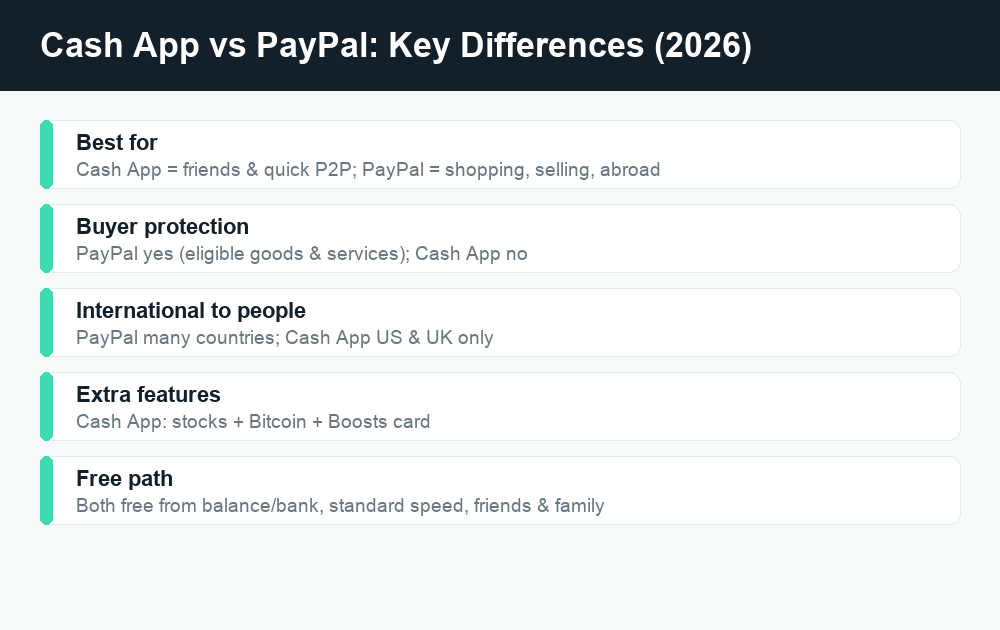
Cash App vs PayPal at a glance
Both apps let you hold a balance, link a bank account or card, and move money in a few taps. The difference is in their DNA. PayPal was built around online checkout and marketplaces, so it leans heavily on protections, invoicing, and accepting card payments from people you’ve never met. Cash App grew up as a peer-to-peer (P2P) money app for friends, then bolted on a debit card, direct deposit, stock investing, and Bitcoin.
Here’s a side-by-side on the things most people care about. Treat these as general descriptions for 2026 — exact fees and limits change often, so always confirm the current numbers inside each app before you rely on them.
| Feature | Cash App | PayPal |
|---|---|---|
| Send to friends (from balance/bank) | Free | Free for personal “friends & family” within the US |
| Send with a linked credit card | Fee applies (a percentage) | Fee applies on personal card-funded payments |
| Instant transfer to your bank | Fee applies (percentage of the amount) | Fee applies (percentage, capped) |
| Standard bank withdrawal | Free (takes 1-3 business days) | Free (takes about 1-3 business days) |
| Buyer/Purchase Protection | No formal program for P2P | Yes, on eligible “goods & services” purchases |
| Debit card | Cash Card (free, with “Boosts”) | PayPal/cash-back debit and credit options |
| Crypto | Buy/sell/withdraw Bitcoin | Buy/sell several cryptocurrencies |
| Stock investing | Yes, fractional shares | Not a core feature |
| International to individuals | US and UK only (limited) | Yes, many countries (fees apply) |
| Business/merchant tools | Basic (Cash App for Business) | Extensive (invoices, checkout, marketplaces) |
Fees: where each app costs you money
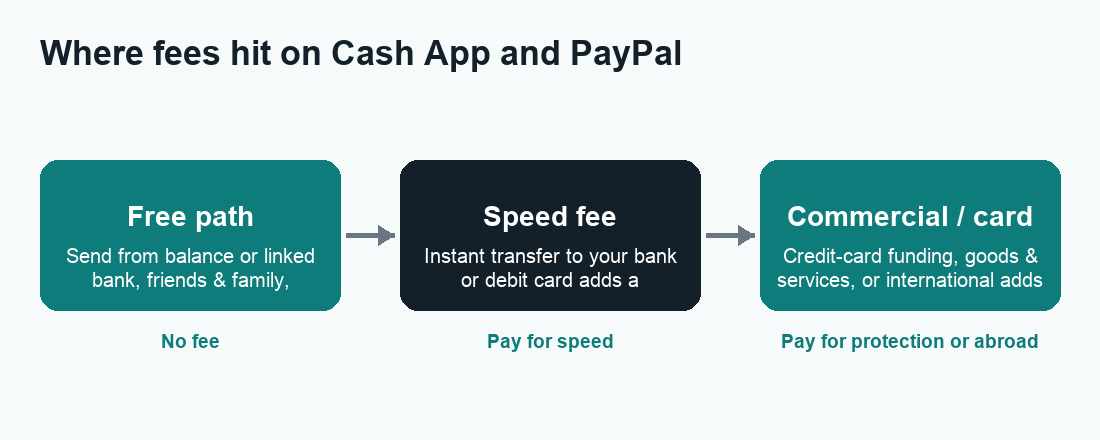
For everyday personal use, both apps can be free — if you’re patient and fund payments the right way. Fees show up when you want speed, when you use a credit card, or when money is treated as a commercial “goods and services” payment.
Cash App fees
Sending money from your Cash App balance or a linked bank account to another person is free. Two common charges to watch:
- Instant Deposit: moving your Cash App balance to your linked debit card right away carries a percentage fee. The free option (standard deposit) takes a few business days.
- Credit-card funding: paying someone using a linked credit card adds a percentage fee on top.
Cash App can also add fees on certain Bitcoin and stock activity, and ATM withdrawals with the Cash Card can be free if you have qualifying direct deposit, or carry a fee otherwise. For a deeper breakdown, see our guide to Cash App fees.
PayPal fees
Personal “friends and family” payments within the US, funded by your PayPal balance or a linked bank account, are typically free. You’ll usually pay when:
- You fund a personal payment with a credit or debit card (a percentage fee, sometimes plus a fixed amount).
- You choose an Instant Transfer to your bank or debit card instead of the free standard transfer.
- You send or receive internationally, where currency conversion and cross-border fees apply.
- You receive a “goods and services” payment as a seller — PayPal charges the recipient a commercial fee, but that’s the trade-off for buyer/seller protection.
The headline takeaway: PayPal’s free path mirrors Cash App’s (balance or bank, standard speed, friends-and-family). The moment you cross into commercial payments, currency conversion, or instant speed, fees enter the picture for both.
Sending and withdrawal limits
Limits on both apps depend heavily on whether you’ve verified your identity. Unverified accounts get low sending and receiving caps; once you confirm your identity (name, date of birth, and often the last digits of your SSN for US accounts), those caps rise substantially.
Because the exact dollar figures change and vary by account, don’t memorize a number you read online — open the app and check your own limits. As a general pattern:
- Verify your identity first. This is the single biggest lever for raising send, receive, and withdrawal limits on both apps.
- Expect rolling windows. Limits often reset over a 7-day or 30-day period rather than per transaction.
- Bank transfers and ATM withdrawals have their own caps separate from your P2P sending limit.
- Business accounts generally have higher receiving limits than personal ones.
If a transfer seems stuck against a cap or in review, our explainers on why a Cash App payment is pending can help you tell a limit problem from a security hold.
Buyer protection: the biggest practical difference
This is where the two apps genuinely diverge, and it’s the reason a lot of people keep PayPal around.
PayPal offers Purchase Protection on eligible “goods and services” transactions. If an item never arrives or is significantly different from the description, you can open a dispute and potentially get your money back, subject to PayPal’s terms and time limits. Sellers get a corresponding Seller Protection program on eligible sales. This is what makes PayPal a sensible choice for buying from someone you don’t know, on marketplaces, or for freelance work.
Cash App is fundamentally a P2P tool and does not provide a comparable buyer-protection program for ordinary person-to-person payments. Cash App and other P2P apps repeatedly warn that you should only send money to people you know and trust, because a sent payment is generally treated like handing over cash — hard to claw back. That’s a crucial safety point, not a knock on the app’s design.
What this means for scams
Scammers love P2P apps precisely because payments are fast and final. Common red flags on either platform: a “buyer” who overpays and asks for a refund, anyone pressuring you to switch a “goods and services” payment to “friends and family” to dodge fees (this also strips your protection), fake support agents who DM you, and prize or job offers that require you to pay first. Real support will never ask for your PIN, full card number, or a verification code. When in doubt, stop and verify through the official app, not a link someone sends you.
Cards, crypto, and investing
Debit cards and rewards
Cash App’s Cash Card is a free customizable debit card tied to your balance, and its standout feature is Boosts — instant discounts at specific merchants you toggle on. PayPal offers its own debit and cash-back card products and a digital wallet you can use at checkout and in stores via QR codes. If automatic, no-coupon discounts appeal to you, Cash App’s Boosts are a fun perk Cash App does better.
Crypto and stocks
Cash App lets you buy, sell, and withdraw Bitcoin, and it also offers commission-free stock investing with fractional shares, so you can buy a slice of a company for a few dollars. PayPal supports buying and selling several cryptocurrencies and has dabbled in its own stablecoin, but it isn’t a stock-trading app. If you want money movement and beginner investing in one place, Cash App is the more complete combo; if you only care about crypto, both work, with fees and supported coins to compare.
Business and selling
For accepting payments from customers, PayPal is the clear heavyweight. It offers professional invoices, online checkout buttons, shopping-cart integrations, subscriptions, and is accepted across countless websites and marketplaces. If you run an online store or freelance, PayPal’s reach and built-in protections are hard to beat.
Cash App for Business exists and is great for sole proprietors, market stalls, creators, and tip-style payments using a simple $Cashtag. Customers pay you with a tap, and you can accept payments quickly without a complicated setup. But it doesn’t match PayPal’s depth for e-commerce, invoicing, or international selling. Remember that business-tagged payments on both platforms may be subject to fees and tax reporting.
International payments
If you need to send money to someone in another country, PayPal wins easily. It supports cross-border transfers to many countries (with currency conversion and fees). Cash App’s person-to-person transfers are limited to the US and UK, so it’s not built for global use. For sending money home or paying an overseas contractor, PayPal — or a dedicated remittance service — is the practical choice.
Which should you use? Quick scenarios
- Splitting dinner or rent with friends: Either works and both are free from your balance or bank. Cash App’s interface is a bit quicker for casual P2P.
- Buying something from a stranger online: PayPal, using “goods and services” so Purchase Protection applies.
- Selling on a marketplace or freelancing: PayPal for invoicing, checkout, and reach.
- Sending money to another country: PayPal (or a specialist money-transfer app).
- Wanting a free debit card with instant discounts: Cash App and its Boosts.
- Dipping into stocks or Bitcoin casually: Cash App.
- Running an online store: PayPal, with Cash App as a simple add-on for fans and tips.
You don’t have to pick just one. A common setup is Cash App for friends and quick personal stuff, and PayPal for shopping, selling, and anything that needs protection. If you want to compare against other popular options, see our hubs for Venmo, Zelle, and PayPal.
How to decide in three steps
- Name your main use. Mostly paying friends? Lean Cash App. Mostly buying, selling, or international? Lean PayPal.
- Check the fee path you’ll actually use. If you’ll fund with a credit card or need instant transfers, compare those specific fees in each app — that’s where costs differ most.
- Decide if you need protection. Any time money goes to someone you don’t fully trust, the buyer protection PayPal offers on eligible purchases is worth the commercial fee.
Frequently asked questions
Is Cash App or PayPal cheaper?
For free, standard, friends-and-family payments funded by your balance or bank, they’re effectively tied — both can be free. Costs diverge on credit-card funding, instant transfers, international payments, and commercial “goods and services” fees, so the cheaper app depends on exactly how you pay. Always confirm current rates in the app.
Does Cash App have buyer protection like PayPal?
No. Cash App does not offer a buyer-protection program comparable to PayPal’s Purchase Protection for ordinary person-to-person payments. Treat Cash App payments like cash and only send to people you trust. PayPal’s protection applies to eligible “goods and services” transactions, subject to its terms.
Which is safer, Cash App or PayPal?
Both use encryption and security features, and both can be safe when used carefully. PayPal generally offers more recourse on eligible purchases thanks to its dispute and protection programs. The biggest risk on either app is scams that trick you into sending money voluntarily — no app can easily reverse those, so caution matters most.
Can I send money internationally with Cash App?
Cash App’s person-to-person transfers are limited to the US and UK, so it isn’t suited for global transfers. For international payments, PayPal supports many countries (with fees and currency conversion), or you can use a dedicated remittance service.
Can I have both Cash App and PayPal?
Yes, and many people do. A popular approach is using Cash App for casual payments to friends and PayPal for online shopping, selling, and anything that needs protection. There’s no conflict in keeping both installed and linked to the same bank account.
Do Cash App and PayPal report to the IRS?
Payments tagged as business or “goods and services” can be subject to tax reporting rules, and thresholds for these forms have changed in recent years. Genuine gifts and reimbursements between friends generally aren’t taxable income, but you should keep records and check the current IRS guidance or a tax professional for your situation.
Why is my payment pending or held?
Pending status usually means a security review, an unverified account hitting a limit, or a bank-transfer delay. Verifying your identity and confirming details typically clears it. See our guides on Cash App pending payments and Venmo pending payments for step-by-step help.
How do I close an account I no longer use?
Both apps let you withdraw any remaining balance and then close the account from the app’s settings or support area. For Cash App specifically, see our walkthrough on how to delete your Cash App account, and always cash out your balance first.
Last updated: June 2026. Fees, limits, and features can change — always confirm current details in the app. WalletWisp is an independent guide and is not affiliated with any app mentioned. This article is general information, not financial advice.
Related: A full breakdown of Cash App fees, how Venmo’s fees compare, and whether Zelle is safe to use.