If you want to know how to delete a PayPal account, the short version is that you close it from the Settings section on PayPal.com or in the app once your balance is at zero and no transactions are pending. Closing a personal PayPal account takes only a few minutes, but you must first withdraw or zero out your balance, settle any open disputes or payments, and clear any negative balance — after that, you go to Settings and choose the option to close your account. Once it’s closed, the account is permanently gone and you can’t log back in with it.
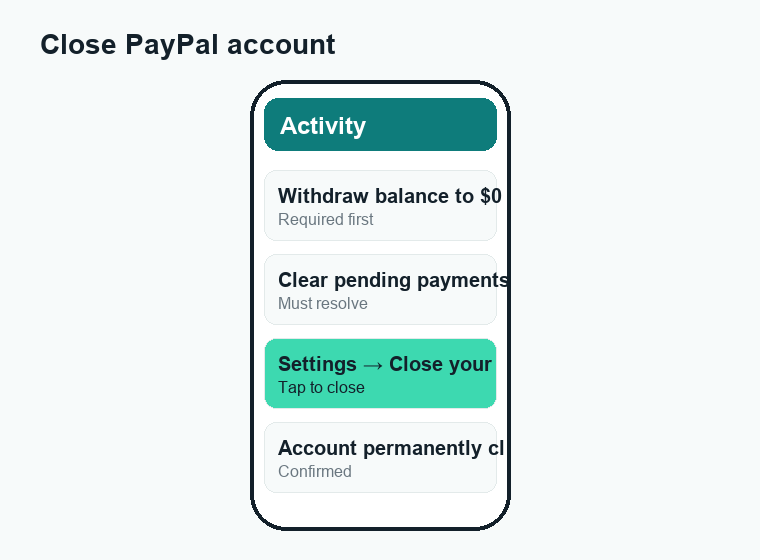
Quick answer: To delete a PayPal account, first move your balance to $0 (withdraw to your bank or spend it), resolve any pending payments and disputes, and pay off any negative balance. Then open Settings on PayPal.com (gear icon) or the app, find the Close your account option under your account or profile settings, and confirm. The closure is permanent — you cannot reopen the same account, though you can sign up again later with a new one.
Before you delete: do these things first
PayPal won’t let you close an account that has money in it or unfinished business attached to it. Trying to skip these steps is the number one reason people get stuck on an error message. Walk through this checklist before you touch the close button.
1. Withdraw or spend your balance
Your PayPal balance must read zero. You can transfer the money to a linked bank account or debit card, or simply spend it. Standard bank transfers are usually free but take a few business days; instant transfers to an eligible debit card or bank typically arrive within minutes for a fee. Confirm the current transfer fee in the app before you send, because these can change.
2. Clear any pending transactions
If you have payments that are still processing, e-checks that haven’t cleared, or money someone just sent you that’s “on hold,” wait until everything settles. PayPal treats a pending balance as money tied to the account, and it will block closure until those clear. This is similar to how a Venmo payment shows as pending until it fully processes on the other side.
3. Resolve open disputes, claims, and chargebacks
Any active case in the Resolution Center — a buyer dispute, a claim, or a chargeback — has to be closed out first. If a customer or seller has an open case against you, PayPal keeps the account active so the case can be decided. Check the Resolution Center and make sure nothing is in progress.
4. Pay off a negative balance
If your balance is negative (for example, after a refund or reversal you owe PayPal), you must bring it back to zero before closing. A negative balance is a debt, and closing the account does not erase it. Leaving money owed can lead to collections, so settle it properly.
5. Cancel subscriptions and automatic payments
If you pay for streaming services, software, memberships, or anything else with recurring billing through PayPal, cancel or move those to another payment method first. Once the account is gone, those automatic payments will fail, which can interrupt your services or rack up late fees from the merchant.
6. Download your statements and transaction history
After closure you lose easy access to your history. If you need records for taxes, expense reports, or warranty proof of purchase, download your statements or activity export first. You generally have limited or no access to detailed records once the account is closed.
How to delete a PayPal account on the website (desktop)
The web version gives you the clearest view of your settings, so many people find it the easiest place to close an account. Here’s the standard flow on a computer.
- Go to PayPal.com and log in with your email and password.
- Click the Settings gear icon, usually near the top-right corner.
- Stay on the Account or profile area where your personal information is listed.
- Look for a Close your account link. It is often near the bottom of the account settings page.
- Click it and read the on-screen notice about what closing does.
- If prompted, confirm your identity and confirm again that you want to permanently close the account.
- You’ll see a confirmation that the account is closed. PayPal may also email you to confirm.
If the Close your account option is missing or grayed out, that’s PayPal’s way of telling you something on the checklist above isn’t done yet — most often a non-zero balance, a pending payment, or an open case.
How to delete a PayPal account in the mobile app
You can also close your account from the PayPal app on iPhone or Android. The wording shifts slightly between app updates, but the path is consistent.
- Open the PayPal app and sign in.
- Tap your profile icon or the Settings gear, usually in a corner of the home screen.
- Scroll to Account or Account settings.
- Look for Close account or Close your account.
- Tap it, review the warning, and confirm.
If you have a PayPal business account, the steps are similar, but you may be routed to contact support or complete an extra verification step depending on your account type and country. If you can’t find the option at all in the app, switch to the desktop website — it tends to expose every setting more reliably.
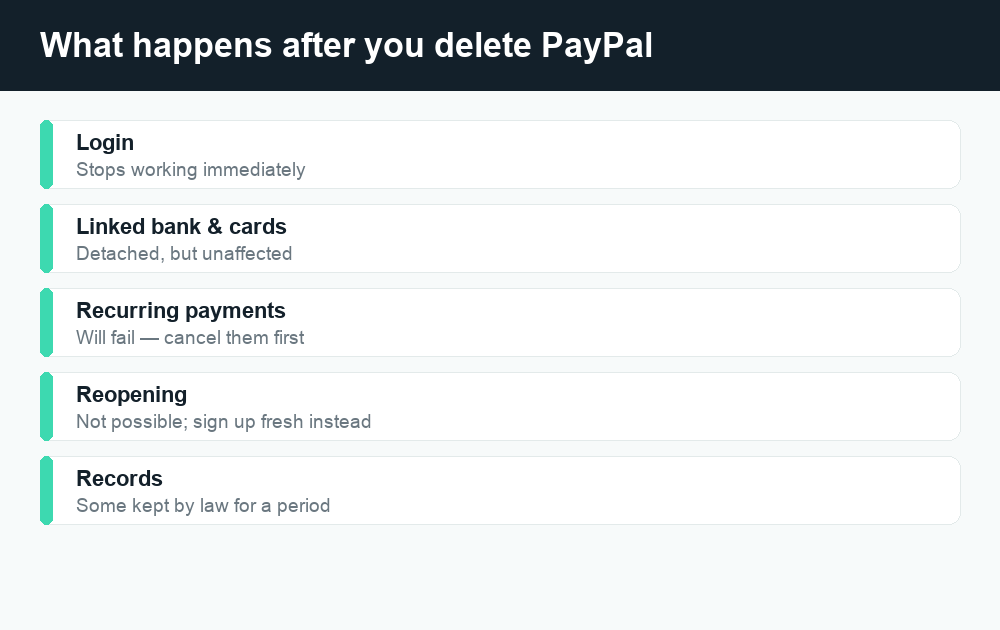
What happens after you close your PayPal account
Closing is meant to be final, so it’s worth knowing exactly what changes. Here’s what to expect once the account is gone.
- You can’t log in anymore. The login for that account stops working immediately.
- Linked cards and bank accounts are detached. Your bank and cards themselves are unaffected — they’re simply no longer connected to PayPal.
- Recurring payments stop. Any subscriptions billed through PayPal will fail going forward, which is why canceling them first matters.
- Your email/phone may free up. After closure, the email address tied to the old account can usually be reused on a brand-new PayPal account later.
- Some records are retained. PayPal keeps certain transaction data for a period of time to meet legal, tax, and anti-fraud requirements, even though you can’t see it. This is normal for regulated financial services.
Money you didn’t withdraw
If you somehow closed with a small leftover balance, or a refund lands after closure, contact PayPal customer support. They can help you reclaim funds owed to you. Never trust an outside “agent” who messages you promising to release PayPal funds for a fee — that’s a classic scam pattern. Only deal with PayPal through its official site, app, or verified support channels.
Timeline: how long each step takes
Most of the closure itself is instant. The waiting happens earlier, while your money moves and cases resolve. Here’s a rough guide; always confirm current timing in the app because it can vary by bank, country, and account status.
| Step | Typical timeframe | Notes |
|---|---|---|
| Standard bank withdrawal | 1–3 business days | Usually free; timing depends on your bank |
| Instant transfer to debit/bank | Minutes (most cases) | Fee applies; confirm rate in app |
| Pending payment / e-check clearing | Up to several business days | Must fully clear before you can close |
| Open dispute or claim resolution | Days to weeks | Varies by case; some claims run longer |
| Account closure itself | Instant | Confirmed on screen and often by email |
| Reusing the same email on a new account | Usually right away | You create a fresh account, not a reopened one |
Can you reopen a closed PayPal account?
In most cases, no — a closed PayPal account is permanently closed and cannot be reopened or restored to its old state. If you change your mind, the practical path is to create a new account, usually with the same email and bank details. Your old transaction history, saved settings, and reputation won’t carry over to the new account.
There are narrow exceptions. If your account was closed very recently, or if it was closed in error, contacting PayPal support quickly is your best shot at any kind of recovery. Don’t count on it, though — treat closure as a one-way door, which is exactly why the pre-closure checklist matters so much.
A reversible alternative: limit or deactivate use
If you’re closing the account mainly to stop using it or to feel more secure, you have softer options. You can remove your linked bank and cards, turn off automatic payments, and simply stop using the account. That keeps your history accessible and leaves the door open if you ever need PayPal again, without the finality of full closure.
Deleting PayPal vs. other money apps
The pattern is the same across most payment apps: zero out your balance, clear pending items, then close from settings. If you’re cleaning up several apps at once, our guides on deleting a Cash App account and managing Cash App fees walk through the equivalent steps. The big shared rule everywhere is simple — never close an account that still holds money or has an open dispute.
Watch out for closure scams
Account changes are a favorite hook for scammers. Around the time you’re searching for how to close or “delete” your account, be alert for fake “PayPal security” emails, texts, or calls claiming your account will be deleted unless you “verify” by clicking a link or sharing a code. PayPal will never ask for your password or a one-time code over the phone or by text. When in doubt, ignore the message and log in directly by typing PayPal.com yourself. For broader payment-app safety habits, see our look at whether Zelle is safe — the same instincts apply to PayPal.
Frequently asked questions
Does deleting my PayPal account delete my data?
It removes your access and detaches your bank and cards, but PayPal still retains certain records for a legally required period to meet financial, tax, and anti-fraud rules. You won’t be able to see this data, and your login stops working, but it isn’t all instantly erased from PayPal’s systems.
Can I delete my PayPal account if I still have money in it?
No. You must bring your balance to exactly zero first by withdrawing the funds to your bank or debit card, or by spending them. PayPal blocks closure while there’s a balance, so transfer or use the money before you try to close.
Can I delete my PayPal account with a negative balance?
No. A negative balance is money you owe PayPal, and you must pay it off before closing. Closing the account does not cancel the debt; leaving it unpaid can lead to collection efforts, so settle it properly first.
How do I delete a PayPal account without logging in?
You generally can’t close an account you can’t access. If you’ve lost your password, use PayPal’s password recovery or account-access help to regain entry first, then follow the closure steps. If you’re locked out for security reasons, contact official PayPal support for help.
Will closing PayPal cancel my subscriptions?
Closing the account stops PayPal from funding those subscriptions, so they’ll fail going forward — but the merchants may still consider you signed up and could charge late fees or interrupt service. Cancel or move recurring payments to another method before closing to avoid surprises.
Can I reopen a PayPal account after deleting it?
In most cases the closure is permanent and the old account can’t be reopened. You can create a new account, often with the same email and bank, but your previous history and settings won’t transfer. If it was closed very recently or in error, contact support promptly.
How long does it take to delete a PayPal account?
The closure itself is essentially instant once you confirm. The time-consuming part is the prep — withdrawing your balance (often 1–3 business days for a standard bank transfer) and waiting for any pending payments or disputes to fully resolve before the close option becomes available.
What’s the difference between closing and just removing my card?
Removing a linked card or bank simply unlinks that funding source while your account stays open and usable. Closing the account ends everything permanently. If you only want to stop a specific payment method or take a break, unlinking is the reversible, lower-stakes choice.
Last updated: June 2026. Fees, limits, and features can change — always confirm current details in the app. WalletWisp is an independent guide and is not affiliated with any app mentioned. This article is general information, not financial advice.
Related: How to delete a Cash App account · Venmo fees explained · More PayPal guides