Why is my Zelle payment pending? In almost every case, it is because the recipient has not yet enrolled in Zelle with the email or U.S. mobile number you sent money to. Zelle holds the payment until they enroll, and if they do not enroll within about 14 days the payment automatically cancels and the money returns to your account. The other common causes are a short bank security review on a first-time or large transfer, or a routine bank processing delay. None of these usually require action beyond waiting or nudging your recipient to enroll.
Below we break down each reason a Zelle payment shows as pending in 2026, how long “pending” typically lasts, how to check the real status inside your banking app, and exactly what to do to fix or cancel a stuck payment.
The 3 Main Reasons a Zelle Payment Is Pending
1. The recipient has not enrolled in Zelle (most common)
Zelle sends money to an email address or U.S. mobile number, not to an account number. If the person you paid has never linked that specific email or phone number to Zelle through their bank’s app, there is no account for the money to land in yet. Zelle sends them an invitation and holds the transfer as pending until they enroll. This is by far the most frequent reason people ask why is my Zelle payment pending.
Important: Zelle discontinued its standalone app in 2025. Today Zelle works only inside participating banks’ and credit unions’ own apps. Your recipient must enroll through their bank’s or credit union’s mobile app or online banking, not through a separate Zelle app, because that app no longer exists.
2. A first-time or large transfer flagged for security review
Banks routinely apply a short security or fraud review to payments that look higher-risk: your very first Zelle payment, a first payment to a brand-new recipient, or a transfer that is large relative to your normal activity. During this review the payment appears pending, typically for a few minutes up to a few hours, occasionally until the next business day. This is a protective step, not a sign anything is wrong.
3. A routine bank processing or connectivity delay
Sometimes the pending status is simply a processing lag on the bank’s side, a temporary outage, or a payment initiated outside business hours. These clear on their own, usually within minutes to a few hours. If either your bank or the recipient’s bank is having a service disruption, the transfer can sit pending until systems recover.
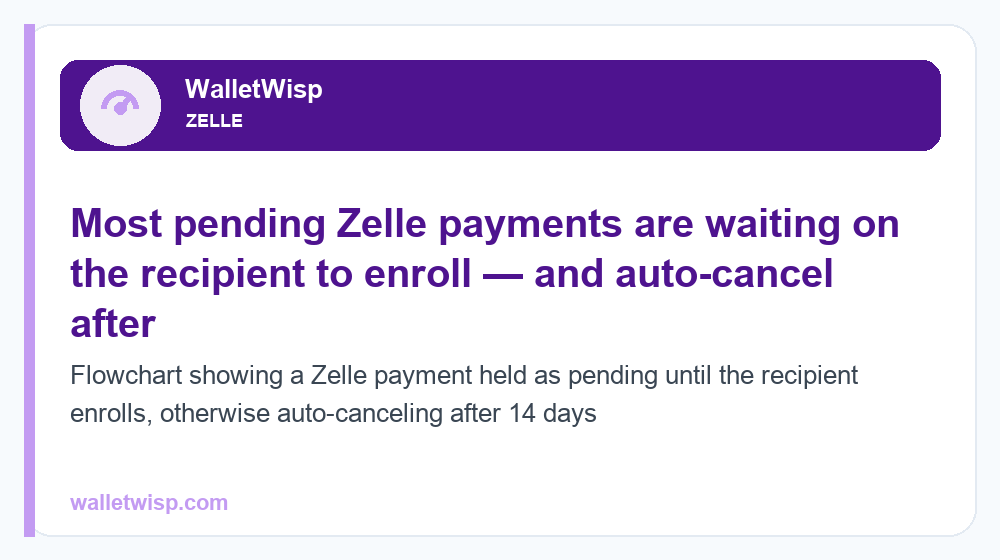
Reasons a Zelle Payment Is Pending and How Long It Lasts
The table below summarizes each cause, typical duration, and whether you need to do anything. Durations are typical/approximate and vary by bank.
| Pending reason | Typical duration | Do you need to act? |
|---|---|---|
| Recipient not enrolled in Zelle | Until they enroll; auto-cancels after ~14 days | Yes — remind them to enroll via their bank app |
| First-time payment / new recipient review | Minutes to a few hours (rarely next business day) | No — usually just wait |
| Large or unusual transfer flagged | Minutes to same/next business day | Maybe — bank may text you to confirm |
| Routine bank processing delay | Minutes to a few hours | No — wait |
| Bank or Zelle network outage | Until service is restored | No — check bank status page |
| Wrong email/phone entered | Stays pending; auto-cancels after ~14 days | Yes — cancel and resend correctly |
How Long Does a Zelle Payment Stay Pending?
It depends entirely on the cause. A security review or processing delay usually clears in minutes to a few hours. A payment to an unenrolled recipient can stay pending for up to about 14 days while Zelle waits for them to sign up. If they never enroll, the payment expires and the funds are returned to your account automatically. For a deeper look at normal delivery windows versus these hold periods, see our guide on how long a Zelle transfer takes.
Note that once a recipient is enrolled, Zelle payments typically arrive within minutes. If a payment to an already-enrolled recipient still shows pending after a few hours, that points to a security review or a processing/outage issue rather than an enrollment problem.
How to Check the Status of a Pending Zelle Payment
Because Zelle now lives inside your bank’s app, you check status there:
- Open your bank’s or credit union’s mobile app or online banking.
- Find the Zelle or “Send Money with Zelle” section (often under Payments or Transfers).
- Open Activity or Transaction history.
- Look for the payment’s status label: Pending, Processing, or a note that the recipient must enroll to receive the funds.
If the status says the recipient needs to enroll, that confirms reason #1. If it just says pending or processing with no enrollment note, it is more likely a security review or processing delay. Many banks also let you tap the transaction to see an estimated completion time or a “Stop this payment” / “Cancel” option.
How to Fix or Cancel a Pending Zelle Payment
If the recipient has not enrolled
You have two good options. First, ask the recipient to enroll: they open their own bank’s app, find Zelle, and register the exact email or phone number you sent to. Once enrolled, the pending payment usually completes within minutes. Second, if you sent to the wrong contact info or want your money back sooner, you can cancel the payment while it is still pending, since an unenrolled recipient means the funds have not moved yet.
How to cancel a pending payment
- Open your bank’s app and go to your Zelle activity.
- Select the pending payment.
- Choose Cancel This Payment or Stop Payment (wording varies by bank).
- Confirm; the funds return to your account, typically right away.
For a full walkthrough of your cancellation rights and the key limitation, read our step-by-step on how to cancel a Zelle payment. The critical rule: you can cancel only while the payment is pending because the recipient has not enrolled. Once someone is enrolled and the money is delivered, Zelle payments cannot be reversed — Zelle is designed for people you trust, like sending cash.
If a large transfer is stuck
If the pending payment is large or your first, check for a text or push notification from your bank asking you to confirm the transaction; approving it often releases the payment immediately. If your amount exceeds your daily or monthly cap, the payment may not go through at all — review the numbers in our guide to Zelle transfer limits.
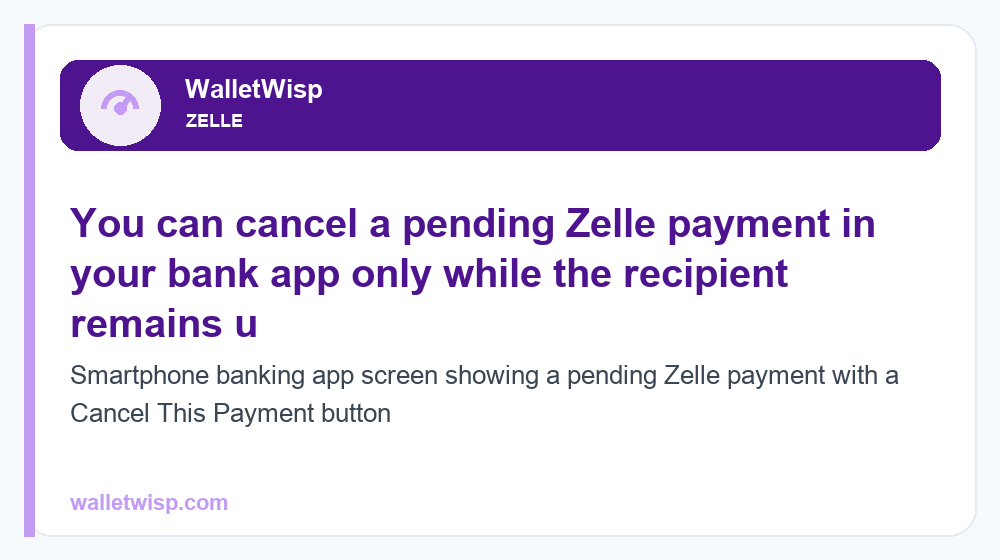
What to Do for Each Pending Situation
Use this quick-reference table to match your situation to the right next step.
| Your situation | What to do | Expected outcome |
|---|---|---|
| Status says “recipient must enroll” | Text them to enroll via their bank app | Payment completes within minutes after they enroll |
| Sent to wrong email/phone | Cancel the pending payment; resend to correct info | Funds returned; new payment goes to right person |
| First Zelle payment ever | Wait; approve any bank confirmation prompt | Clears in minutes to a few hours |
| Large payment flagged | Confirm via bank alert; verify you are under limits | Released after confirmation or next business day |
| Recipient enrolled but still pending 24h+ | Contact your bank’s support | Bank investigates outage or hold |
| Payment pending 14+ days | Confirm it auto-canceled and funds returned | Money back in your account |
When to Contact Your Bank
Most pending payments resolve on their own, but reach out to your bank or credit union’s customer support when:
- A payment to an already-enrolled recipient has been pending for more than a few hours (over 24 hours is a clear flag).
- The funds left your available balance but the recipient never received them and the payment is not showing as pending or returned.
- A payment that should have auto-canceled after ~14 days did not return your money.
- You suspect fraud, sent money to a scammer, or do not recognize a Zelle transaction.
Because Zelle operates through your bank, your bank — not a separate Zelle helpline — is the right contact for holds, returns, and disputes. Have the recipient’s email/phone, the amount, and the date ready to speed things up.
How to Avoid Pending Zelle Payments Next Time
- Confirm enrollment first. Ask the recipient which email or U.S. mobile number they have registered with Zelle before you send.
- Double-check the contact info. One wrong digit or a typo in an email sends the payment into limbo.
- Send smaller test amounts for first-time or large transfers to a new recipient to sidestep security holds.
- Stay under your limits. Know your bank’s daily and monthly Zelle caps.
- Send during business hours when possible, so any review clears faster.
Frequently Asked Questions
Why is my Zelle payment pending if I have used Zelle before?
Even if you have used Zelle successfully, a specific payment can pend because that particular recipient has not enrolled, or because your bank flagged this transfer as unusually large or as a first payment to a new contact. Check the status note in your bank app to see which applies.
How long will my Zelle payment stay pending?
A security review or processing delay typically clears in minutes to a few hours. A payment to someone who has not enrolled can stay pending for up to about 14 days, after which it auto-cancels and the money returns to your account.
Will a pending Zelle payment come out of my account?
When the recipient has not enrolled, the money has not actually moved, so a canceled or expired payment returns to your balance. If your available balance already dropped and the payment is stuck, contact your bank to confirm the funds are being held or returned.
Can I cancel a pending Zelle payment?
Yes — but only while it is pending because the recipient has not enrolled. Open your bank app, select the pending payment, and choose Cancel or Stop Payment. Once a recipient is enrolled and the money is delivered, the payment cannot be canceled or reversed.
How do I get a pending Zelle payment to go through?
Ask the recipient to enroll the exact email or U.S. mobile number you sent to, using their own bank’s app. Once they enroll, the pending payment usually completes within minutes. For flagged transfers, approve any confirmation prompt your bank sends.
Is there still a Zelle app I can download to fix this?
No. The standalone Zelle app was discontinued in 2025. Zelle now works only inside participating banks’ and credit unions’ own apps, so both you and your recipient must use your respective banking apps to send, receive, and enroll.
My Zelle payment has been pending for over 24 hours — what now?
If the recipient is already enrolled and it has been more than a day, that suggests a hold, outage, or processing issue rather than enrollment. Contact your bank’s customer support with the amount, date, and recipient details so they can investigate.
Does a large Zelle payment always get flagged as pending?
Not always, but larger or unusual amounts are more likely to trigger a short security review, and amounts above your bank’s daily or monthly limit may be blocked entirely. Check your caps before sending and split large payments if needed.