

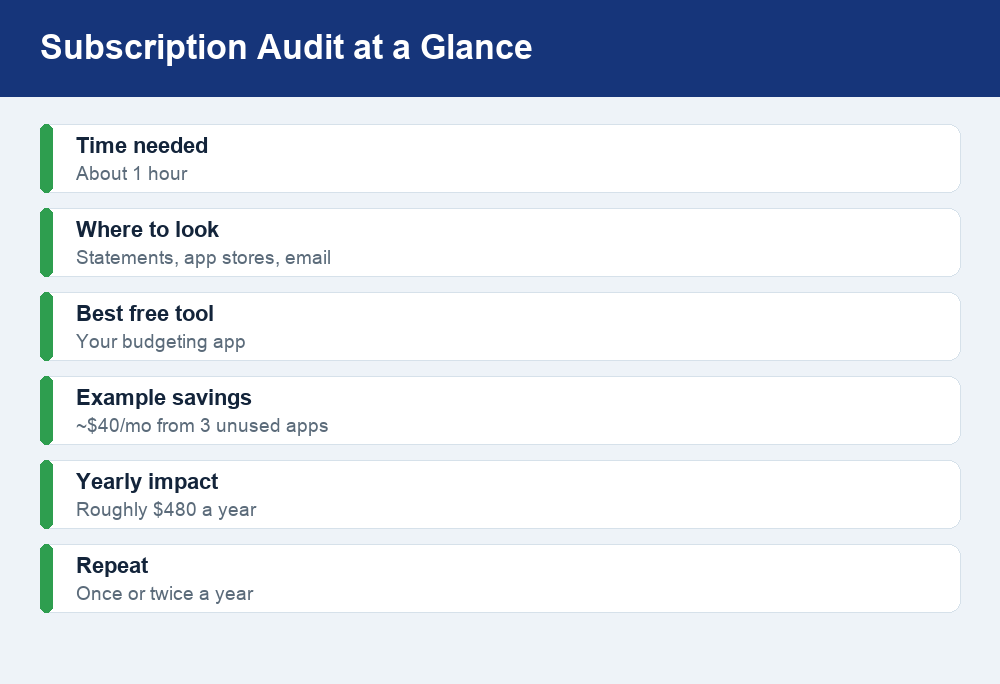
To cancel unwanted subscriptions and save money in 2026, first track down every recurring charge on your bank and card statements and in your Apple and Google app stores, then cancel each one at its source and set a reminder before any free trial renews. The whole audit takes about an hour and can free up real money you are currently paying for services you forgot you had.
Quick answer: List every subscription by scanning your bank and credit-card statements, checking your App Store and Google Play subscription lists, and searching your email for receipts. Cancel each service where you signed up: streaming sites in your account settings, phone apps in your device settings, and gyms often in person or by certified mail. Before you cancel outright, consider pausing or asking for a lower rate. Then track recurring charges in a budgeting app so nothing sneaks back in.
Why forgotten subscriptions quietly drain your budget
Subscriptions are designed to be easy to start and easy to forget. You sign up for a free trial, a streaming service for one show, or an app you used once, and the charge keeps hitting your account month after month. Because each one is small, none of them feels worth the trouble of cancelling, so they pile up in the background.
The trouble is that small charges add up fast. A handful of $10-to-$15 services you no longer use can quietly cost you a few hundred dollars a year. Surveys have repeatedly found that people underestimate what they actually spend on subscriptions, often by a wide margin, because the money leaves in small, automatic pieces rather than one obvious payment. A subscription audit fixes that by putting every recurring charge in one place so you can decide, on purpose, what is worth keeping.
Step 1: Find every subscription you are paying for
You cannot cancel what you cannot see, so the first job is building a complete list. Use several sources, because no single one catches everything.
- Scan your bank and credit-card statements. Pull the last two or three months and look for anything that repeats on roughly the same date each month or year. Annual charges are easy to miss, so check a full year if you can.
- Check your Apple App Store and Google Play subscription lists. On an iPhone, open Settings, tap your name, then Subscriptions. On Android, open the Google Play Store, tap your profile icon, then Payments & subscriptions. Many app subscriptions bill through these stores rather than the company directly.
- Review your email receipts. Search your inbox for words like receipt, renewal, your subscription, trial, and invoice. This often surfaces services that bill straight from the company and never show up in an app store.
- Use a subscription-tracking or audit app. Tools such as Rocket Money connect to your accounts and flag recurring charges automatically. They can be a fast shortcut, but read the terms first: some charge a fee or take a cut of what they save you, and you can always do the same audit by hand for free.
Write everything down in one list, whether that is a note on your phone, a spreadsheet, or a budgeting app. For each item, jot the amount, the billing date, and whether you actually use it.
Step 2: Decide what to keep, cut, pause, or negotiate
Once you can see the full list, go through it line by line and be honest about how often you use each service. Cancelling is not the only option. Sometimes pausing or negotiating keeps something you value while still cutting the cost.
| Situation | Best move | Why |
|---|---|---|
| You never use it or forgot you had it | Cancel | No reason to keep paying for something you do not touch. |
| You use it seasonally (a workout app in winter, a streaming service for one series) | Pause | Many services let you pause for a set period so you keep your settings without paying. |
| You use it but the price keeps rising | Negotiate or downgrade | Ask for a retention discount, switch to an ad-supported tier, or move to an annual plan that costs less per month. |
| You use it regularly and it is worth the cost | Keep | A subscription you genuinely value is money well spent. |
To negotiate, call or chat with customer service and simply say you are thinking about cancelling because of the price. Companies often route you to a “retention” offer with a lower rate, a free month, or a plan you did not know existed. Rotating services also works well: subscribe to one streaming platform, watch what you want, cancel, and move to the next one next month instead of paying for four at once.
Step 3: Cancel each type the right way
Where you cancel depends on where you signed up. Cancelling in the wrong place, or just deleting an app, usually does not stop the billing. Here is how the common types work.
Streaming and website subscriptions
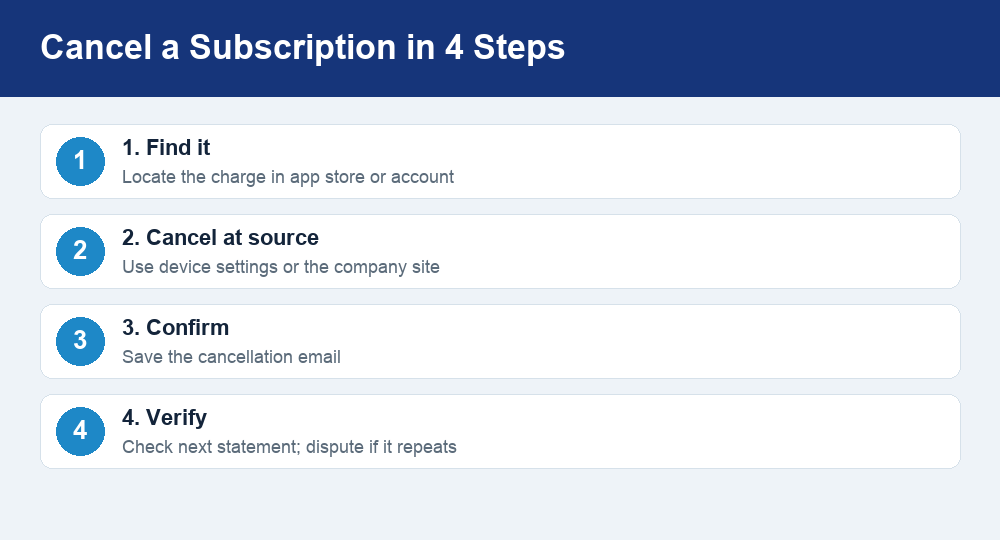
For services you signed up for directly on a company’s website, log in to your account, open Account or Membership settings, and look for Cancel or Manage plan. Follow it all the way to a confirmation screen and save the confirmation email. Deleting the app from your phone does nothing to the billing; you have to cancel the plan itself.
App-store subscriptions (iPhone and Android)
If a subscription bills through your phone, you have to cancel it in your device settings, not in the app. On an iPhone, go to Settings > your name > Subscriptions, tap the service, and choose Cancel Subscription. On Android, open the Google Play Store > profile icon > Payments & subscriptions > Subscriptions, pick the service, and tap Cancel subscription. You will usually keep access until the end of the period you already paid for.
Gym memberships
Gyms are often the hardest to leave on purpose. Many require you to cancel in person, by phone, or by mailed letter, and some ask for advance notice before your next billing date. Read your contract for the exact steps, keep a copy of any cancellation notice you send, and consider sending letters by a method that gives you proof of delivery. Watch for annual “maintenance” fees that can hit even after you think you are done.
Free-trial traps that auto-convert
Free trials are the single biggest source of surprise charges because they are built to convert to paid automatically. The moment you start one, set a calendar reminder a day or two before it ends, and cancel then if you do not want to keep it. In most cases cancelling during the trial still lets you use the service until the trial period is up, so you lose nothing by cancelling early.
How to avoid accidental re-subscription
Cancelling once does not always keep a charge gone for good. A few habits stop services from creeping back onto your statement:
- Always cancel through to a confirmation. Screenshot or save the confirmation email so you have proof if a charge appears anyway.
- Check your next statement. Confirm the charge actually stopped. If it did not, contact the company, and if they will not fix it, dispute the charge with your bank or card issuer.
- Be careful with “pause” offers. Some cancellation flows push you to pause instead, which quietly restarts billing later. Make sure you are cancelling, not just pausing, if that is what you want.
- Use a fresh reminder every renewal season. Put a recurring note in your calendar to re-run this audit once or twice a year.
- Watch virtual-card and “buy now” sign-ups. If your bank offers single-use or lockable card numbers, they can make it easier to shut off a merchant that keeps charging you.
The most reliable safeguard is to track every recurring charge in one place. A budgeting tool that categorizes your spending will flag a subscription the moment it reappears. If you do not already have one, our roundup of the best free budgeting apps for 2026 is a good starting point, and many of them let you tag recurring bills so nothing hides.
How much can a subscription audit save?
The exact number depends on how many services you carry, but the math is encouraging. Imagine you find three services you no longer use at roughly $12 to $15 each. Cancelling them frees up about $40 a month, which is close to $480 over a year, all from an hour of work. Add a negotiated discount on a service you keep, and the total climbs higher.
That freed-up money is most useful when you give it a job instead of letting it disappear again. Rolling the savings into an emergency fund, debt payoff, or your regular categories fits neatly into a plan like the 50/30/20 budget rule, where recurring “wants” like streaming get a clear spending cap. Trimming subscriptions also pairs well with everyday wins such as the tactics in our guide to saving money on groceries in 2026, so several small cuts add up to a noticeably lighter monthly budget.
Watch out for these common traps
A quick scam-aware checklist as you go through your list:
- “Cancel my subscription” search links. Search results and ads sometimes lead to fake cancellation pages that ask for your login or card details. Go directly to the company’s real website or your device settings instead.
- Third-party “cancel it for you” services that overreach. Legitimate tools exist, but be cautious about handing full account access to any app, and know exactly what it charges before you sign up.
- Prices and fees that change. Subscription prices, trial lengths, and gym fees change often. Confirm the current terms in the app or on the company’s official site rather than relying on an old figure.
Frequently asked questions
Does deleting an app cancel the subscription?
No. Removing an app from your phone stops you from using it but does not stop the billing. You have to cancel the subscription itself, either in your iPhone or Android settings if it bills through the app store, or in your account on the company’s website if it bills directly.
Is it worth using a subscription-tracking app like Rocket Money?
It can be, especially if you have a lot of accounts and want the audit done automatically. Just read the terms first, since some tracking apps charge a subscription of their own or keep a portion of what they save you. You can always build the same list for free by reviewing your statements, app-store subscription lists, and email receipts.
Should I cancel or just pause a subscription?
Pause when you still want the service but only use it part of the year, such as a fitness app you use seasonally or a streaming platform you binge for one show. Cancel when you genuinely will not use it again. Pausing keeps your account and settings without charging you, but make sure you know when billing restarts.
How do I stop a free trial from charging me?
Set a reminder a day or two before the trial ends and cancel then. In most cases you keep access for the rest of the trial period even after you cancel, so there is no downside to cancelling early. If a charge still appears, contact the company and, if needed, dispute it with your bank.
What if a company keeps charging me after I cancel?
First, confirm you completed the cancellation and have a confirmation email. If a charge still hits your account, contact the company with that proof. If they will not refund or stop it, dispute the charge with your bank or card issuer, and consider using a lockable or single-use card number to block the merchant.
The bottom line
Cancelling unwanted subscriptions is one of the easiest ways to free up money without changing your lifestyle. Spend an hour finding every recurring charge, decide on purpose what to keep, cut, pause, or negotiate, and cancel each service where you signed up. Then track recurring charges in a budgeting app and re-run the audit once or twice a year. The services worth paying for stay, the forgotten ones go, and the savings quietly work in your favor.


