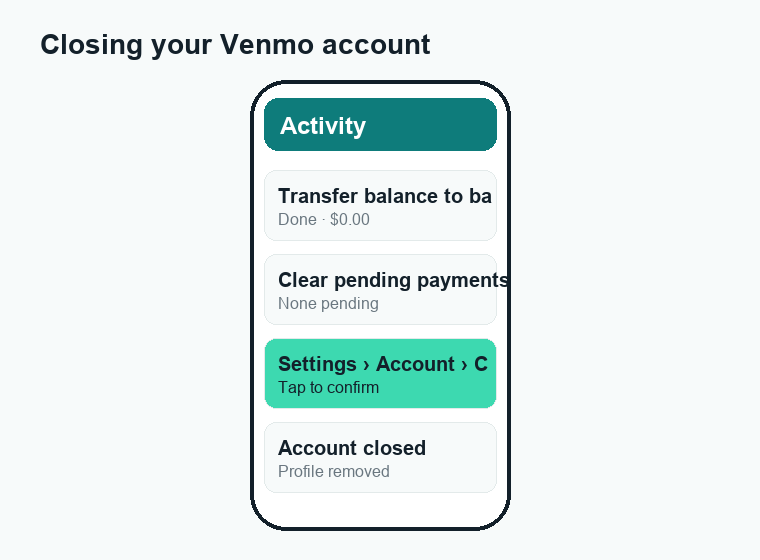
If you want to know how to delete a Venmo account, here is the short version: empty your balance and clear any pending payments first, then go to Settings and choose “Delete Account” in the app, or close it on the Venmo website. Venmo will not let you finish if you still hold money or have transfers in progress, so the cleanup step matters most.
Quick answer: Move your full balance to a linked bank, cancel or wait out any pending payments, then open the Venmo app, tap the Settings (gear or “Me”) menu, and select Account > Close/Delete Account. You can also do it at venmo.com under Settings. Once confirmed, your profile is removed and you cannot send or receive money, though Venmo keeps records of past transactions for legal and tax reasons.
Before you delete your Venmo account: zero the balance first
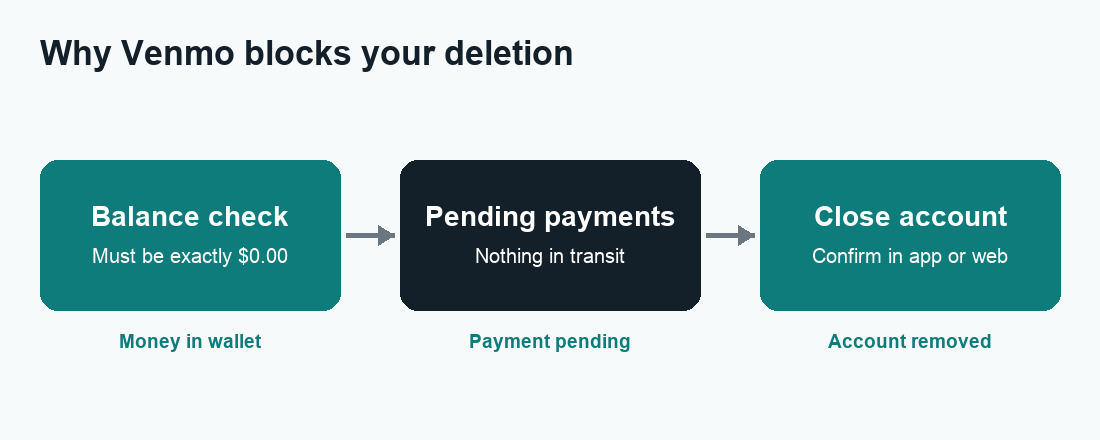
This is the step most people skip, and it is the reason the delete button often will not work. Venmo treats your account like a wallet. You cannot throw away a wallet that still has cash in it. So your first job is to get your Venmo balance down to exactly $0.00 and make sure nothing is in transit.
1. Cash out your full balance
- Open the Venmo app and look at your balance near the top of the screen.
- Tap your balance, then choose Transfer to Bank (sometimes shown as “Add” or “Transfer Money”).
- Pick Instant (small fee, arrives in minutes) or Standard (free, usually 1-3 business days).
- Confirm the transfer to your linked bank account or debit card.
If you only have a few cents left that you cannot move, you can send that tiny amount to a trusted friend instead. The goal is simply a $0.00 balance.
2. Clear pending payments and requests
A payment that is still “pending” counts as money in motion, and Venmo will block the closure until it settles. Check your activity feed and cancel any pending requests you sent, or wait for incoming ones to complete. If something is stuck, our guide on a Venmo payment that is pending walks through why it happens and how to clear it.
3. Turn off auto-features and subscriptions
If you use the Venmo Debit Card, Venmo Credit Card, crypto, or “Pay in 4,” settle or close those first. Also cancel any merchant or subscription that bills through Venmo, so a charge does not bounce after your account is gone.
| Cleanup task | Why it matters | Typical time |
|---|---|---|
| Transfer balance to bank | Venmo blocks deletion with a positive balance | Instant or 1-3 business days |
| Clear pending payments | Money in transit stops closure | Up to a few days |
| Cancel subscriptions billed to Venmo | Avoids failed charges after closing | Same day |
| Settle Venmo card or crypto | Open products prevent account removal | Varies |
How to delete a Venmo account in the app (iPhone & Android)
Once your balance is $0.00 and nothing is pending, the in-app route is the fastest way to close your account. The exact wording can shift slightly between app updates, but the path is consistent.
- Open the Venmo app and make sure you are signed in.
- Tap the Me tab (your profile photo), then tap the Settings gear in the top corner.
- Scroll to and tap Account.
- Select Close Account (older versions may say “Delete Account”).
- Read the on-screen notice, then confirm. You may be asked to re-enter your password or pass a security check.
If the option is greyed out, that almost always means a balance or a pending item is still open. Go back to the cleanup steps above and try again.
How to delete a Venmo account on the web (desktop)
Prefer a computer, or the app keeps blocking you? You can close your account from a browser instead. This is also handy if you no longer have the phone tied to your account.
- Go to venmo.com and sign in with your usual login.
- Click your profile name, then open Settings.
- Choose the Account section.
- Click Close my Venmo account (you may need to scroll down).
- Confirm your choice. Venmo may email you to verify the request.
The web flow checks the same requirements as the app: a zero balance and no money in transit. If it refuses, the screen usually tells you what is left to resolve.
What happens after you delete your Venmo account
Closing the account is not like deleting a photo. Some things vanish right away, and some do not. Here is the honest picture.
- Your profile disappears. Friends can no longer find you, pay you, or request money from you. Your username may be released over time.
- You lose access to your history in-app. Download a copy of your transaction statements first if you want them for budgeting or taxes.
- Venmo keeps some records. Like any U.S. money service, Venmo must retain certain transaction data for years to follow anti-fraud, tax, and financial regulations. “Closed” does not mean “erased from their systems.”
- Linked banks are unaffected. Your actual bank account and debit card stay open; only the Venmo link is cut.
- The Venmo email may stop too. You will stop getting payment notifications, but watch your inbox for any final confirmation.
| After closing | What you can still do | What you cannot do |
|---|---|---|
| Send or receive money | Nothing | No new payments either direction |
| Old transaction records | Retained by Venmo for legal reasons | View them in the closed app |
| Your username | May be reused/released later | Guaranteed to keep it |
| Linked bank/debit card | Stays fully active | — |
Can you reopen a Venmo account after deleting it?
Sometimes, but do not count on getting your old account back. In many cases you can reactivate or re-open shortly after closing if you contact Venmo support and your details still match. After more time passes, that window closes and the cleaner option is to sign up fresh.
If you create a brand-new account, you can usually reuse the same email and phone number, but your old transaction history, friends list, and possibly your old username will not carry over. If keeping your data is the goal, export your statements before you close anything.
Deactivate vs. delete: a quick note
Venmo does not offer a clean “pause” or “deactivate” toggle the way some apps do. The real choice is to close the account or simply stop using it. If you are unsure, you can remove your linked bank and card, set your privacy to Private, and let the app sit unused instead of permanently closing it.
Common problems when deleting a Venmo account
If the process stalls, it is almost always one of these issues.
“You must have a $0 balance” error
You still have money in Venmo, even a few cents. Transfer it out or send it to a friend, then retry. Remember that a pending incoming payment also counts.
A pending or frozen payment
Payments under review, or sent to someone who has not accepted them, keep the account open. Cancel what you can and wait for the rest to settle.
Negative balance or owed money
If a payment was reversed or a charge bounced, your balance can go negative. Venmo will not let you walk away from a debt. You will need to settle the amount first.
Account locked or under review
If Venmo has frozen your account for a security or verification check, you may have to resolve that with support before you can close it. Reach out through the in-app Help center.
The delete option is missing
App versions move buttons around. Update to the latest version, or switch to the venmo.com web flow, which exposes the same setting.
How Venmo compares to closing other payment apps
The “zero the balance, then close in Settings” pattern is common across money apps. The details differ a little. If you are also tidying up other apps, our guides on deleting a Cash App account and reviewing Venmo fees before you go can help you avoid surprises. Curious how transfers compare? See how long a Zelle transfer takes.
Frequently asked questions
How do I delete my Venmo account permanently?
Empty your balance to $0.00, clear any pending payments, then go to Settings > Account > Close Account in the app, or do the same at venmo.com. Confirm when prompted. Venmo still keeps transaction records it is legally required to retain.
Why won’t Venmo let me delete my account?
The most common reasons are a balance above zero, a pending payment in transit, a negative balance, or an account under security review. Resolve the flagged item and the option should become available.
Will deleting Venmo remove my bank account info?
It removes the link between Venmo and your bank or debit card, but it does not touch your actual bank account. Your bank stays open and unchanged.
Can I get my old Venmo account back after deleting it?
Possibly, if you act quickly and contact support. After a while you will need to create a new account instead, and your old history and username may not return.
Does deleting Venmo delete my transaction history?
You lose access to it inside the app, but Venmo retains the records on its end for legal, tax, and anti-fraud reasons. Download your statements before closing if you want a copy.
How long does it take to close a Venmo account?
The closure itself is usually immediate once you confirm. The slow part is the prep: a standard bank transfer can take 1-3 business days, and pending payments may take a few days to settle.
Can I delete Venmo without the app?
Yes. Sign in at venmo.com on any browser, open Settings > Account, and choose to close your account. This is the best route if you have lost access to your phone.
What happens to a pending payment when I close Venmo?
You cannot close the account while a payment is pending. Cancel outgoing requests where possible and wait for incoming ones to complete first. If a payment is stuck, see our Venmo payment pending guide.
Last updated: June 2026. Fees, limits, and features can change — always confirm current details in the app. WalletWisp is an independent guide and is not affiliated with any app mentioned. This article is general information, not financial advice.
Related: Venmo fees explained · How to delete a Cash App account · Why is my Venmo payment pending?