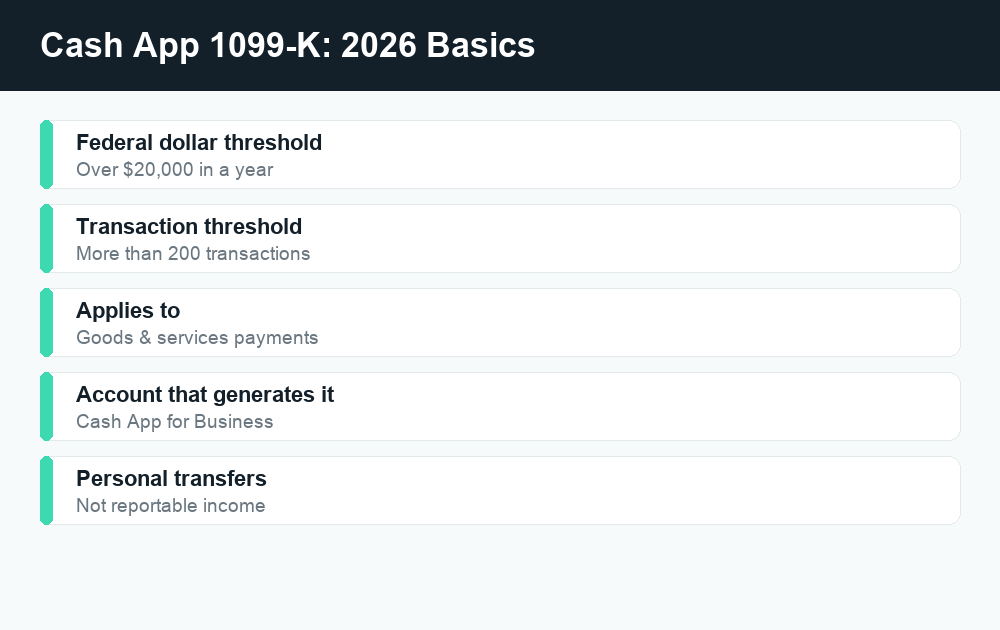
Cash App will send you a federal 1099-K only if you received payments for goods and services that exceed $20,000 and you had more than 200 transactions in the year. Personal payments you get from friends and family — splitting rent, repaying a dinner, a birthday gift — are not reportable income and do not trigger a 1099-K.
Quick answer: For 2026, Cash App follows the federal 1099-K rule of $20,000 and 200+ goods-and-services transactions. Those totals are tied to a Cash App for Business account, not casual personal transfers. Some states set lower thresholds, so you may get a form even under the federal limit. Always confirm the current numbers at IRS.gov and Cash App’s help center, because reporting rules have shifted in recent years.
What a 1099-K actually is
A Form 1099-K is an information return that payment platforms and card processors send to both you and the IRS. It reports the gross amount of payments you received for goods and services during the year through that platform. Cash App, like other apps, is required to issue one when your business activity crosses the reporting threshold.
The key word is information. A 1099-K is not a bill and it is not a tax in itself. It simply tells the IRS, “this taxpayer received this much through this platform.” Whether any of that money is taxable depends on what the payments were for. A 1099-K also reports gross amounts — before fees, refunds, or your own costs — so the number on the form is rarely the same as your actual profit.
When does Cash App send a 1099-K in 2026?
For the 2026 federal threshold, Cash App is required to send a 1099-K when both of these are true for your goods-and-services payments:
- More than $20,000 in total goods-and-services payments received, and
- More than 200 transactions in the calendar year.
Both conditions generally have to be met under the federal rule. If you sold a few items and collected $3,000 across 30 transactions, you would fall under both limits and would not expect a federal 1099-K. If you ran a small online shop and collected $25,000 across 400 sales, you would expect one.
One important caveat: reporting thresholds for payment apps have been a moving target over the last several years, and Congress and the IRS have adjusted them more than once. Because of that, you should treat any specific dollar figure as something to verify each tax season. Check the official current threshold at IRS.gov and in Cash App’s help center before assuming you are above or below the line.
States can set a lower bar
Several states require payment platforms to issue 1099-Ks at amounts well below the federal threshold. That means you could receive a Cash App 1099-K because of your state’s rule even if your totals never came close to $20,000 or 200 transactions federally. The exact state thresholds vary, so check your own state’s department of revenue if your business numbers are modest but you still received a form.
Personal account vs. Cash App for Business
This is the part that confuses the most people, so it is worth being precise. The 1099-K threshold tracks goods-and-services payments, and on Cash App those totals are generated by a Cash App for Business account. A standard personal Cash App account is built for sending money to and receiving money from people you know.
Personal peer-to-peer transfers — your roommate paying their share of utilities, a friend repaying you for concert tickets, a relative sending a gift — are not payments for goods and services and are not reportable as income. They should not produce a 1099-K, because they are not the kind of activity the form is designed to capture.
| Situation | Account type | Counts toward 1099-K? |
|---|---|---|
| Friend repays you for dinner | Personal | No — personal transfer |
| Splitting rent with a roommate | Personal | No — personal transfer |
| Gift from a family member | Personal | No — personal transfer |
| Customer pays for a product you sold | Business | Yes — goods/services |
| Client pays you for a service | Business | Yes — goods/services |
The practical takeaway: keep business and personal money separate. If you run any kind of side hustle or store, route those payments through a Cash App for Business account so the goods-and-services totals are tracked correctly and your personal transfers do not get mixed into the same bucket. Mixing them is one of the most common reasons people end up with a 1099-K number that looks wrong.
An important reminder about income
Not getting a 1099-K does not mean money you earned is tax-free. If you sold goods or provided services for a profit, that income is generally reportable whether or not a platform sends you a form. The 1099-K is just a reporting tool. The underlying rule — report your taxable income — applies regardless of the threshold. If you are unsure how to report self-employment or side-gig income, a tax professional or the guidance on IRS.gov can walk you through it.
Where to find and download your Cash App tax forms
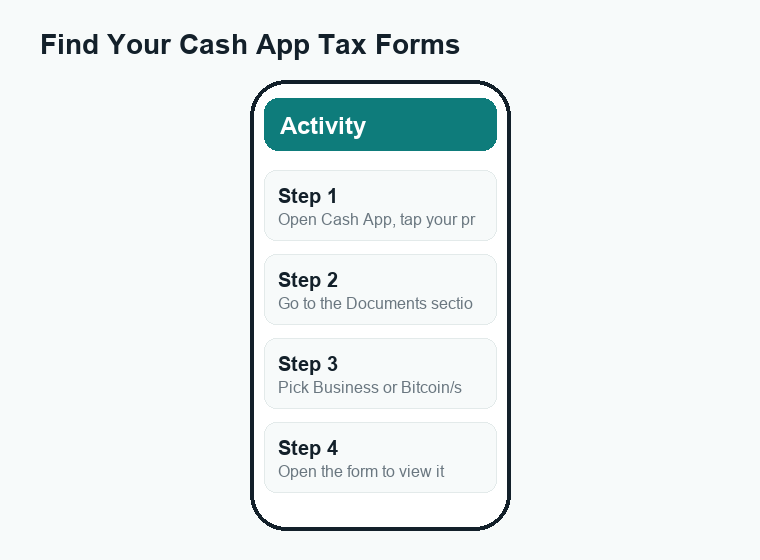
If Cash App issues you a tax document, you can retrieve it inside the app rather than waiting for the mail. The general path is:
- Open the Cash App app and tap your profile icon.
- Look for the Documents section.
- Select the relevant area — your business documents for a 1099-K, or your Bitcoin and stock documents for investing forms.
- Open the form to view it and download or share the PDF for your records or your tax preparer.
Menus and labels can change between app versions, so if you do not see a form you expect, use the in-app search or visit Cash App’s help center for the current steps. Forms for a given tax year are typically made available early in the following year, in line with IRS deadlines.
Bitcoin and stock tax documents
Beyond the 1099-K, Cash App also issues other tax forms tied to its investing side. If you bought or sold Bitcoin or traded stocks through Cash App, you may receive separate documents covering that activity. These are different from a 1099-K: they relate to investment gains, losses, and proceeds rather than goods-and-services payments.
Selling Bitcoin or stock can create a taxable gain or a deductible loss, and the forms Cash App provides give you the figures you need to report it. You will find these documents in the same Documents area of the app, usually grouped under your Bitcoin or investing records. If you were active in either, look for them before you file so nothing is missed.
| Form type | What it covers | Tied to |
|---|---|---|
| 1099-K | Goods-and-services payments received | Cash App for Business |
| Bitcoin tax document | Bitcoin buys/sells and proceeds | Cash App investing (Bitcoin) |
| Stock tax document | Stock trades, gains, and losses | Cash App investing (stocks) |
Filing your taxes: Cash App Taxes is free
If you need to file a return, it is worth knowing that Cash App Taxes is free. It is a separate tool from the payments app and lets eligible filers prepare and file without the per-form fees many services charge. If you received a Cash App 1099-K or investing documents, you can enter that information when you file. As with any tax tool, review your situation carefully and confirm it fits your needs before you rely on it.
What to do if you get a 1099-K
Receiving a 1099-K is not a reason to panic. Work through it methodically:
- Read the form. Confirm the gross amount and that it matches your own records of business payments.
- Separate business from personal. If personal transfers were swept in, identify them so they are not reported as income.
- Account for fees, refunds, and costs. The 1099-K shows gross totals, not profit. Your deductible expenses and the cost of goods sold reduce your taxable amount.
- Report your income correctly. Business income generally goes on the appropriate part of your return; a tax professional or IRS.gov guidance can confirm where.
- Keep documentation. Hold onto the form, your transaction history, and records of expenses in case of questions later.
If you got a 1099-K in error
Sometimes a 1099-K shows up when it should not — for example, if personal payments were incorrectly tagged as goods and services, or the amount looks inflated. If that happens:
- Contact Cash App support through the help center to ask about a correction. The issuer is the one who can amend or void the form.
- Do not simply ignore it. Because a copy went to the IRS, an unexplained form can prompt a mismatch notice. It is better to resolve it or document why the amount is not all taxable.
- Consider professional help for anything complicated, especially if a large or clearly wrong amount is involved.
Watch out for scams around tax forms
Tax season brings a wave of impersonation scams. The IRS does not initiate contact by text, email, or social media demanding immediate payment, and legitimate platforms will not ask you to “verify” your account by sending money or sharing your full sign-in credentials over chat. If you get a message claiming to be from Cash App or the IRS about your 1099-K, do not click unfamiliar links. Go directly to the official app or to IRS.gov instead. Treat any request for gift cards, crypto, or urgent wire transfers as a red flag.
Frequently asked questions
Does Cash App report personal payments from friends to the IRS?
No. Personal peer-to-peer payments — repaying a friend, splitting a bill, or receiving a gift — are not payments for goods and services and are not reportable income. They do not count toward the 1099-K threshold. Problems usually arise only when personal money flows through a business account, so keep the two separate.
What is the Cash App 1099-K threshold for 2026?
The federal rule the brief describes is more than $20,000 in goods-and-services payments and more than 200 transactions in the year. Because these thresholds have changed in recent years, confirm the current figure at IRS.gov and Cash App’s help center before assuming where you stand. Some states use lower thresholds.
Where do I download my Cash App tax forms?
Open the app, tap your profile, and look in the Documents section. Business documents hold a 1099-K, while Bitcoin and stock documents cover investing activity. You can view and download the PDFs there. If a form is missing, check Cash App’s help center for the current steps and timing.
Do I owe taxes if I never receive a 1099-K?
Possibly. Not receiving a form does not make income tax-free. If you earned a profit selling goods or providing services, that income is generally reportable whether or not a 1099-K was issued. When in doubt, consult IRS.gov or a tax professional.
Are Bitcoin and stock sales on Cash App taxable?
They can be. Selling Bitcoin or stock can produce a taxable gain or a deductible loss, and Cash App issues separate investing tax documents for that activity. These are different from a 1099-K. Look for them in the Documents area before you file so you report your investment activity accurately.
Conclusion
For 2026, a Cash App 1099-K hinges on goods-and-services payments through a Cash App for Business account crossing the federal $20,000-and-200-transaction line — with some states setting lower bars. Personal transfers from friends and family stay out of it. Keep business and personal money separate, pull your forms from the Documents section, remember the separate Bitcoin and stock documents, and verify any time-sensitive threshold at IRS.gov and Cash App’s help center before you file. For more, see our related WalletWisp guides on Cash App taxes, the broader 1099-K rules across payment apps, and reporting side-hustle income.