Chime SpotMe is a fee-free overdraft feature that lets eligible Chime members spend a little more than they have in their Checking Account without getting hit with an overdraft fee. It covers eligible debit card purchases (and some cash withdrawals) up to a personal limit that starts around $20 and can grow to $200 or more, and Chime never charges a fee or interest to use it. When your next deposit lands, Chime automatically uses it to cover what you spent.
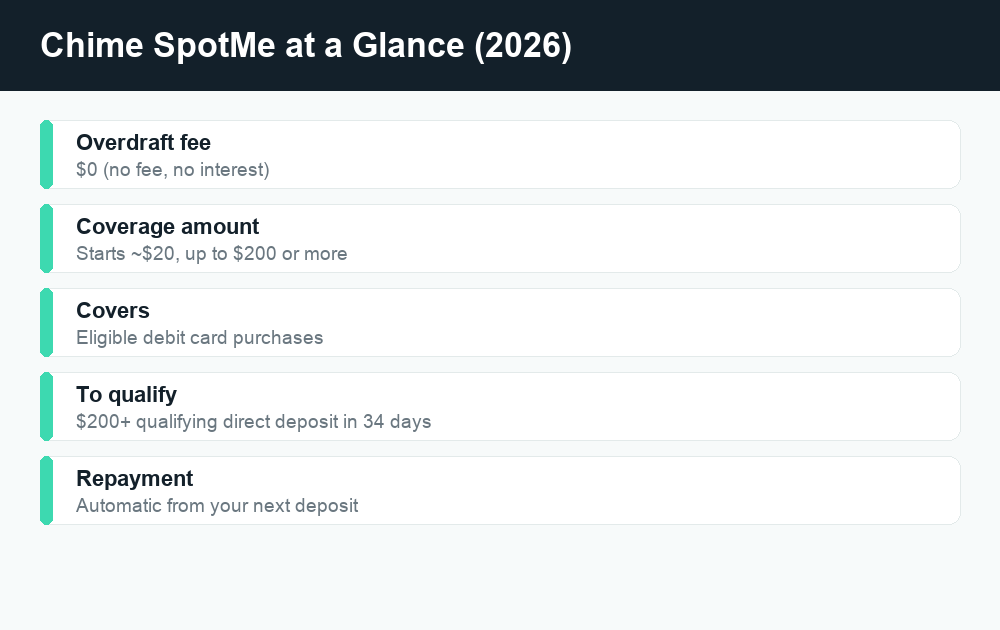
Quick answer: Chime SpotMe is no-fee overdraft on debit card purchases. To qualify you need at least $200 in qualifying direct deposits to your Chime Checking Account within the last 34 days, plus an activated Chime card. Your limit usually starts near $20 and can rise to $200+ over time. There are no overdraft fees and no interest. You can’t manually request a higher limit — Chime adjusts it automatically based on your account activity.
If you’ve ever paid a $35 overdraft fee at a traditional bank for going $4 over, SpotMe is built to be the opposite of that experience. But there are real rules around who qualifies, what it covers, and how high your limit can go. This guide breaks all of it down in plain English and points out the details Chime asks you to confirm in the app.
What is Chime SpotMe?
SpotMe is Chime’s overdraft program. Normally, if you try to spend more than your account balance, the transaction is declined. With SpotMe turned on, Chime will instead “spot” you the difference up to your personal limit, let the purchase go through, and then collect the money back automatically from your next deposit.
The headline benefit is simple: no overdraft fees and no interest. Traditional banks have historically charged a flat fee — often around $35 — every time you overdraw, and sometimes more than once a day. SpotMe replaces that fee with $0. You only pay back exactly what you spent over your balance, nothing extra.
SpotMe is also optional. It’s a feature you opt into, not something that’s forced on your account. If you’d rather have transactions declined when your balance hits zero, you can simply leave it off.
How SpotMe is different from a normal overdraft
The mechanics feel similar — you spend money you don’t have yet — but the cost structure is the key difference. Here’s a quick comparison.
| Feature | Chime SpotMe | Typical legacy bank overdraft |
|---|---|---|
| Overdraft fee | $0 | Often ~$35 per item |
| Interest charged | None | Sometimes, depending on product |
| Coverage amount | Up to $200 (limit varies by member) | Varies by bank |
| How you repay | Automatically from your next deposit | Owed immediately; fees can stack |
| Opt-in required | Yes | Often yes for debit/ATM coverage |
How does Chime SpotMe work?
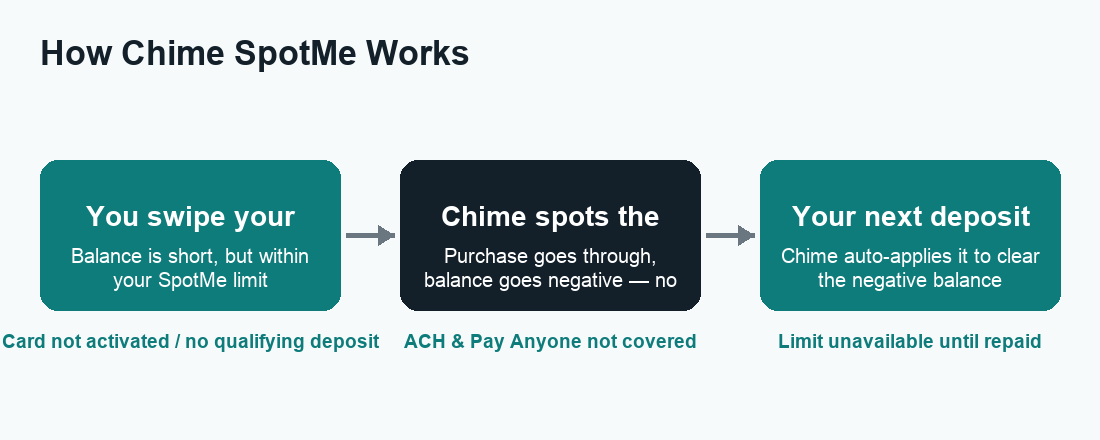
The flow is straightforward once you’re enrolled. You make a purchase with your Chime debit card. If your balance can’t cover it but the amount falls within your SpotMe limit, Chime approves it and your balance simply goes negative by the spotted amount. The next time money is deposited into your Checking Account — whether that’s your paycheck, a transfer, or another deposit — Chime applies it to your negative balance first, then the rest is yours to spend.
You don’t have to remember to pay anything back manually. Repayment happens behind the scenes. Once your negative balance is cleared, your SpotMe limit is available again for the next time you need it.
What SpotMe covers
SpotMe is designed for card-based transactions. According to Chime, it generally covers eligible debit card purchases at merchants, and may also cover cash withdrawals and Credit Builder card purchases for eligible members. The exact items it covers can depend on your account, so it’s worth checking the details Chime shows you in the app.
What SpotMe does NOT cover
This is where a lot of people get tripped up. SpotMe does not cover non-card transactions. Per Chime, that includes:
- ACH transfers (such as a bill payment pulled directly from your account)
- Pay Anyone transfers to other people
- Chime Checkbook transactions
So if a scheduled ACH bill payment would push you negative, SpotMe won’t step in to cover it the way it would for a debit card swipe. Plan around that distinction — it’s one of the most common surprises new members run into.
Chime SpotMe limits: how much can you overdraft?
SpotMe limits are personal and set by Chime automatically. Most eligible members start with a limit of around $20. Over time, that limit can increase, and the program is advertised as covering up to $200 or more for members who qualify for a higher amount.
Your exact limit isn’t a number you choose. Chime determines it using a mix of factors tied to how you use your account. Based on Chime’s own descriptions, those factors can include:
- How long you’ve been a Chime member
- Your account history and overall activity
- How much you direct deposit each month and how often
- Your spending patterns and other risk-based factors
Because the limit is risk-based and individualized, two members with similar deposits can have different limits. That’s normal.
How to increase your SpotMe limit
Here’s the part that surprises people: you can’t manually request a higher SpotMe limit. There’s no button to ask for more. Instead, your limit may grow on its own as your account activity supports it. The habits that tend to help, according to Chime, are:
- Keep your qualifying direct deposits consistent. Receiving at least one qualifying direct deposit of $200 or more each month keeps you eligible and demonstrates steady income.
- Stay active and in good standing. A longer, healthier account history can work in your favor.
- Use the account normally over time. Limits can rise the longer you keep up reliable deposits and responsible activity.
There’s no guaranteed timeline for an increase, and limits can also go down if your direct deposit activity changes. The best strategy is simply to keep your deposits steady and let the system adjust.
Chime SpotMe fees: is it really free?
Yes — using SpotMe itself is free. Chime does not charge an overdraft fee or interest for SpotMe coverage. You repay only the amount you were spotted. That’s the core promise of the feature, and it’s a big reason people switch to Chime from fee-heavy traditional banks.
A couple of honest caveats so you have the full picture:
- Optional tipping. Chime has historically given members the option to leave a voluntary tip after using SpotMe. Tips are entirely optional — you are never required to tip, and choosing not to does not affect your eligibility or limit.
- Out-of-network ATM fees still apply. SpotMe doesn’t change the third-party fees an out-of-network ATM operator might charge. Those are separate from SpotMe and from Chime.
None of that changes the headline: the overdraft coverage carries no mandatory fee and no interest.
Chime SpotMe eligibility: who qualifies?
SpotMe isn’t automatic for every Chime user — there are a few requirements. To be eligible, you generally need to:
- Have an activated Chime card. That means your Chime debit card (or Credit Builder card) is activated and ready to use.
- Receive a qualifying direct deposit of $200 or more. Chime looks for at least $200 in qualifying direct deposits to your Chime Checking Account within the past 34 days.
- Enroll in SpotMe. Eligibility opens the door, but you still have to turn the feature on in the app.
What counts as a qualifying direct deposit
This is the detail that determines eligibility for a lot of people, so it’s worth being precise. According to Chime, a qualifying direct deposit is income sent via ACH or Original Credit Transaction (OCT) from a payer such as an employer or payroll provider, a gig-economy platform, or a government benefits source (like Social Security). The following generally do not count:
- ACH transfers from your own other bank accounts
- Pay Anyone transfers
- Verification or trial deposits from banks
- Transfers from third-party apps like PayPal, Cash App, or Venmo
- Mobile check deposits and cash deposits
- One-time deposits such as a tax refund
In short: it needs to be real income from an employer, gig platform, or government source, delivered through the direct-deposit rails. If you’re moving money in from another app or your own savings, that typically won’t satisfy the SpotMe requirement even if it’s $200 or more.
How to enable Chime SpotMe (step by step)
Once you meet the eligibility requirements, turning SpotMe on takes only a minute in the Chime app. Make sure you’re running the latest version of the app first.
- Open the Chime app and sign in.
- Go to the Settings tab to check whether SpotMe is available for your account.
- Find the SpotMe section and review your eligibility and current limit.
- Toggle SpotMe on and confirm any prompts to enroll.
That’s it. After enrolling, your available SpotMe limit appears in the app, and coverage kicks in automatically on eligible transactions when your balance runs short. If you don’t see SpotMe as an option, it usually means you haven’t met the qualifying direct deposit requirement yet — or your card isn’t activated.
How repayment works after you use it
You don’t schedule a payment or transfer anything yourself. When your next deposit arrives, Chime automatically applies it to your negative balance before the funds become spendable. If you’d like to clear it sooner, simply adding money to your account (for example, a transfer) will also reduce or pay off the spotted amount. Once it’s repaid, your full limit is available again.
Is Chime SpotMe worth using?
For people who occasionally come up a few dollars short before payday, SpotMe is one of the friendlier overdraft options out there because it removes the fee that makes traditional overdrafts so painful. It works best as an occasional safety net, not a recurring source of spending — since it’s repaid from your next deposit, leaning on it every cycle can leave you short again.
If you want broader context on how mobile money apps handle fees and transfers, our guides on Cash App fees and Venmo fees are useful companions, and you can browse everything Chime-related in our Chime category.
Frequently asked questions
Does Chime SpotMe cover ATM withdrawals?
SpotMe is built primarily for eligible debit card purchases, and for some members it may also cover cash withdrawals. Coverage can depend on your account, so check what your app shows. Keep in mind that any out-of-network ATM operator fees are separate from SpotMe.
How much can I overdraft with SpotMe?
Most eligible members start with a limit around $20, and limits can grow to $200 or more over time. Your specific limit is set automatically by Chime based on your account history, direct deposit activity, and other factors. Your exact number appears in the app.
Can I request a higher SpotMe limit?
No. There’s no way to manually request an increase. Chime raises (or lowers) your limit automatically based on how you use your account. Keeping consistent qualifying direct deposits of $200 or more each month is the most reliable way to support a higher limit over time.
Does SpotMe charge any fees or interest?
No. Chime does not charge an overdraft fee or interest for SpotMe coverage. You repay only the amount you were spotted. There’s an optional tipping feature, but tipping is never required and has no effect on your eligibility or limit.
What counts as a qualifying direct deposit for SpotMe?
Qualifying direct deposits are income payments sent via ACH or OCT from an employer or payroll provider, a gig-economy platform, or a government benefits source. Transfers from other banks or apps (like PayPal, Cash App, or Venmo), mobile check deposits, cash deposits, and one-time deposits such as tax refunds generally do not count.
Does SpotMe cover bill payments and transfers to other people?
No. SpotMe does not cover non-card transactions, including ACH transfers, Pay Anyone transfers, and Chime Checkbook transactions. It’s designed for eligible card purchases. Plan around scheduled ACH bill payments, since SpotMe won’t cover those if you’re short.
What happens if I go negative and don’t get paid for a while?
Your negative balance simply waits until your next deposit, which Chime then applies automatically to cover it. There’s no daily interest piling up. That said, you generally can’t keep using SpotMe beyond your limit, so a lingering negative balance reduces how much coverage you have available until it’s repaid.
How do I turn SpotMe off?
SpotMe is optional. You can toggle it off in the Settings or SpotMe section of the Chime app at any time. Turning it off means transactions that would exceed your balance are declined instead of covered. Any existing negative balance still needs to be repaid.
Last updated: June 2026. Fees, limits, and features can change — always confirm current details in the app. WalletWisp is an independent guide and is not affiliated with any app mentioned. This article is general information, not financial advice.
Related: Chime guides · Cash App fees explained · Venmo fees explained