Seeing a PayPal payment pending notice usually means the money has left one side of the transaction but hasn’t fully settled on the other yet — it is on hold, not lost. In most cases the payment is waiting on one of four things: an eCheck (bank-funded payment) clearing, a PayPal security or risk review, the recipient not having claimed the money yet, or a hold on a newer account — and it almost always resolves on its own within a few hours to about 21 days.
Quick answer: A PayPal payment pending status means the transfer started but hasn’t settled. The usual causes are an eCheck clearing (typically 4–7 business days), a security/risk review, the recipient not yet accepting the money, or a hold on a new or low-history account. Most clear automatically — you rarely need to do anything except confirm your identity or bank, or wait. Check the transaction in Activity for the exact reason and any “Resolve” button.
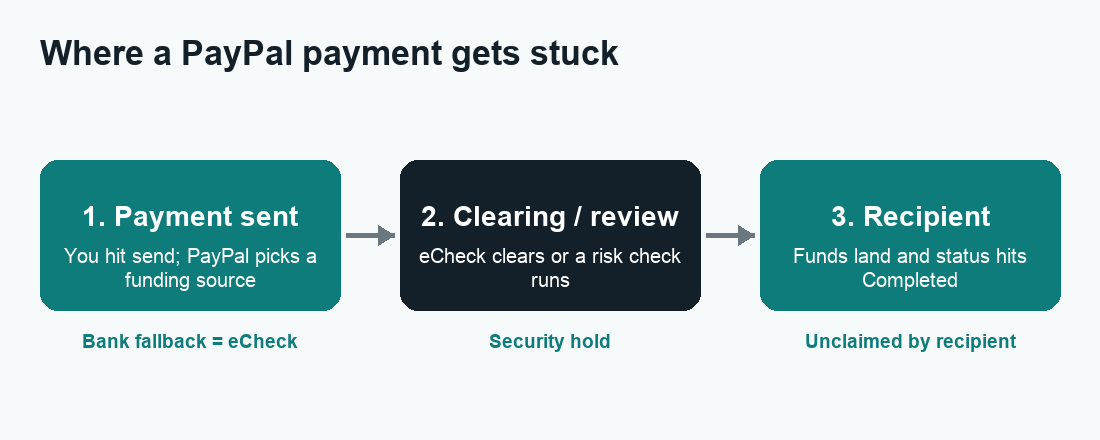
Pending is one of the most common — and most confusing — statuses on PayPal, because the same word covers several very different situations. The fix depends entirely on why it’s pending. Below, we break down each cause in plain English, tell you roughly how long it takes, and give you the exact steps to move things along (or at least know when to stop worrying). We’ll also flag a few scam patterns that hide behind fake “pending” messages, because those are worth recognizing before you ship anything or send more money.
How to find out why your PayPal payment is pending
Before you try any fix, find the actual reason. PayPal almost always tells you — it’s just buried in the transaction detail rather than the headline. Here’s how to check on the app or website:
- Open the PayPal app or log in at paypal.com.
- Go to Activity (the clock or list icon).
- Tap or click the pending transaction.
- Read the status line and any note — it will say something like “This is an eCheck,” “We’re reviewing this payment,” “Recipient hasn’t accepted yet,” or “On hold.”
- Look for an estimated date or a Resolve / Complete setup button. If there’s an action button, that’s your fastest path.
That one screen tells you which of the sections below applies to you. If you don’t see a clear reason and there’s no action button, it’s almost always a timing hold (eCheck or risk review) that clears on its own.
Cause 1: It’s an eCheck (bank-funded payment still clearing)
This is the single most common reason a sent payment shows pending. When a payment is funded directly from a linked bank account — and PayPal can’t instantly draw the funds — it processes as an eCheck. An eCheck is essentially an ACH bank transfer, and like any bank transfer it has to clear before the money is “real” on the recipient’s side.
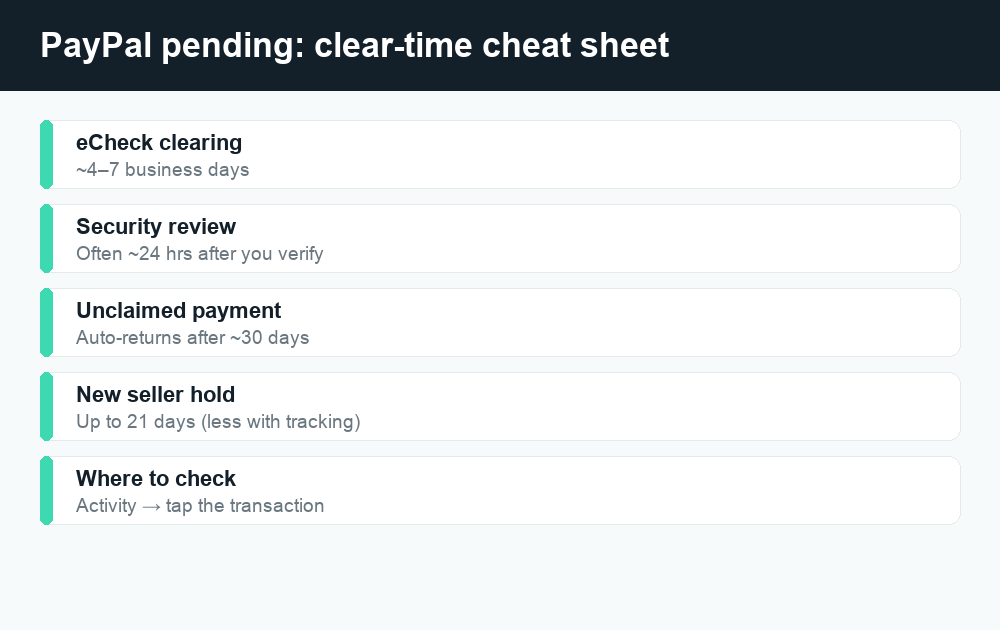
PayPal states that an eCheck typically takes 4–7 business days to clear, and sometimes longer. “Business days” is the catch: weekends and U.S. bank holidays don’t count, so an eCheck sent Friday evening often doesn’t even start processing until Monday. There’s nothing broken here — it’s just how bank-to-bank money movement works.
Why did my payment go out as an eCheck?
You usually didn’t choose this. A payment becomes an eCheck when PayPal can’t pull an instant funding source. Common triggers:
- You paid from a bank account that isn’t set up for instant transfers (no confirmed instant-debit capability).
- Your linked card or PayPal Balance couldn’t cover the amount, so PayPal fell back to the bank.
- You hit a limit on instant funding for that account.
- The bank requires the slower ACH path for that transaction.
How to fix or speed up an eCheck
The honest answer: once a payment has gone out as an eCheck, you generally can’t speed it up — it has to clear through the banking system. But you can avoid it next time and manage it now:
- Wait it out. Open the transaction in Activity to see the estimated clearing date. This is the normal outcome.
- Don’t pay twice. Sending a second payment doesn’t cancel the eCheck — you’ll just be out the money on both.
- Next time, fund instantly. Add and confirm a debit card or keep a PayPal Balance, and choose that as your payment method so future payments post immediately.
- Sellers: wait for “Completed” before shipping. An eCheck is not guaranteed money until it clears.
Cause 2: PayPal flagged it for a security or risk review
PayPal runs automated risk checks on payments. If a transaction looks unusual compared with your account history, it can be held while PayPal reviews it. This protects both sides from fraud — but it’s frustrating when it’s your own legitimate payment caught in the net.
Things that commonly trigger a review include a payment that’s much larger than usual, a brand-new linked bank account or card, sending to a recipient or country you’ve never paid before, a recent password or email change, or simply a lot of activity in a short window. PayPal may also hold a payment to make sure there are enough funds in the connected bank account.
How to clear a security hold
- Check Activity and the Resolution Center. If PayPal needs something from you, there will be a task or “Resolve” button. Complete it.
- Confirm your identity if asked. This may include verifying your email, phone, bank, or uploading an ID. Do this only inside the PayPal app or at paypal.com — never through a link in a text or email (more on that below).
- Confirm your bank account or card if it’s newly added — an unconfirmed funding source is a frequent cause of holds.
- Then wait. Many risk reviews resolve automatically within a day or so once verification is done; some take longer.
If a review drags on with no action button and no movement, contact PayPal support directly through the Help section in the app — don’t rely on numbers or links from a search result or message.
Cause 3: The recipient hasn’t accepted the payment yet
If you sent money to someone and it’s pending or “unclaimed,” the problem is often on the receiving end. PayPal holds the funds until the recipient is set up to receive them. This happens when:
- You sent to an email address or phone number not yet attached to a PayPal account, so the recipient has to sign up or add it to claim the money.
- The recipient’s email isn’t confirmed, or their account has a limitation.
- The recipient simply hasn’t logged in and accepted yet.
What to do about an unclaimed payment
- Tell the recipient to check. Ask them to log in (or sign up with the exact email/phone you sent to) and accept the payment.
- Double-check the address. A typo in the email or phone number is a classic cause — the money may be sitting at an address nobody owns.
- Cancel if needed. Unclaimed payments to an unregistered recipient can usually be canceled from your Activity while they’re still pending, and the money returns to you. If you don’t see a Cancel option, PayPal typically returns an unclaimed payment automatically after about 30 days.
Cause 4: New account or low-history holds (and seller 21-day holds)
Newer accounts, and accounts without much transaction history, get extra scrutiny. PayPal may hold incoming money temporarily while it builds confidence that the account and its activity are legitimate. If you just opened your account, this is normal and improves as you transact and verify.
For sellers, there’s a specific version of this: PayPal can place money on hold for up to 21 days after a sale. The hold is meant to make sure the transaction goes smoothly before releasing funds, and it’s especially common for new sellers, new businesses on PayPal, or accounts with limited selling history. The money is usually released once the order is marked delivered, the buyer confirms, or the 21-day window passes without a dispute.
How to release or shorten a seller hold
- Complete your account setup. Confirm your email, link and confirm a bank account, and add business details where requested.
- Add tracking. Upload valid shipping tracking in the transaction — for many shipments, funds release a day or so after delivery is confirmed rather than waiting the full 21 days.
- Ship and communicate promptly. Fewer disputes and faster delivery build the history that shrinks future holds.
- Keep selling cleanly. As your positive history grows, PayPal generally eases holds over time.
How long does a pending PayPal payment take?
It depends entirely on the cause. Here’s a rough guide to typical timelines. These are general ranges, not guarantees — your transaction detail screen shows the estimate that applies to you, and PayPal can change these timeframes.
| Reason it’s pending | Typical time to clear | Do you need to act? |
|---|---|---|
| eCheck / bank-funded payment | About 4–7 business days (weekends/holidays don’t count) | No — just wait |
| Security / risk review | Often within ~24 hours after verifying; can be longer | Maybe — complete any “Resolve” task |
| Recipient hasn’t accepted | Until they claim it; auto-returns after ~30 days if not | Yes — nudge recipient or cancel |
| New / low-history account hold | Varies; eases as history builds | Verify account details |
| Seller payment hold | Up to 21 days, often sooner with tracking | Add tracking, fulfill order |
If you’re comparing how different apps handle stuck transfers, you may find our guides on Cash App payments pending and Venmo payments pending useful — the causes overlap, but the fixes and timelines differ.
Watch out for fake “pending payment” scams
Scammers love the word “pending.” A few patterns to recognize:
- “Payment is pending — ship the item first.” A buyer claims they paid but says PayPal is holding the money until you provide tracking or send the goods. Real PayPal money shows in your Activity. If it isn’t there, you weren’t paid.
- Fake email or text “receipts” that look like PayPal and say funds are pending in an “external” account or escrow. PayPal does not hold money in a separate account that releases only after you ship. Ignore links; log in directly.
- “Verify to release your pending payment” links. These lead to phishing pages that steal your login. PayPal verification happens inside the app or at paypal.com — never via a link someone sends you.
When in doubt, close the message, open the official app yourself, and verify in Activity. If something feels off, report it to PayPal and, for fraud, to the FTC at reportfraud.ftc.gov. Treating money as “received” before it shows as Completed in your own account is the single most common way people get burned.
When to contact PayPal support
Most pending payments don’t need a human. Reach out to PayPal directly through Help in the app or the Resolution Center if: the hold has lasted well beyond the estimate shown, an eCheck has passed its expected clearing date with no update, your account is limited and you can’t find the steps to resolve it, or you suspect fraud. Use only PayPal’s in-app contact options or the official site so you don’t end up talking to an impostor. For complaints you can’t resolve with the company, U.S. consumers can also submit them through the Consumer Financial Protection Bureau at consumerfinance.gov/complaint.
Frequently asked questions
Can I cancel a pending PayPal payment?
Sometimes. If you sent money to someone who hasn’t claimed it yet (an unclaimed payment), you can usually cancel it from your Activity and the money returns to you. Payments that are pending because of an eCheck clearing or a security review generally can’t be canceled mid-process — you have to wait for them to complete or fail.
Why is my eCheck taking so long to clear?
eChecks move through the banking (ACH) system, which only processes on business days. Typical clearing is about 4–7 business days, but weekends, holidays, insufficient funds, or a security flag can stretch it. Check the transaction in Activity for the estimated date, and avoid sending the payment again.
Will a pending payment still go through?
Usually yes. Most pending payments complete automatically once the eCheck clears, the review finishes, or the recipient accepts. A payment only fails to go through if it’s canceled, returned (for example, an unclaimed payment after about 30 days), or rejected during review — and in those cases the money returns to the sender.
I received money but it says pending — when can I use it?
You can spend it once the status changes to Completed. If it’s an incoming eCheck, that’s after it clears (around 4–7 business days). If it’s a seller hold or new-account hold, it releases once the conditions are met — adding tracking and confirming delivery often speeds up a seller hold.
Does PayPal charge a fee while a payment is pending?
Pending status itself doesn’t add a fee. Standard PayPal fees (where they apply, such as goods-and-services or currency conversion) are calculated on the transaction, not on how long it sits pending. Always confirm current fees in the app, since they can change.
Why does PayPal hold new sellers’ money for 21 days?
It’s a risk-management measure. Holding funds for up to 21 days gives time for the order to be delivered and for any dispute to surface before the money is released. New sellers and accounts with little history see this most. Adding valid tracking and fulfilling orders quickly usually releases funds sooner.
The recipient says they never got my payment — what now?
First confirm the payment shows as sent in your Activity and check the exact email or phone you used for typos. Ask the recipient to log in (or sign up with that exact address) and accept it. If it’s still unclaimed and you see a Cancel option, you can cancel and get your money back; otherwise it auto-returns after about 30 days.
Is a “pending” message from a buyer proof they paid me?
No. Only your own PayPal Activity is proof. Buyers who insist a payment is “pending in escrow” until you ship are almost always running a scam — genuine PayPal funds appear in your account and reach Completed on their own. Never ship based on an email, text, or screenshot.
Last updated: June 2026. Fees, limits, and features can change — always confirm current details in the app. WalletWisp is an independent guide and is not affiliated with any app mentioned. This article is general information, not financial advice.
Related: Why is my Venmo payment pending? · Cash App payment pending: causes and fixes · More PayPal guides